
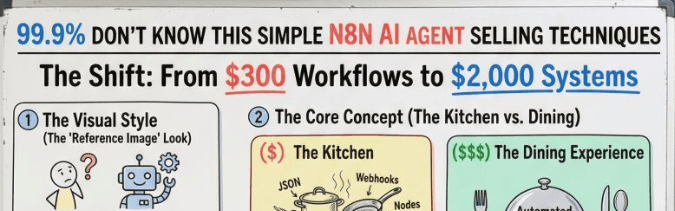
The High-Ticket n8n Selling Guide (Step-by-Step)

Updated: July 25, 2026

The Core Rule (memorize this)

Don’t sell automation. Sell outcomes.

Not “I can connect apps.”

But “I can stop lead leakage + increase revenue + reduce wasted hours.”


STEP 1) Pick a “Money Problem” (not a random workflow)

High-paying clients don’t pay for tasks.

They pay for business pain that costs money daily.

Best problems to sell:

✅ Lead leakage

✅ Slow response time

✅ Junk leads wasting sales time

✅ No follow-up system

✅ CRM is messy = deals lost

✅ Manual reporting = bad decisions

✅ No tracking = no visibility

Bad problems (low-ticket):

❌ “Send me an email when I get a form response”

❌ “Sync Notion to Sheets”

❌ “Save attachments automatically”

Those are $50–$200 jobs.


STEP 2) Turn the Problem into a “System Offer”

You’re not selling a workflow.

You’re selling a system with:

  • Frontend (client-facing)
  • Backend (automation brain)
  • Visibility (dashboard + alerts)
  • Reliability (error handling)

Example Offer Names (steal these)

  • “Hot Lead Response System”
  • “Inbound Lead Qualification Engine”
  • “CRM Auto-Cleanup + Enrichment System”
  • “Speed-to-Lead Automation Stack”
  • “Sales Follow-up + Booking Machine”

STEP 3) Use the “Showroom + Factory” Stack

This is the main reason you’ll charge 5x–10x.

A) Frontend = Showroom (GoHighLevel / Web App)

This is what clients see and love:

  • Forms
  • Pipeline
  • Tags
  • Contact records
  • Sales dashboards
  • Team visibility

Clients pay more because it feels like a real product.

B) Backend = Factory (n8n)

This is your engine:

  • API calls
  • logic
  • AI agents
  • lead scoring
  • enrichment
  • routing
  • retries
  • webhooks

Your n8n stays hidden.

The client experiences a smooth “system”.


STEP 4) Build a “High-Ticket Flow” Template (Hot Lead System)

This is the easiest high-ticket offer to sell.

Goal:

Respond faster than competitors

and focus only on high-intent leads.

The full workflow map:

Lead Form (GHL) → n8n → AI Score → Routing → WhatsApp + Proposal + Alert → CRM Update


STEP 5) Define Lead Scoring (the part clients instantly understand)

You need a clear scoring model.

Example scoring inputs:

  • Budget range
  • Timeline (urgent = higher score)
  • Company size
  • Role (founder vs intern)
  • Problem clarity
  • Service match
  • Location (optional)

Score output:

  • 0–40 = cold lead
  • 41–70 = warm lead
  • 71–100 = hot lead

This is where you say:

“We stop your team from wasting time on junk leads.”


STEP 6) Build the 3-Minute Miracle (your sales hook)

This is what makes clients go: “damn, that’s fast.”

When lead score is high:

Within 3.5 minutes, the system triggers:

✅ WhatsApp message to the lead

✅ Proposal / offer doc generated

✅ Slack/WhatsApp alert to sales: “CALL NOW”

✅ CRM updated + tagged HOT

✅ Auto-booking link sent

This becomes your main selling line:

“We convert speed into revenue.”


STEP 7) Add the “Enterprise Features” that justify pricing

This is the difference between $300 workflow and $2,000+ system.

1) Error handling (non-negotiable)

  • Error Trigger workflow
  • Slack alert on failure
  • Auto retry for temporary errors

2) Rate limiting

  • Split In Batches
  • Wait nodes
  • Backoff retry logic

3) Secure credentials

  • No hardcoded keys
  • Use n8n credentials properly
  • Environment variables if self-hosted

4) Human-in-the-loop approvals (premium)

Examples:

  • If score is borderline → ask sales manager approval
  • If proposal generated → send preview before sending

5) Logging + visibility

  • Google Sheets log / Airtable log
  • Dashboard: leads processed, hot leads found, response time

This is how you show ROI.


STEP 8) Make the Client Feel “In Control”

High-ticket clients pay for control + clarity, not tech.

Add these inside the showroom:

  • “Today’s leads”
  • “Hot leads this week”
  • “Avg response time”
  • “Deals won from automation”

Even if it’s simple, it looks powerful.


STEP 9) Package Deliverables Like a Pro (this increases trust)

Cheap freelancers deliver a JSON file.

High-ticket delivery looks like this:

What you deliver:

✅ Working system (frontend + backend)

✅ Setup doc (Notion / Google Doc)

✅ Loom walkthrough video

✅ Support window (7–14 days)

✅ Monitoring + alerts enabled

✅ “Dev vs Prod” version (optional but premium)

This alone can justify a big price jump.


STEP 10) Pricing Structure (simple + high-ticket)

Stop selling “workflow cost”.

Sell:

Setup Fee + Monthly Retainer

Setup fee: ₹75,000 – ₹1,50,000

Monthly retainer: ₹15,000 – ₹40,000

Retainer includes:

  • fixes
  • monitoring
  • improvements
  • adding new features

STEP 11) The Sales Script (what to say on calls)

Use this exact structure:

1) Diagnose

“Where do leads come from today?”

“What % are junk?”

“How fast do you respond?”

“How many hours/week wasted?”

2) Cost of problem

“If you get 100 leads/month and 80 are junk…

that’s 80 time-wasters.”

3) Promise the outcome

“I’ll build a system that qualifies leads automatically and alerts you only when it’s worth calling.”

4) Explain the system simply

“Frontend is your dashboard + forms.

Backend is n8n + AI scoring.

You get instant alerts + proposals.”

5) Close with speed + professionalism

“You’ll look like the fastest company in your niche.”


STEP 12) Your “Content Strategy” to attract these clients

You don’t need viral content.

You need content that screams:

“I build revenue systems.”

Post ideas:

  • “Why most n8n workflows fail in production”
  • “3 features that make automations reliable”
  • “Hot lead system in 3 minutes (breakdown)”
  • “Stop selling nodes, start selling systems”

Your Action Plan (Follow this in order)

Week 1: Build

  1. Create 1 “Hot Lead System” template
  2. Add scoring + WhatsApp + Slack alert
  3. Add error trigger + retry + logging

Week 2: Package

  1. Make a simple frontend dashboard (GHL)
  2. Record Loom demo
  3. Write onboarding doc

Week 3: Sell

  1. DM 20 agencies / coaches / service businesses
  2. Offer a “free lead flow audit”
  3. Pitch the system, not the workflow

The Core Rule (memorize this)

Don’t sell automation. Sell outcomes.

Not “I can connect apps.”

But “I can stop lead leakage + increase revenue + reduce wasted hours.”


STEP 1) Pick a “Money Problem” (not a random workflow)

High-paying clients don’t pay for tasks.

They pay for business pain that costs money daily.

Best problems to sell:

✅ Lead leakage

✅ Slow response time

✅ Junk leads wasting sales time

✅ No follow-up system

✅ CRM is messy = deals lost

✅ Manual reporting = bad decisions

✅ No tracking = no visibility

Bad problems (low-ticket):

❌ “Send me an email when I get a form response”

❌ “Sync Notion to Sheets”

❌ “Save attachments automatically”

Those are $50–$200 jobs.


STEP 2) Turn the Problem into a “System Offer”

You’re not selling a workflow.

You’re selling a system with:

  • Frontend (client-facing)
  • Backend (automation brain)
  • Visibility (dashboard + alerts)
  • Reliability (error handling)

Example Offer Names (steal these)

  • “Hot Lead Response System”
  • “Inbound Lead Qualification Engine”
  • “CRM Auto-Cleanup + Enrichment System”
  • “Speed-to-Lead Automation Stack”
  • “Sales Follow-up + Booking Machine”

STEP 3) Use the “Showroom + Factory” Stack

This is the main reason you’ll charge 5x–10x.

A) Frontend = Showroom (GoHighLevel / Web App)

This is what clients see and love:

  • Forms
  • Pipeline
  • Tags
  • Contact records
  • Sales dashboards
  • Team visibility

Clients pay more because it feels like a real product.

B) Backend = Factory (n8n)

This is your engine:

  • API calls
  • logic
  • AI agents
  • lead scoring
  • enrichment
  • routing
  • retries
  • webhooks

Your n8n stays hidden.

The client experiences a smooth “system”.


STEP 4) Build a “High-Ticket Flow” Template (Hot Lead System)

This is the easiest high-ticket offer to sell.

Goal:

Respond faster than competitors

and focus only on high-intent leads.

The full workflow map:

Lead Form (GHL) → n8n → AI Score → Routing → WhatsApp + Proposal + Alert → CRM Update


STEP 5) Define Lead Scoring (the part clients instantly understand)

You need a clear scoring model.

Example scoring inputs:

  • Budget range
  • Timeline (urgent = higher score)
  • Company size
  • Role (founder vs intern)
  • Problem clarity
  • Service match
  • Location (optional)

Score output:

  • 0–40 = cold lead
  • 41–70 = warm lead
  • 71–100 = hot lead

This is where you say:

“We stop your team from wasting time on junk leads.”


STEP 6) Build the 3-Minute Miracle (your sales hook)

This is what makes clients go: “damn, that’s fast.”

When lead score is high:

Within 3.5 minutes, the system triggers:

✅ WhatsApp message to the lead

✅ Proposal / offer doc generated

✅ Slack/WhatsApp alert to sales: “CALL NOW”

✅ CRM updated + tagged HOT

✅ Auto-booking link sent

This becomes your main selling line:

“We convert speed into revenue.”


STEP 7) Add the “Enterprise Features” that justify pricing

This is the difference between $300 workflow and $2,000+ system.

1) Error handling (non-negotiable)

  • Error Trigger workflow
  • Slack alert on failure
  • Auto retry for temporary errors

2) Rate limiting

  • Split In Batches
  • Wait nodes
  • Backoff retry logic

3) Secure credentials

  • No hardcoded keys
  • Use n8n credentials properly
  • Environment variables if self-hosted

4) Human-in-the-loop approvals (premium)

Examples:

  • If score is borderline → ask sales manager approval
  • If proposal generated → send preview before sending

5) Logging + visibility

  • Google Sheets log / Airtable log
  • Dashboard: leads processed, hot leads found, response time

This is how you show ROI.


STEP 8) Make the Client Feel “In Control”

High-ticket clients pay for control + clarity, not tech.

Add these inside the showroom:

  • “Today’s leads”
  • “Hot leads this week”
  • “Avg response time”
  • “Deals won from automation”

Even if it’s simple, it looks powerful.


STEP 9) Package Deliverables Like a Pro (this increases trust)

Cheap freelancers deliver a JSON file.

High-ticket delivery looks like this:

What you deliver:

✅ Working system (frontend + backend)

✅ Setup doc (Notion / Google Doc)

✅ Loom walkthrough video

✅ Support window (7–14 days)

✅ Monitoring + alerts enabled

✅ “Dev vs Prod” version (optional but premium)

This alone can justify a big price jump.


STEP 10) Pricing Structure (simple + high-ticket)

Stop selling “workflow cost”.

Sell:

Setup Fee + Monthly Retainer

Setup fee: ₹75,000 – ₹1,50,000

Monthly retainer: ₹15,000 – ₹40,000

Retainer includes:

  • fixes
  • monitoring
  • improvements
  • adding new features

STEP 11) The Sales Script (what to say on calls)

Use this exact structure:

1) Diagnose

“Where do leads come from today?”

“What % are junk?”

“How fast do you respond?”

“How many hours/week wasted?”

2) Cost of problem

“If you get 100 leads/month and 80 are junk…

that’s 80 time-wasters.”

3) Promise the outcome

“I’ll build a system that qualifies leads automatically and alerts you only when it’s worth calling.”

4) Explain the system simply

“Frontend is your dashboard + forms.

Backend is n8n + AI scoring.

You get instant alerts + proposals.”

5) Close with speed + professionalism

“You’ll look like the fastest company in your niche.”


STEP 12) Your “Content Strategy” to attract these clients

You don’t need viral content.

You need content that screams:

“I build revenue systems.”

Post ideas:

  • “Why most n8n workflows fail in production”
  • “3 features that make automations reliable”
  • “Hot lead system in 3 minutes (breakdown)”
  • “Stop selling nodes, start selling systems”

Your Action Plan (Follow this in order)

Week 1: Build

  1. Create 1 “Hot Lead System” template
  2. Add scoring + WhatsApp + Slack alert
  3. Add error trigger + retry + logging

Week 2: Package

  1. Make a simple frontend dashboard (GHL)
  2. Record Loom demo
  3. Write onboarding doc

Week 3: Sell

  1. DM 20 agencies / coaches / service businesses
  2. Offer a “free lead flow audit”
  3. Pitch the system, not the workflow
Author
Written By
Vikash Kumar
Building AI agents, n8n workflows and end-to-end automation for 30+ Brands across India, the US, Europe, Dubai & Australia. 7+ years of Experience saving founders real hours every week - no code required.
Ask more Questions about this Blog with AI:

Our AI Articles

Learn from our AI Articles to excel in your profession ;)

n8n Webhook Tutorial: Trigger Any Automation from Anywhere (2026)

Learn how to set up n8n webhooks step by step. This beginner guide covers triggers, test vs production mode, security...

n8n Pricing 2026: Free Self-Hosted vs Cloud Costs Explained

n8n pricing broken down for 2026: every Cloud plan cost, real self-hosted server prices, and how to pick the option...

n8n MCP: How to Connect AI Agents to Any Tool (2026)

n8n MCP lets your AI agent connect to any tool through one shared standard, no custom code needed. Here is...

Lara Acosta LinkedIn Templates and Hooks (2026 Examples)

Copy Lara Acosta LinkedIn templates and hook examples, plus the SLAY framework, to write posts that get read. A simple...

n8n Docker Setup: Install n8n the Easy Way (2026 Guide)

Learn how to install n8n with Docker step by step. A beginner-friendly 2026 guide to run n8n on your own...

How to Self Host n8n for Free: The Beginner VPS Setup Guide (2026)

The n8n cloud version has a free trial that runs out. After that, you pay a monthly fee for every...

10 Best n8n Workflows Every Business Should Automate

Manual work is killing business speed. In 2026, companies that still copy-paste data between apps are already behind. This is...

Automating the First 14 Days After Someone Buys From You

How to automate the first 14 days after a sale closes — welcome messages, account setup, kickoff booking, and day-7/day-14...

10 Questions to Ask Before Hiring an n8n Automation Agency

Before hiring an n8n automation agency, ask about their pricing model (per-workflow vs retainer), who owns the finished workflows, how...

n8n vs Zapier vs Make: Which Automation Tool is Best for Business

n8n is the best fit for businesses that want self-hosting, unlimited executions, and deep AI-agent capability and have some technical...

How to Use OpenRouter with n8n: Free AI Workflows (No Card Needed)

You keep hearing about AI automation but every option seems to cost money. ChatGPT Plus is $20 a month. Claude...

How to Automate Lead Follow-Up Calls with AI: A Step-by-Step Guide

Here is a number that should worry every business owner: leads that are called within five minutes of showing interest...

1:1 Free Strategy Session
Your competitors are already automating. Are you still paying for it manually?

Do you want to adopt AI Automation?

Every hour your team does repetitive work, you're burning real money.
While you wait, faster businesses are cutting costs and moving quicker.
AI and automations aren't the future anymore — they're the present.

Book a live 1-on-1 session where we show you exactly which of your daily tasks can be automated — and what it’s costing you not to.