
7 Claude Code prompts

Here are 7 simple Claude Code prompts to get you started:

  1. “Look at [function name] and clean it up so it’s easier to read and follow. Then explain in plain English what each change does, why it makes the code better, and what was wrong with the original version before.”
  2. “I’m getting [error message] in [file]. Walk me through exactly what’s causing it, fix the problem for me, and then explain it in simple terms so that I can recognize and solve this same kind of issue on my own next time.”
  3. “Go through [file] and add clear, helpful comments explaining what each part does. Write them simply enough that a complete beginner could read along, follow the logic, and understand how all the different pieces connect and work together.”
  4. “Write a few basic tests for [function name] that check it works the way it should. Then explain in plain words what each test is actually checking for, why that matters, and what would go wrong if that test ever failed.”
  5. “Take [script] and rewrite it in [language], keeping it simple and easy to read. Then point out anything that behaves differently between the two languages, so I understand the changes and don’t get caught out by them later on.”
  6. “Read through [file] and explain what the code does step by step, like you’re patiently teaching someone who is seeing this kind of code for the very first time and wants to truly understand how it works.”
  7. “Help me build a simple [feature] from scratch. Walk me through each step in order, and explain the choices you make along the way, so that I actually learn something and could do it again myself next time.”

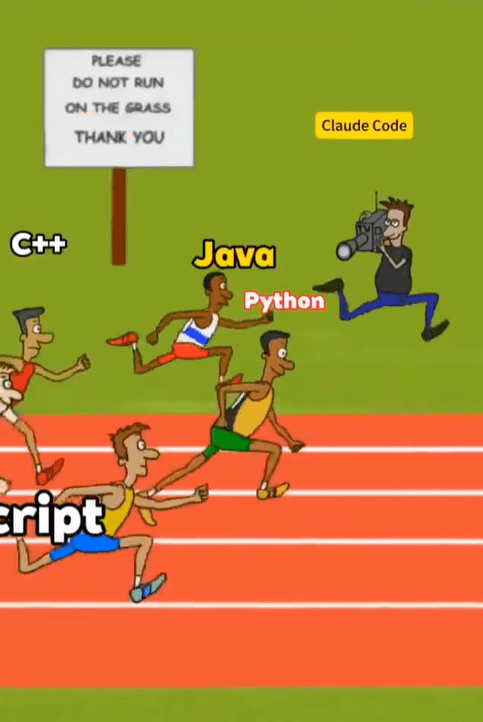
The cameraman always wins.

The real question for 2026 isn’t whether to use AI – it’s how fast you can learn to run alongside it.

Here are 7 simple Claude Code prompts to get you started:

  1. “Look at [function name] and clean it up so it’s easier to read and follow. Then explain in plain English what each change does, why it makes the code better, and what was wrong with the original version before.”
  2. “I’m getting [error message] in [file]. Walk me through exactly what’s causing it, fix the problem for me, and then explain it in simple terms so that I can recognize and solve this same kind of issue on my own next time.”
  3. “Go through [file] and add clear, helpful comments explaining what each part does. Write them simply enough that a complete beginner could read along, follow the logic, and understand how all the different pieces connect and work together.”
  4. “Write a few basic tests for [function name] that check it works the way it should. Then explain in plain words what each test is actually checking for, why that matters, and what would go wrong if that test ever failed.”
  5. “Take [script] and rewrite it in [language], keeping it simple and easy to read. Then point out anything that behaves differently between the two languages, so I understand the changes and don’t get caught out by them later on.”
  6. “Read through [file] and explain what the code does step by step, like you’re patiently teaching someone who is seeing this kind of code for the very first time and wants to truly understand how it works.”
  7. “Help me build a simple [feature] from scratch. Walk me through each step in order, and explain the choices you make along the way, so that I actually learn something and could do it again myself next time.”

The cameraman always wins.

The real question for 2026 isn’t whether to use AI – it’s how fast you can learn to run alongside it.

Author

Written By

Vikash Kumar

Building AI agents, n8n workflows and end-to-end automation for 30+ Brands across India, the US, Europe, Dubai & Australia. 7+ years of Experience saving founders real hours every week - no code required.

Ask more Questions about this Blog with AI:

Our AI Articles

Learn from our AI Articles to excel in your profession ;)

How to Actually Grow on LinkedIn

The real strategy behind 500,000+ impressions in two months — no fluff, just what works. Most people think LinkedIn growth...

The AI Career Shift Nobody Is Talking About

AI isn't just creating agencies anymore. Companies now need AI-native employees who can transform workflows, making internal AI leadership one...

How To Build AI Voice Agents Using Claude, Retell AI, And Zapier MCP

This guide explains how to build a fully automated AI calling system where Claude can automatically call customers, handle conversations,...

AI Voice Receptionist Guide For Clinics

Most clinics don’t lose patients because doctors are bad They lose patients because nobody picked up the phone....

The Complete Claude Mastery Guide

This roadmap breaks Claude mastery into 10 stages. Follow them in order....

Complete Guide To Claude Code Agent Teams

Agent Teams are one of the most advanced features inside Claude Code. Instead of using one AI agent to complete...

How To Build Realistic AI Voice Agents With 11Labs + Make.com

How Agent Teams turn Claude Code into a collaborative AI workforce for building complex systems....

100 SECRET CLAUDE PROMPT CODES

Practical Claude prompt systems that improve writing, research, strategy, automation, and workflows....

The Real Claude AI Business Guide for 2026

5 Claude AI business models solving expensive problems businesses already pay for in 2026....

Complete Guide: How To Build A Claude Skill For SEO Content Writing

Reusable Claude workflows that turn generic AI writing into personalized, scalable SEO systems....
1:1 Free Strategy Session
Your competitors are already automating. Are you still paying for it manually?

Do you want to adopt AI Automation?

Every hour your team does repetitive work, you're burning real money.
While you wait, faster businesses are cutting costs and moving quicker.
AI and automations aren't the future anymore — they're the present.

Book a live 1-on-1 session where we show you exactly which of your daily tasks can be automated — and what it’s costing you not to.