

Transcribe Bank Statements to Markdown with n8n & Google Gemini

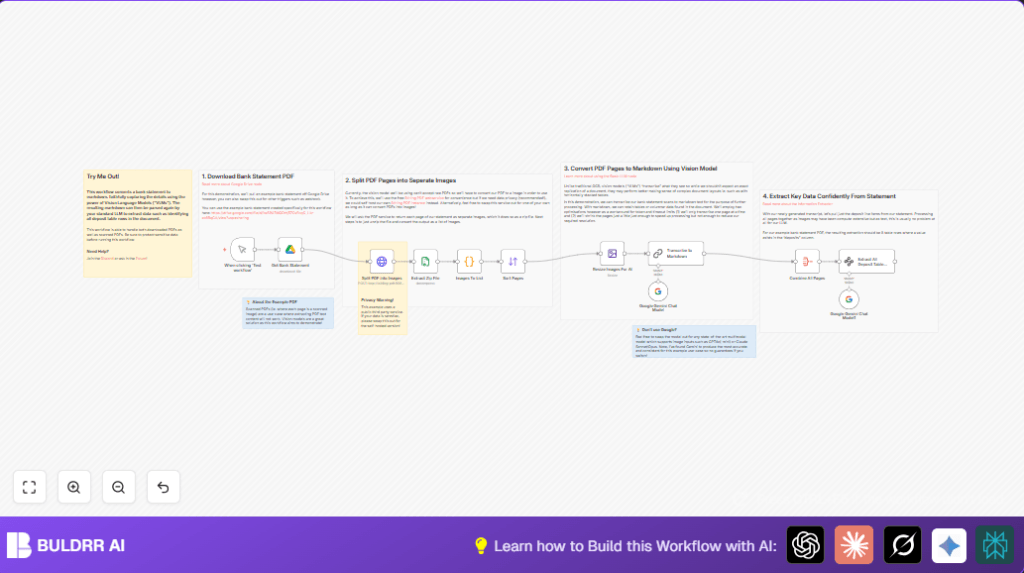
This n8n workflow automates the extraction of deposit data from bank statement PDFs by converting scanned pages to markdown using Google Gemini vision models. It solves the challenge of extracting detailed financial information from scanned or complex PDF statements without manual effort.
manualTrigger
lmChatGoogleGemini
googleDrive
+9
Workflow Identifier: 2087
NODES in Use: Manual Trigger, Google Gemini Chat Model, Google Drive, HTTP Request, Compression, Code, Sort, Edit Image, Chain LLM, Aggregate, Information Extractor, Sticky Note
Automate bank statement transcription with n8n and Google Gemini

Press CTRL+F5 if the workflow didn't load.

Learn how to Build this Workflow with AI:

What This Workflow Does

This workflow takes scanned bank statement PDFs and changes them into clear markdown text with tables preserved.
It helps find deposit entries quickly without manual work.
The workflow pulls the PDF from Google Drive, turns each page into an image, then uses a special AI to read and write out the page as markdown.
Finally, it picks out all deposit rows from the markdown and gives a neat structured list.


Who Should Use This Workflow

Anyone with scanned bank PDFs that have complex layouts.
Perfect for accountants or finance workers who spend too much time copying data by hand.
This helps reduce mistakes and saves hours reviewing pages.


Tools and Services Used

  • Google Drive API: Fetches bank statement PDFs.
  • Stirling PDF service: Converts PDF pages to JPG images.
  • Google Gemini Vision Language Model: Reads images and converts them to markdown keeping tables.
  • n8n automation platform: Controls workflow logic and data flow.

Workflow Input → Process → Output

Inputs

  • Bank statement PDF file stored on Google Drive.

Processing Steps

  • Download PDF from Google Drive.
  • Send PDF to Stirling PDF API to get images per page.
  • Unzip the image files and sort them by filename.
  • Resize images smaller to ease AI processing.
  • For each image, run Google Gemini to transcribe the page to markdown.
  • Collect all markdown pages and combine them.
  • Extract deposit table rows from combined markdown using AI extraction prompt.

Output

  • JSON list of deposits with date, description, and amount fields.

Beginner Step-By-Step: How to Use The Workflow in n8n

Import Workflow

  1. Download the workflow file using the Download button on this page.
  2. Open the n8n editor.
  3. Click on “Import from File” and select the downloaded workflow file.

Configure Credentials

  1. Add your Google Drive API credentials in the Get Bank Statement node.
  2. Add Google Gemini API Key or credentials in the Transcribe to Markdown and Extract All Deposit Table Rows nodes.
  3. Set the Stirling PDF API URL if self-hosted, or keep default if using public service.

Update File Inputs

  1. Change the fileId in the Get Bank Statement node to the actual Google Drive file ID with the bank PDF.

Test and Activate

  1. Run manual test by clicking “Execute Workflow”.
  2. Check that the workflow completes without errors.
  3. After successful tests, activate the workflow for production runs.

For self hosted options or better data privacy, learn about self-host n8n.


Handling Common Problems and Failures

  • Permission errors: Check Google Drive sharing and OAuth scopes.
  • PDF API unreachable: Use self-hosted Stirling PDF or other converter.
  • Page order wrong: Make sure images are sorted by filename before transcription.
  • AI output cut off: Resize images smaller and transcribe pages one by one.

Customization Ideas

  • Change Google Drive file IDs to work with other bank statements.
  • Switch AI model nodes to other APIs like GPT4o or Claude Sonnet.
  • Adjust image resize values to balance speed with detail.
  • Change extraction prompt to pick withdrawals or other data.
  • Replace Stirling PDF API with private or self-hosted solution to keep data private.

Summary

→ Converts scanned bank PDFs to markdown with tables.
→ Extracts deposit entries automatically.
→ Saves hours of manual copy-pasting.
→ Produces structured JSON deposit data.
→ Runs fully in n8n with configurable services.


Automate bank statement transcription with n8n and Google Gemini

Visit through Desktop to Interact with the Workflow.

Frequently Asked Questions

Verify that Google Drive file is shared properly and n8n credentials have required access scopes.
Use a self-hosted Stirling PDF service or change to a different PDF-to-image conversion API.
Ensure the Sort Pages node arranges images by filename before sending to AI nodes.
Yes. Switching to GPT4o or Claude Sonnet is possible but accuracy and cost may differ.

Promoted by BULDRR AI

Related Workflows

Automate Twist Channel Creation and Messaging with n8n

This workflow automates creating and updating a channel in Twist and sending a personalized message to specific users. It eliminates manual setup errors and saves time managing Twist communications.

Automate Ideogram Image Generation with Google Sheets & Gmail

This workflow automates graphic design image generation via Ideogram AI, storing image data in Google Sheets and Google Drive, with email alerts via Gmail. It saves designers hours by automating image creation, remixing, review, and record-keeping.

Automate IT Support with Slack and OpenAI in n8n

Streamline IT support by automating Slack message handling using n8n and OpenAI. This workflow handles Slack DMs, filters bots, queries a Confluence knowledge base, and delivers AI-generated responses, improving support efficiency and response time.

Automate Crypto Analysis with CoinMarketCap & n8n AI Agent

Discover how this unique n8n workflow leverages CoinMarketCap’s multi-agent AI to deliver precise, real-time cryptocurrency insights directly via Telegram. Manage crypto data analysis efficiently with automated multi-source API integration.

Automate Gumroad to Beehiiv Subscriber Sync with n8n

Learn how to automatically add new Gumroad sales customers as Beehiiv newsletter subscribers using n8n automation. This workflow saves time by syncing sales data to Google Sheets CRM and notifying your Telegram channel instantly.

Generate On-Brand Blog Articles Using n8n and OpenAI

This workflow automates the creation of on-brand blog articles by analyzing existing company content using n8n and OpenAI. It extracts article structures and brand voice to produce consistent draft articles, saving significant content creation time.
1:1 Free Strategy Session
Your competitors are already automating. Are you still paying for it manually?

Do you want to adopt AI Automation?

Every hour your team does repetitive work, you're burning real money.
While you wait, faster businesses are cutting costs and moving quicker.
AI and automations aren't the future anymore — they're the present.

Book a live 1-on-1 session where we show you exactly which of your daily tasks can be automated — and what it’s costing you not to.