

What This Automation Does
This workflow takes customer feedback and purchase data and sends tailored marketing emails.
It solves the problem of manually reading feedback and wasting hours writing emails.
The outcome is personalized emails sent automatically, saving time and catching unhappy customers with coupon offers.
It helps marketing teams react fast and keep customers happy without extra work.
Tools and Services Used
- n8n: Automates the workflow process.
- OpenAI API: Used by LangChain AI for sentiment analysis and writing emails.
- SMTP Email Account: Sends the composed emails to customers.
- Excel Spreadsheet (.xlsx): Contains dummy customer feedback and purchase data.
Workflow Inputs, Processing, and Outputs
Inputs
- Dummy customer purchase and feedback data downloaded as an Excel file.
- Campaign tone preferences set for AI guidance.
Processing Steps
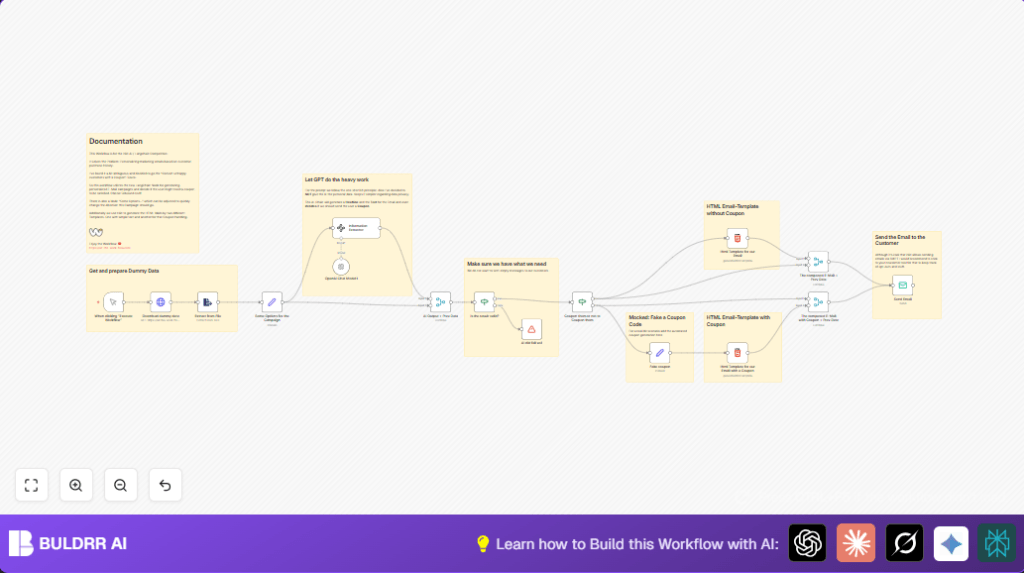
- Download Excel file with feedback data using HTTP Request node.
- Extract spreadsheet data via Extract from File node.
- Set campaign options like target and flavour text for AI.
- Analyze feedback with LangChain AI Information Extractor node to get sentiment, headline, body, and coupon decision.
- Use OpenAI Chat Model node to power the AI output.
- Merge AI results with original customer data.
- Validate AI output to ensure headline and body are not empty.
- Use conditional logic to decide if coupon should be sent.
- Generate mock coupon if needed, then create HTML email templates (with or without coupon).
- Merge email HTML with customer data before sending.
- Send email via SMTP node.
Outputs
- Personalized marketing emails with subject, content, and optional coupon.
- Email delivered to correct customer email address.
Beginner Step-by-Step: How to Use This Workflow in n8n
1. Import the workflow
- Download the workflow file using the Download button on this page.
- Open the n8n editor and click on “Import from File”.
- Select the downloaded workflow file and import it.
2. Configure connections and keys
- Add your OpenAI API Key in the credentials section used by LangChain nodes.
- Set up SMTP Email credentials for the Email Send node.
- If needed, update any email addresses, list IDs, or URLs in the nodes.
3. Review prompts and inputs
- Check the campaign options in the Set node for tone and target texts.
- Verify the prompt text inside the LangChain Information Extractor node.
4. Test the workflow
- Run the workflow manually using the Manual Trigger node.
- Look at execution results to verify AI outputs and email content.
5. Activate workflow for production
- Switch the Manual Trigger node to a Cron Trigger for regular sending.
- Enable and save the workflow.
If using self hosting n8n, check self-host n8n for help with setup and deployment.
Customization Ideas
- You can change the “Campaign Target” or “Flavour” values in the Set node to adjust email tone.
- Replace the fake coupon generation with an API from your ecommerce platform to create real coupons.
- Edit the HTML Template nodes to add company colors, logos, or footer information.
- Change the Manual Trigger to a Cron Trigger node for scheduled sending.
- Add filters before AI processing to handle customer segments like location or purchase amount.
Handling Errors and Edge Cases
- If the workflow stops with “Unexpected Langchain Output”, check the AI prompt and output fields for missing headline or body.
- Make sure SMTP credentials are correct if emails fail to send.
- If no coupon is sent for unhappy feedback, verify AI boolean field “SendCoupon” logic matches prompt conditions.
- Use the If node “Is the result valid?” to avoid sending empty or broken emails.
Pre-Production Checklist
- Confirm Excel data downloads correctly and fields appear properly.
- Test AI prompt on example feedback to get correct headline and body.
- Send test emails to verify HTML display on different devices.
- Ensure SMTP credentials are active and email sending is authorized.
- Run the whole workflow to check results end-to-end.
- Save a backup of the workflow JSON before big changes.
Deployment Guide
Use the Manual Trigger to start testing.
Switch to Cron Trigger to run regularly and send batches of emails automatically.
Watch n8n execution logs for errors and delivery status.
For full production use, consider linking Email Send to a newsletter platform API to handle unsubscribes properly.
Summary
✓ This workflow sends personalized marketing emails based on customer feedback.
✓ It saves many manual hours creating custom messages and deciding coupons.
✓ The automation improves customer satisfaction by timely engaging unhappy buyers.
→ Result: More loyal customers with less effort from marketing teams.
