
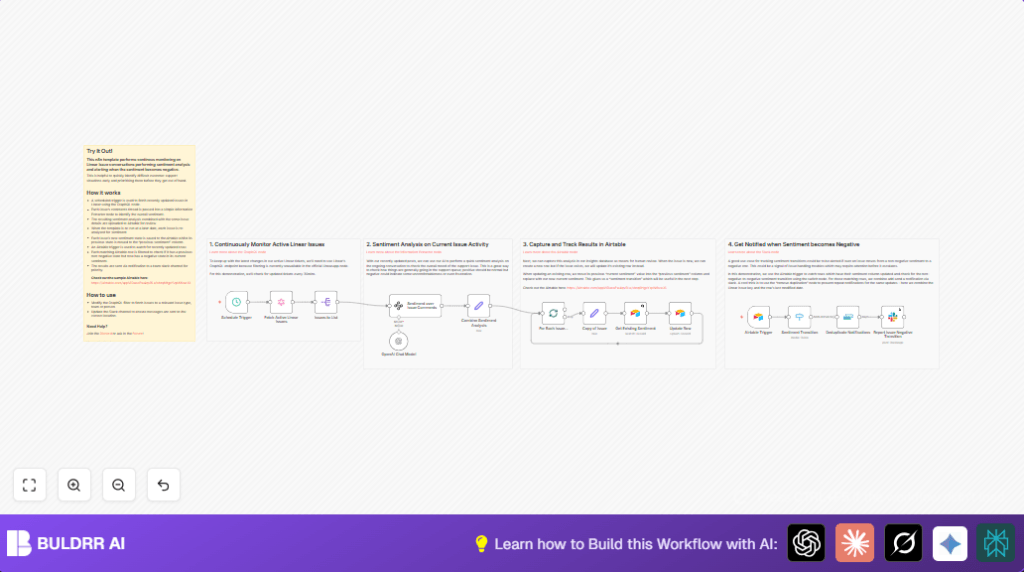

What This Workflow Does
This workflow checks customer support tickets for bad feelings in their comments every 30 minutes. It reads your Linear issues, looks at the comments, and uses AI to tell if the mood is good or bad. If the mood gets worse, it saves this info in Airtable and then sends a warning message on Slack. This way, the team can act fast before problems grow bigger.
The workflow stops repeated warnings by checking if it already alerted about the same issue. This saves time and helps keep unhappy customers from slipping through unnoticed.
Who Should Use This Workflow
Support teams using Linear who want to watch ticket conversations for signs of trouble. If the team spends a lot of hours reading comments to find upset customers, this workflow can help. It’s good for anyone who wants faster alerts about negative feedback and fewer manual checks.
Tools and Services Used
- Linear API: Gets issues and their recent comments using GraphQL.
- OpenAI via LangChain: Runs sentiment analysis on conversation texts.
- Airtable: Stores and tracks changes in sentiment data.
- Slack Incoming Webhook: Sends alert messages for worsening sentiment.
- n8n Automation Platform: Runs and manages the workflow.
Inputs → Processing Steps → Outputs
Inputs
- Linear issues updated in the last 30 minutes with all comments.
- Issue comment texts combined for analysis.
Processing Steps
- GraphQL node: Fetch recent Linear issues with comments.
- Split Out node: Handle each issue alone.
- Information Extractor node: Summarize sentiment with AI.
- Set node: Combine sentiment with issue details.
- Split In Batches node: Process few issues at a time for Airtable limits.
- Airtable Search node: Check if sentiment record already exists.
- Airtable Update or Create node: Save new sentiment or update past sentiment.
- Airtable Trigger node: Watches sentiment changes.
- Switch node: Detects if sentiment worsened (from good/neutral to negative).
- Remove Duplicates node: Blocks repeated alerts.
- Slack node: Sends alert message with issue link and summary.
Outputs
- Airtable table with current and previous sentiment states.
- Slack channel alert messages for negative sentiment transitions.
Beginner Step-by-Step: Using This Workflow in n8n
Step 1: Import the Workflow
- Download the workflow file using the Download button on this page.
- Go to the n8n editor where you already work.
- Use the Import from File option to upload the workflow.
Step 2: Set Up Credentials
- Add your Linear API Key in the appropriate GraphQL node.
- Configure OpenAI API key in the LangChain or OpenAI nodes.
- Enter your Airtable API key and verify the base and table names match your Airtable.
- Put your Slack webhook URL in the Slack node.
Step 3: Adjust Settings as Needed
- Change any IDs, emails, table names, or Slack channels if your setup is different.
- Review the GraphQL query variables to fit your team or label preferences.
- Update Airtable fields mapping if you added custom columns.
Step 4: Test and Activate
- Run the workflow manually to check it fetches issues and analyzes sentiment.
- Watch if Airtable updates correctly and Slack alerts appears when sentiment turns bad.
- If all works, turn on the workflow live mode to run automatically every 30 minutes.
You can also self-host n8n if preferred for more control.
Customization Ideas
- Change the GraphQL filter to watch issues by specific team, label, or assignee.
- Refine sentiment categories to add severity levels like “Very Negative” or “Needs Attention.”
- Send Slack messages to different channels based on issue priority.
- Add more Airtable fields such as priority or issue type for richer analysis.
- Include last comment or assignee mention in Slack alert texts.
Troubleshooting Tips
- GraphQL Returns Empty: Check your API key and filters. Try relaxing the date range.
- Missing or Bad Sentiment Results: Confirm comments text is combined correctly. Test OpenAI API with example prompts.
- Airtable API Errors or Slowdowns: Use batching to limit request rates. Verify field names and API keys.
Pre-Production Checklist
- All API keys and credentials for Linear, OpenAI, Airtable, and Slack verified.
- GraphQL query tested in Linear’s API explorer.
- Manual workflow run shows correct sentiment analysis and data saved.
- Airtable updates trigger alerts in Slack.
- Test alert sent by simulating sentiment change to negative.
- Backup Airtable data before using in production.
Deployment Guide
Activate the workflow in live mode after testing. Monitor Slack alerts and Airtable records to make sure the workflow works as expected. Change schedule time or alert details to match team needs.
Use batching and API limits carefully if there are many issues. Self-host n8n for secure and reliable operation at higher scale. See self-host n8n for options.
Summary
✓ Saves time by automatically checking sentiment in issue comments.
✓ Alerts the team when customer conversations turn negative.
✓ Tracks sentiment history for each issue in Airtable.
→ Helps spot problems earlier and improve customer support.
→ Runs automatically every 30 minutes with simple setup.
