
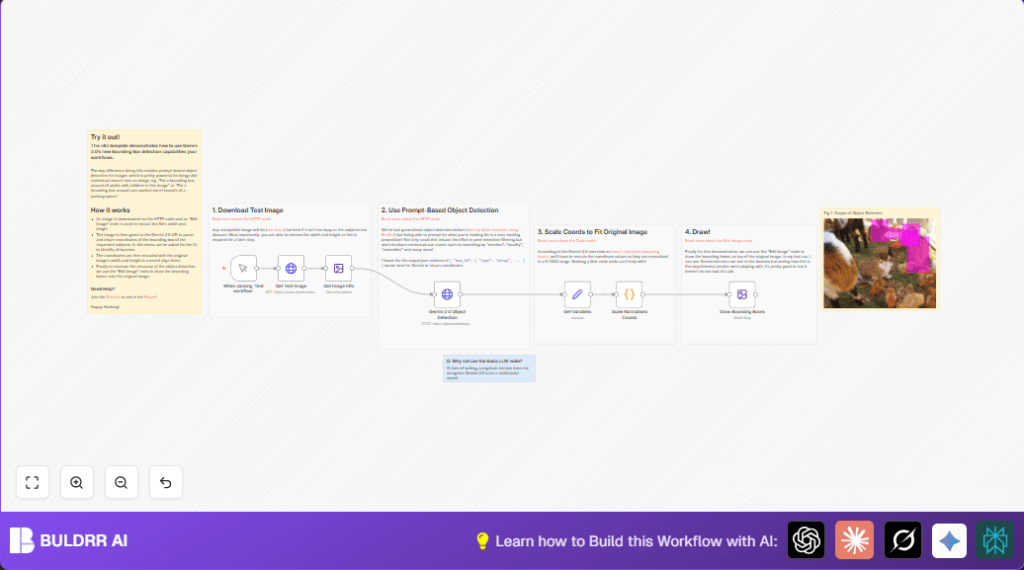

What this workflow does
This workflow finds and marks objects like rabbits in images automatically.
It solves the problem of manual tagging which is slow and can be wrong.
After running, you get the same image with boxes around all rabbits shown clearly.
Who should use this workflow
This is useful for people who handle lots of photos and want to mark animals or objects fast.
Users with little time or technical skill can quickly label images for marketing or websites.
Beginners can use it with no coding by following simple steps.
Tools and services used
- n8n platform: For building and running the automation.
- Google Gemini 2.0 API: Detects objects in images by prompt request.
- HTTP Request nodes: Download images and call APIs.
- Edit Image nodes: To get image data and draw bounding boxes.
- Code node: Runs JavaScript to scale coordinates.
- self-host n8n option: For users running their own servers.
Inputs, processing, and outputs
Inputs
- Image downloaded by URL in HTTP Request node (Get Test Image).
- API key and model prompt for Google Gemini to detect rabbits.
Processing Steps
- Get image dimensions with Edit Image node (Get Image Info).
- Send image and prompt to Google Gemini using HTTP Request node (Gemini 2.0 Object Detection).
- Extract bounding box coordinates normalized 0-1000 scale from API response.
- Set variables in Set node (Get Variables) for width, height, and coordinates.
- Use Code node (Scale Normalised Coords) to convert normalized boxes to actual pixel positions.
- Draw colored bounding boxes onto the original image with Edit Image node (Draw Bounding Boxes).
Outputs
- Image with visible bounding boxes around all detected rabbits.
- Output can be saved, shared, or used for marketing easily.
Beginner step-by-step: How to use this workflow in n8n
Step 1: Download the workflow
- Click the Download button on this page to get the workflow file.
Step 2: Import into n8n editor
- Open the n8n editor you have access to (cloud or self-host n8n server).
- Go to menu and select “Import from File” and upload the workflow JSON you downloaded.
Step 3: Configure required settings
- Enter Google Gemini 2.0 API Key in the HTTP Request node (Gemini 2.0 Object Detection).
- If needed, update the image URL in HTTP Request node (Get Test Image).
- If changing detected objects, update prompt JSON in the Gemini node:
{
  "prompt": "I want to see all bounding boxes of rabbits in this image."
}- Check other settings like email, folder, or channels if added.
Step 4: Test the workflow
- Click the Manual Trigger node and then “Execute Workflow” to make sure it runs without errors.
Step 5: Activate for production
- Change trigger node if you want automatic runs (like on new image upload).
- Save and activate the workflow for daily or real use.
Following these steps lets even new users automate object detection fast in n8n.
Customization ideas
- Change prompt inside Gemini API node to detect different things like cars or dogs.
- Update image URL to use any photo for detection.
- Modify draw colors or box thickness in the Edit Image node (Draw Bounding Boxes) to fit your look.
- Add nodes after drawing to save images to cloud or send via email automatically.
- Run multiple API calls with different prompts for complex images with many objects.
Edge cases and troubleshooting
No bounding boxes returned
Check if the image really has objects matching your prompt.
Try using a simpler or clearer prompt message.
Boxes don’t match image
Double-check image width and height from the Get Image Info node.
Make sure scale code in the Code node matches these sizes exactly.
API call fails
Confirm API Key is correct and active in Gemini node credentials.
Watch for network issues or expired key problems.
Summary of results
→ Automatically detects and marks animals or objects by prompt.
→ Saves manual tagging time and improves accuracy.
→ Provides easy-to-see bounding boxes on original images.
→ Simple to configure and run inside n8n editor.
→ Can be customized for many detection tasks by changing prompts or images.