
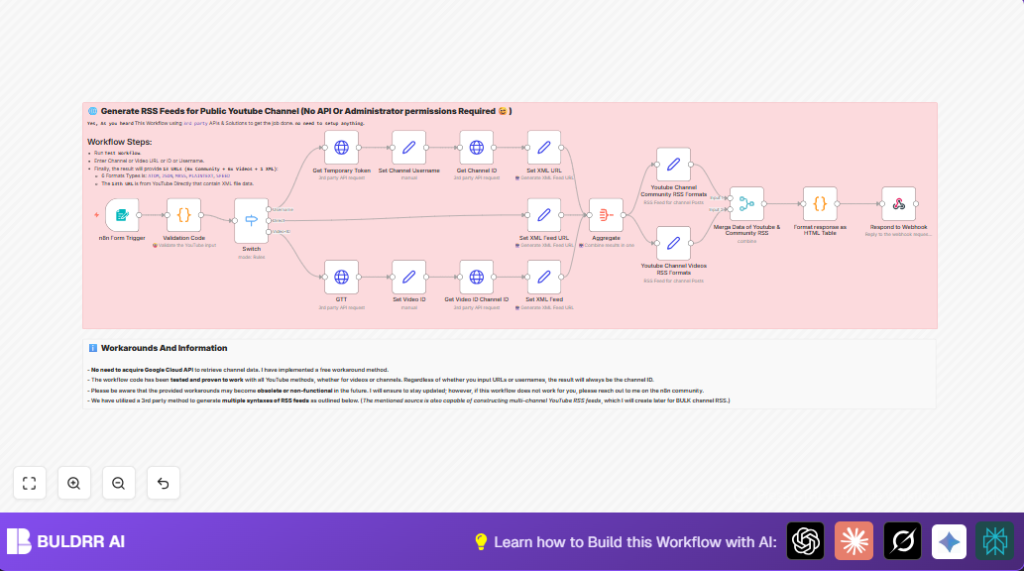

What This Workflow Does
Paste any YouTube input — a channel username like @MrBeast, a
full channel ID, a video URL, or a video ID — and this workflow
instantly generates every RSS feed format you need.
It works with:
→ Channel usernames (with or without @)
→ Channel IDs (UC… format)
→ Full YouTube video URLs (youtube.com/watch?v=…)
→ Short video URLs (youtu.be/…)
The output is a clean HTML table with all your RSS feed links
in 6 formats — HTML, Atom, JSON, MRSS, Plaintext, and SFeed —
ready to click, copy, or plug into any automation.
No guessing channel IDs. No manual URL building. Just paste and get feeds.
What Can You Do With These RSS Feeds?
Once you have your YouTube RSS feed URL, here are the 3 most
powerful ways to use it:
1. Get Instant New Video Alerts
Plug the RSS feed into an n8n RSS Trigger node — the moment
a new video drops on any channel, your workflow fires
automatically. Send alerts to Telegram, Slack, email, or any
other tool without ever checking YouTube manually.
2. Build an Automated Video Digest
Combine feeds from multiple channels and schedule a daily or
weekly digest. n8n aggregates the latest videos, formats them
into a clean email or message, and sends it to your team —
zero manual curation needed.
3. Pipe Videos Into Your Own Apps or CRMs
The JSON and Atom feed formats plug directly into any webhook,
database, or CRM. Automatically log new videos to Notion,
Airtable, Google Sheets, or trigger any downstream workflow
the moment new content goes live.
All three start with a single RSS feed URL — this workflow
generates them all in one click.
Who Should Use This Workflow
This workflow helps users who manage many YouTube channels or videos.
It fits marketers, content creators, or teams needing updated RSS feeds fast.
No need to manually find or guess channel IDs or make feed URLs.
Good for any non-technical user wanting simple, reliable YouTube RSS URLs.
Tools and Services Used
- n8n Platform: Automation workflow editor.
- commentpicker.com API: To get tokens and YouTube channel data.
- rss-bridge.org: To create many RSS feed formats like HTML, Atom, JSON, MRSS.
- Webhook testing tools: Postman, Thunder Client to test the workflow.
Inputs, Processing Steps, and Outputs
Inputs
- User input from the form Trigger node.
- Input can be YouTube channel username (with or without @), channel ID, video URL, or video ID.
Processing Steps
- Validate and parse the input to find its exact type and identifier.
- Use switch node to route depending on input type.
- If username, get token, then get channel ID from commentpicker.com API.
- If channel ID, construct the official YouTube RSS feed URL directly.
- If video ID, get token, then find channel ID from video details.
- Generate multiple RSS feed URLs in formats: HTML, Atom, JSON, MRSS, Plaintext, SFeed for videos and community posts.
- Aggregate all URLs into one structured data block.
- Format the final output as an HTML table for easy reading and clicking.
Output
An HTML table listing all different RSS feed URLs.
The response is sent back via the webhook so users get instant results.
Beginner Step-by-Step: How to Use This Workflow in n8n
1. Import the Workflow File
- Download the workflow file using the Download button on this page.
- Open your n8n editor (cloud or self-host n8n).
- Click “Import from File” and select the downloaded workflow file.
2. Configure Credentials and Settings
- Add any required API credentials for commentpicker.com HTTP Request nodes.
- Check and update any placeholder IDs, emails, channels, folders, or tables if found in the workflow.
- Paste the provided JavaScript code exactly inside the Code node named “Validation Code” (see code below).
3. Test the Workflow
- Trigger the Webhook node using a test YouTube input.
- Verify the workflow runs without errors and returns an HTML table.
4. Activate for Production
- Switch the workflow toggle to active inside n8n.
- Share or use the webhook URL to send real inputs.
Following these steps allows any beginner user to import and start using the workflow quickly.
// JavaScript to extract YouTube channel ID, username, or video ID
const items = [];
const inputData = $input.all();
const input = inputData.length > 0 ? inputData[0].json["youtube Channel username or ID"] : null;
if (!input) {
  throw new Error('Input is undefined or not provided');
}
const usernamePattern = /^@?([a-zA-Z0-9_-]+)$/;
const channelIdPattern = /^(UC[a-zA-Z0-9_-]{22})$/;
const videoUrlPattern1 = /(?:https?:\/\/)?www\.youtube\.com\/watch\?v=([a-zA-Z0-9_-]+)/;
const videoUrlPattern2 = /(?:https?:\/\/)?youtu\.be\/([a-zA-Z0-9_-]+)/;
const channelUrlPattern1 = /(?:https?:\/\/)?www\.youtube\.com\/@([a-zA-Z0-9_-]+)/;
const channelUrlPattern2 = /(?:https?:\/\/)?www\.youtube\.com\/channel\/(UC[a-zA-Z0-9_-]{22})/;
const customChannelUrlPattern = /(?:https?:\/\/)?www\.youtube\.com\/c\/([a-zA-Z0-9_-]+)/;
function determineTypeAndValue(input) {
  if (channelIdPattern.test(input)) return { type: 'channel ID', value: input };
  else if (usernamePattern.test(input)) return { type: 'channel username', value: input };
  else if (videoUrlPattern1.test(input) || videoUrlPattern2.test(input)) {
    const videoId = videoUrlPattern1.test(input) ? input.match(videoUrlPattern1)[1] : input.match(videoUrlPattern2)[1];
    return { type: 'video ID', value: videoId };
  } else if (channelUrlPattern1.test(input) || customChannelUrlPattern.test(input)) {
    const username = channelUrlPattern1.test(input) ? input.match(channelUrlPattern1)[1] : input.match(customChannelUrlPattern)[1];
    return { type: 'channel username', value: username };
  } else if (channelUrlPattern2.test(input)) {
    return { type: 'channel ID', value: input.match(channelUrlPattern2)[1] };
  } else {
    return { error: 'Invalid input or unsupported format.' };
  }
}
const result = determineTypeAndValue(input);
items.push({ json: result });
return items;
Customization Ideas
- Change RSS feed formats in the Set nodes by editing
rss-bridge.orgURLs.
- Change RSS feed formats in the Set nodes by editing
- Add more input check patterns in the Code node for new YouTube URL types.
- Extend the HTML output to include export buttons for JSON or CSV formats for easier data use.
- Modify the input form to accept multiple channels for bulk RSS feed generation.
- Rename the webhook path to match your brand or API naming style.
Troubleshooting and Common Issues
- Error: “Invalid input or unsupported format.” means input does not match allowed patterns.
Fix: Provide proper username, channel ID, or video URL. Adjust regex if YouTube changes.
- Error: “Invalid input or unsupported format.” means input does not match allowed patterns.
- Error: HTTP requests to commentpicker.com fail.
Fix: Check internet connection, correct HTTP headers, and tokens in request nodes.
- Error: HTTP requests to commentpicker.com fail.
- Issue: No RSS URLs in output.
Fix: Verify channel ID extraction, confirm correct routing in switch node.
- Issue: No RSS URLs in output.
Pre-Production Checklist
- Test inputs with usernames, IDs, and video links.
- Confirm HTTP calls get tokens and channel data successfully.
- Check RSS URLs have proper channel IDs.
- Ensure aggregated data builds full HTML table correctly.
- Use tools like Postman to test webhook endpoints and responses.
Deployment Guide
Turn workflow active inside n8n editor.
Copy webhook URL from the Form Trigger node.
Give webhook URL to users or systems for input submission.
Watch execution logs in n8n to handle problems or retries.
Summary
✓ Saves hours by automatically creating many RSS feed URLs from YouTube input.
✓ Avoids errors in manual channel ID or URL finding.
✓ Gives many RSS format options for videos and community posts.
→ Returns a clean formatted HTML table with clickable RSS links instantly via webhook.
