

Generate 9:16 Aspect Ratio Video Images with AI and n8n

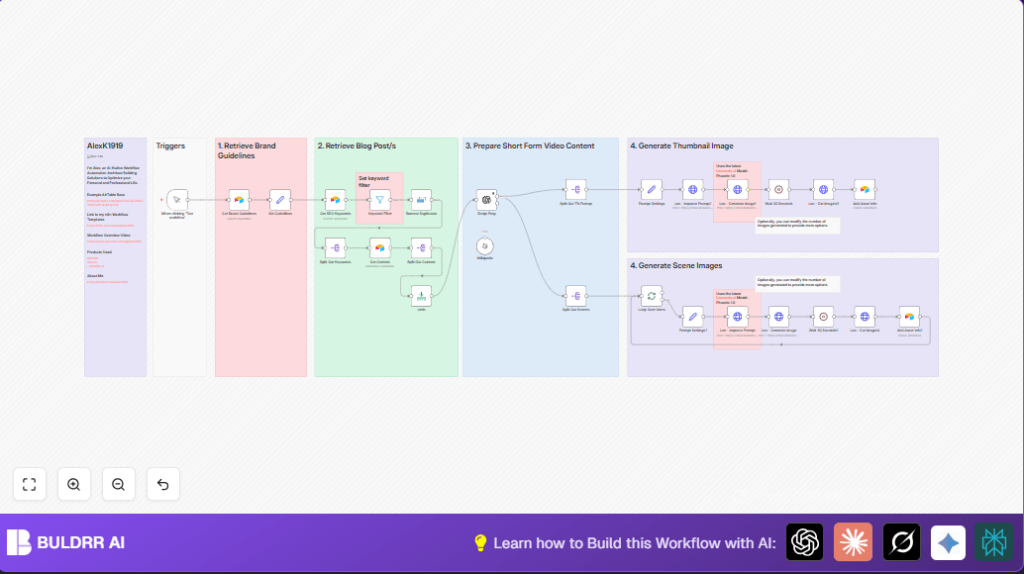
This workflow transforms blog content into 9:16 aspect ratio short-form video assets using AI-driven script generation and Leonardo.ai image creation. Perfect for content creators looking to automate image and thumbnail production for vertical videos, saving hours of manual work.
manualTrigger
airtable
httpRequest
+9
Workflow Identifier: 1261
NODES in Use: Manual Trigger, Sticky Note, Set, Airtable, Filter, Remove Duplicates, Split Out, Limit, OpenAI, SplitInBatches, Wait, HTTP Request
Automate 9:16 video images with n8n and OpenAI

Press CTRL+F5 if the workflow didn't load.

Learn how to Build this Workflow with AI:

What This Workflow Does

This workflow takes blog posts as input and makes short videos automatically with images and thumbnails in vertical 9:16 format.

It stops users from spending many hours on scripting and making images manually, which can cause mistakes and delays.

The output is ready-to-use video scripts and picture assets that match your brand and style.


Who Should Use This Workflow

People who need to make short social videos from long blog content.

This is good for marketing teams, video creators, or anyone wanting fast and consistent video assets with AI help.


Tools and Services Used

  • Airtable: Stores brand guidelines, SEO keywords, and blog content.
  • OpenAI GPT-4o-mini model: Creates short video scripts and image descriptions.
  • Leonardo.ai API: Improves image prompts and generates vertical 9:16 images and thumbnails.
  • n8n automation platform: Runs and connects all these steps automatically.

Input, Processing, and Output Explained

Inputs

Processing Steps

  • Filter and remove duplicate keywords matching “ai automation.”
  • Generate a 4-scene short video script less than 30 seconds using OpenAI.
  • Create original image prompts for each scene plus a thumbnail prompt.
  • Send these prompts to Leonardo.ai for improvement and high-quality image creation.
  • Wait for Leonardo.ai image jobs to finish, then retrieve final image URLs.
  • Upload all image and asset details back to Airtable for tracking.

Outputs

  • Clear, branded short video scripts in four scenes.
  • High-resolution vertical (9:16) AI-generated images for scenes and a thumbnail.
  • All asset information stored in Airtable for easy reuse.

Beginner Step-by-Step: How to Use This Workflow in n8n

Step 1: Import Workflow File

  1. Download the workflow using the Download button on this page.
  2. Open the n8n editor.
  3. Click “Import from File” and select the downloaded workflow file.

Step 2: Add Credentials

  1. Set up Airtable API Key credentials inside n8n.
  2. Add OpenAI API Key for GPT-4o-mini model access.
  3. Configure Leonardo.ai HTTP credentials for image generation and prompt improvement.

Step 3: Configure Node Settings

  1. Update Airtable base IDs, table names, and fields if different from defaults.
  2. Review and adjust OpenAI prompt text if needed for video length or style.
  3. Check Leonardo.ai model IDs and any additional prompt instructions.

Step 4: Test and Activate

  1. Run the workflow once using the Manual Trigger node inside n8n.
  2. Check the output images and script data in Airtable for correctness.
  3. Fix any errors and retry the test if needed.
  4. Once working, activate the workflow to run automatically or on a schedule.

For users hosting their own n8n instance, this workflow can run reliably with self-host n8n.


Customizations and Extensions

  • Change OpenAI prompt to adjust number of scenes or total video length.
  • Modify Leonardo.ai prompt settings to get different art styles or quality.
  • Broaden SEO keyword filter to include more topics or keywords.
  • Increase number of images generated by changing Leonardo.ai API parameters.
  • Add social media nodes for auto-posting videos and thumbnails after creation.

Known Issues and Troubleshooting

  • Airtable node returns no data.
    Check Airtable base and table IDs match and that API Key has proper permissions.
  • OpenAI node errors or timeouts.
    Verify OpenAI API Key is valid and network connectivity is stable.
  • Leonardo.ai image generation fails or hangs.
    Confirm API credentials and review Leonardo.ai API changes if any.
  • Images mismatch brand style.
    Ensure full and correct brand guidelines are stored in Airtable.

Summary of Results

✓ Save several hours of manual work on scripts and images.

✓ Get consistent, brand-aligned short video scripts and vertical images.

✓ Store all assets centrally in Airtable for easy reuse and tracking.

→ Run the workflow on-demand or schedule regular content creation.

Automate 9:16 video images with n8n and OpenAI

Visit through Desktop to Interact with the Workflow.

Author
Written By
Vikash Kumar
Building AI agents, n8n workflows and end-to-end automation for 30+ Brands across India, the US, Europe, Dubai & Australia. 7+ years of Experience saving founders real hours every week - no code required.
Author
Written By
Vikash Kumar
Building AI agents, n8n workflows and end-to-end automation for 30+ Brands across India, the US, Europe, Dubai & Australia. 7+ years of Experience saving founders real hours every week - no code required.

Frequently Asked Questions

The ‘Keyword Filter’ node selects only SEO keywords that have the exact phrase ‘ai automation’ to focus the content on relevant topics.
The workflow uses OpenAI’s GPT-4o-mini model to generate a four-scene script under 30 seconds based on the blog post content.
Images created by Leonardo.ai are saved with their URLs and metadata in the ‘Assets’ table in Airtable for tracking and reuse.
Yes, the number of images is controlled by parameters in the Leonardo.ai API calls and can be adjusted in the workflow settings.

Related Workflows

Automate Twist Channel Creation and Messaging with n8n

This workflow automates creating and updating a channel in Twist and sending a personalized message to specific users. It eliminates manual setup errors and saves time managing Twist communications.

Automate Ideogram Image Generation with Google Sheets & Gmail

This workflow automates graphic design image generation via Ideogram AI, storing image data in Google Sheets and Google Drive, with email alerts via Gmail. It saves designers hours by automating image creation, remixing, review, and record-keeping.

Automate IT Support with Slack and OpenAI in n8n

Streamline IT support by automating Slack message handling using n8n and OpenAI. This workflow handles Slack DMs, filters bots, queries a Confluence knowledge base, and delivers AI-generated responses, improving support efficiency and response time.

Automate Crypto Analysis with CoinMarketCap & n8n AI Agent

Discover how this unique n8n workflow leverages CoinMarketCap’s multi-agent AI to deliver precise, real-time cryptocurrency insights directly via Telegram. Manage crypto data analysis efficiently with automated multi-source API integration.

Automate Gumroad to Beehiiv Subscriber Sync with n8n

Learn how to automatically add new Gumroad sales customers as Beehiiv newsletter subscribers using n8n automation. This workflow saves time by syncing sales data to Google Sheets CRM and notifying your Telegram channel instantly.

Generate On-Brand Blog Articles Using n8n and OpenAI

This workflow automates the creation of on-brand blog articles by analyzing existing company content using n8n and OpenAI. It extracts article structures and brand voice to produce consistent draft articles, saving significant content creation time.
1:1 Free Strategy Session
Your competitors are already automating. Are you still paying for it manually?

Do you want to adopt AI Automation?

Every hour your team does repetitive work, you're burning real money.
While you wait, faster businesses are cutting costs and moving quicker.
AI and automations aren't the future anymore — they're the present.

Book a live 1-on-1 session where we show you exactly which of your daily tasks can be automated — and what it’s costing you not to.