

What this workflow does
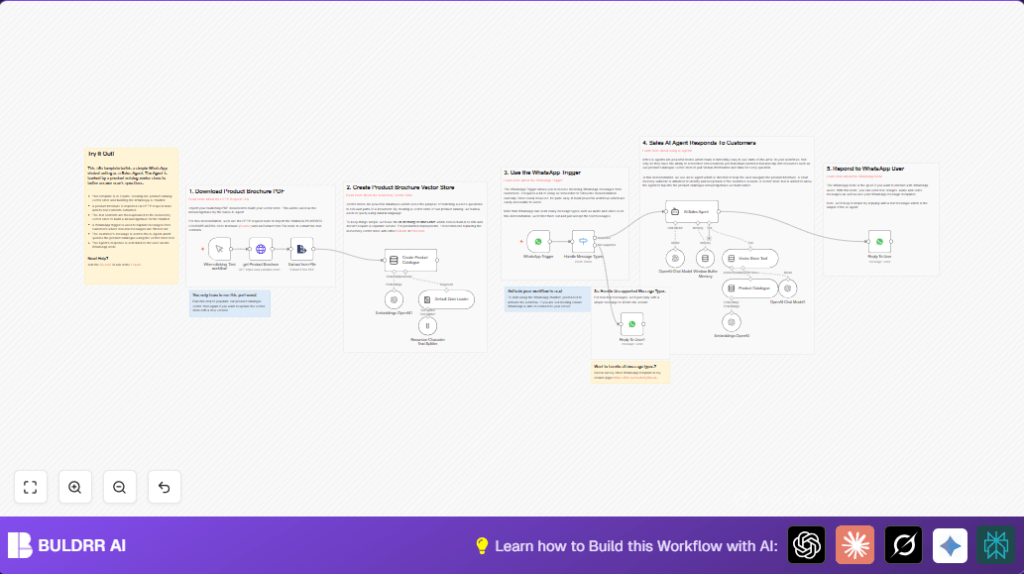
This workflow helps answer customer questions on WhatsApp about Yamaha loudspeaker products fast and correct. It reads a product brochure PDF, turns its text into searchable chunks, and uses AI to reply based on the brochure data. This saves time and avoids mistakes when answering buyers.
The goal is to let the sales team reply 24/7 without hiring more people. It listens for texts, looks up info from the brochure, and sends back helpful replies automatically.
Who should use this workflow
This is for sales teams or companies selling Yamaha loudspeakers wanting faster, clearer customer chat replies. It suits businesses that get many questions on WhatsApp and want to avoid manual copy-paste or slow answers.
It also fits users who have n8n and OpenAI accounts and can connect WhatsApp Business API.
Tools and services used
- n8n Automation Platform: Creates and runs the workflow.
- OpenAI GPT-4 and Embeddings API: Generates AI responses and vector embeddings.
- WhatsApp Business API: Receives and sends WhatsApp messages.
- HTTP Request node: Downloads the product brochure PDF.
- Extract from File node: Extracts text from the PDF.
- Text Splitter node: Breaks brochure text into smaller parts.
- Vector Store In Memory node: Stores text chunks as vectors for quick searching.
- Switch node: Filters incoming WhatsApp messages by type.
- Window Buffer Memory node: Keeps chat context per user.
Inputs, processing, and outputs
Inputs
- PDF file URL of Yamaha loudspeaker product brochure (2024 version).
- Incoming WhatsApp text messages from customers.
Processing steps
- Download the PDF brochure using HTTP Request node.
- Extract readable text from the PDF with Extract from File node.
- Split extracted text into chunks to avoid AI limits using Recursive Character Text Splitter node.
- Create vector embeddings for those chunks with OpenAI embedding model.
- Save vectors in the in-memory vector store with a set key.
- Listen for WhatsApp messages using WhatsApp Trigger node.
- Check message type with Switch node, only accept text messages for AI processing.
- Use an AI Sales Agent powered by GPT-4, referencing vector store to answer customer questions based on brochure content.
- Keep conversation memory per user via Window Buffer Memory node.
- Send AI’s answer back to sender using WhatsApp node.
Outputs
- Accurate, relevant WhatsApp text replies about Yamaha loudspeaker products.
- Friendly replies when users send unsupported message types (non-text).
Beginner step-by-step: How to use this workflow in n8n
1. Import the workflow
- Click the Download button on this page to get the workflow file.
- Open the n8n editor and select “Import from File” from the menu.
- Choose the downloaded workflow file to load it into n8n.
2. Configure credentials
- Add OpenAI API Key credentials in the Embeddings OpenAI node and any other OpenAI nodes.
- Set up WhatsApp Business API credentials in WhatsApp Trigger and WhatsApp nodes.
- If needed, update IDs or phone numbers used for WhatsApp messages.
3. Update settings if needed
- Make sure the HTTP Request node URL points to the Yamaha product brochure PDF.
- Confirm vector store memory key set to “whatsapp-75” matches across nodes.
4. Test the workflow
- Run the workflow once to download and process the brochure, creating the vector store.
- Send a WhatsApp message to the connected number to see if AI replies with brochure info.
5. Activate for production
- Enable the workflow in n8n to listen continuously.
- Make sure n8n is reachable by WhatsApp webhook URLs; see self-host n8n for hosting tips.
Edge cases and failures
- PDF download may fail if the URL changes or network is down.
- Text extraction can be empty if PDF is corrupted or format unsupported.
- AI answers may be wrong if the vector store is empty or keys mismatch.
- Non-text WhatsApp messages get automatic replies explaining only text is supported.
- Webhook connection failures usually come from incorrect URLs or firewall blocking.
Refreshing the brochure ingestion steps fixes vector store data issues.
Customization ideas
- Change the PDF URL to any other product brochure to support other catalogs.
- Replace in-memory vector store with scalable databases like Qdrant or Pinecone.
- Extend the Switch node to handle images or audio messages.
- Adjust the AI system message prompt to change tone or add more company details.
- Add typing indicators using WhatsApp API during AI response generation.
Summary of results
✓ Saves hours daily by automating brochure questions on WhatsApp.
✓ Sends quick, accurate answers referencing official brochure text.
✓ Works without extra staff or manual copy-paste errors.
✓ Supports only text messages with polite fallback replies.
✓ Easy to test, customize, and run inside n8n with OpenAI and WhatsApp credentials.
