
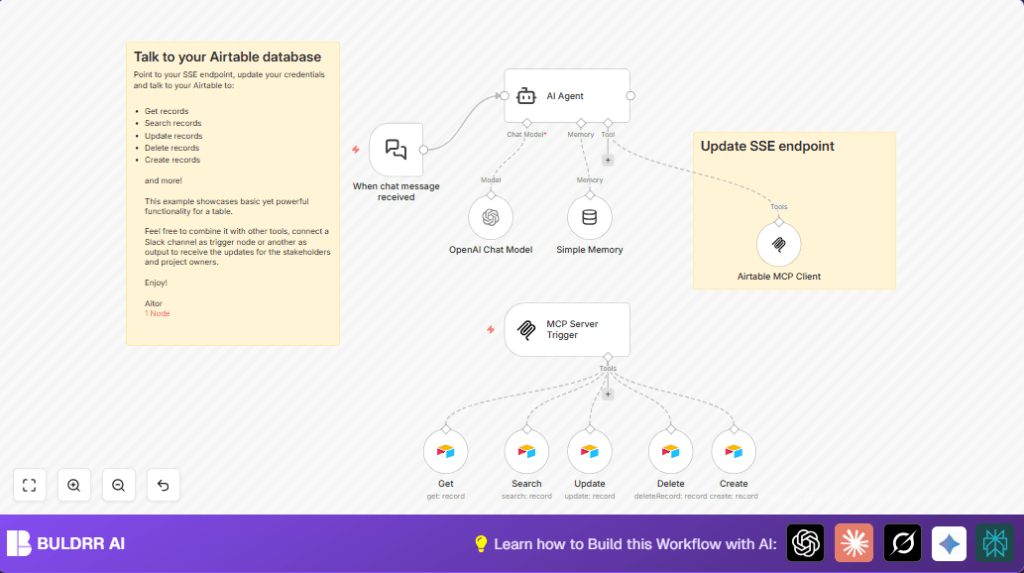

What this workflow does
This workflow creates a chat-based system that talks to Airtable to manage social media posts.
It solves the problem of spending too much time updating and searching social content manually.
You get a chat interface that understands commands, reads or changes Airtable data automatically.
Who should use this workflow
This is meant for marketing teams and managers who track social media posts.
It helps people who want to handle Airtable content faster by chatting instead of using the Airtable app directly.
Tools and services used
- n8n: Runs the automation workflow.
- OpenAI GPT-4o: Understands and responds to chat commands.
- Airtable: Stores social post information with a Personal Access Token for security.
- Server-Sent Events (SSE): Sends real-time updates from the server to the client.
Inputs, processing steps, and outputs
Inputs
- Incoming chat messages via a webhook trigger (When chat message received node).
- API keys for OpenAI and Airtable for access.
- Social post data stored in Airtable base and table.
Processing steps
- Trigger fires when a chat message arrives.
- AI Agent node analyzes message with GPT-4o for understanding commands.
- Simple Memory node stores recent chat to keep conversation context.
- OpenAI Chat Model node generates human-like replies or instructions.
- Airtable MCP Client node connects with the SSE endpoint to sync updates and execute database operations.
- MCP Server Trigger node links chat commands to the workflow.
- Separate Airtable CRUD nodes handle create, read, update, search, and delete social post records.
Outputs
- Real-time chat responses that confirm or show social post data.
- Automatic changes in Airtable records based on chat instructions.
- Live notifications for connected stakeholders or clients about database updates.
Beginner step-by-step: How to run this workflow in n8n production
Import Workflow
- Download the workflow file from this page.
- In the n8n editor, click on the menu and choose “Import from File”.
- Select the downloaded workflow file and open it.
Configure Credentials and Variables
- Add your OpenAI API Key in the OpenAI Chat Model node credentials section.
- Set your Airtable Personal Access Token and make sure the base ID and table name for social posts match your Airtable setup.
- Update the
sseEndpointparameter in the Airtable MCP Client node with your server-sent events URL. - Check the MCP Server Trigger node webhook path to ensure it does not conflict with other endpoints.
Test and Activate
- Send a test chat message to the webhook URL in the When chat message received node.
- Watch the workflow execute and confirm chat responses appear and Airtable updates happen.
- Turn the workflow “Active” to enable running all chat commands automatically.
- To run n8n on your own server, consider self-host n8n to keep the workflow available 24/7.
Customization ideas
- Change the SSE endpoint in the Airtable MCP Client node to fit your server setup.
- Adjust the social channel list in Airtable nodes to focus on your preferred platforms.
- Modify the OpenAI Chat Model node parameters like temperature to change how creative or strict the AI replies.
- Change Airtable filter formulas in the Search node to retrieve different record sets.
- Replace the chat trigger node to support other platforms like Slack, Discord, or Microsoft Teams if needed.
Handling errors and issues
- Check the webhook URL in the When chat message received node if the workflow does not start on chat messages.
- Update Airtable credentials if authorization errors happen during database actions.
- Verify OpenAI API key and model selection in the OpenAI Chat Model node if AI replies are wrong or blank.
Summary
→ Chat commands from users start the workflow and send queries through the OpenAI GPT-4o model.
→ The AI understands the requests and uses Airtable CRUD nodes to create, read, update, or delete social post records automatically.
→ Conversation context keeps chat flow natural with Simple Memory.
→ Results are sent back immediately in chat and synced with real-time updates through SSE endpoints.
✓ Saves lots of manual work on social media database management.
✓ Removes errors caused by missed or late updates in Airtable.
✓ Helps teams stay aligned and informed via instant messaging integration.
