

What This Automation Does
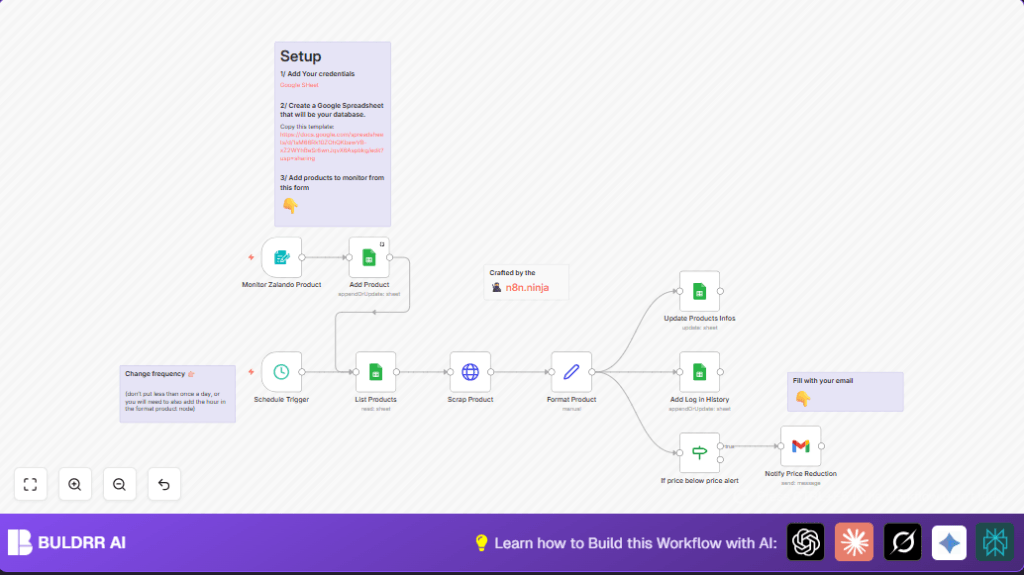
This n8n workflow tracks prices for Zalando products and sends email alerts when prices fall below your set threshold.
It solves the problem of checking prices manually every day and missing deals.
The system updates your Google Sheet with latest prices and keeps a price history log.
You get notified automatically by email if a product’s price drops enough.
It runs on a schedule so you don’t need to watch prices constantly.
The workflow gets product URLs and alert prices from a form.
It fetches data by scraping Zalando product pages.
Then it extracts name and price using JavaScript code.
Google Sheets is updated to reflect current prices.
If the price is below alert, an email is sent.
Who Should Use This Workflow
This workflow is for online shoppers who want to save time tracking Zalando prices.
It is especially useful for people who check many products and want automatic alerts.
No coding skills are needed to use it once setup is done.
You need a Google Sheets account and Gmail.
Also, having URLs and alert prices ready helps start faster.
This helps avoid missed sales and manual checking.
Tools & Services Used
- n8n: Orchestrates workflow automation.
- Google Sheets API: Stores product data and price history.
- Gmail API: Sends price alert notifications.
- Zalando product pages: Data source for prices and names.
Beginner Step-by-Step: How to Use This Workflow in n8n
Download and Import Workflow
- Click the Download button on this page to get the workflow file.
- Open n8n editor and select “Import from File”.
- Upload the downloaded workflow JSON.
Configure Credentials
- Go to n8n Settings → Credentials.
- Add Google Sheets OAuth2 credentials that allow editing your sheet.
- Add Gmail OAuth2 credentials authorized for sending emails.
Update Workflow Parameters
- Open Google Sheets nodes and update Sheet IDs if needed.
- In the Gmail node, change recipient address to your email.
- Verify the web form URL on the Webhook node for product entry.
Test the Workflow
- Fill the web form with a Zalando URL and alert price to add a product.
- Run the workflow manually or trigger schedule to scrape prices.
- Check Google Sheets for product update and price history.
- Confirm email is received if price is below alert.
Activate for Production
- Enable the workflow trigger nodes so it runs on schedule.
- Make sure credentials stay valid and monitor errors in dashboard.
- Optionally, review logs for smooth execution.
If self hosting n8n, consider resources and use self-host n8n resources.
Workflow Inputs, Processing & Outputs
Inputs
- Product links and price alert values via web form.
- Google Sheets as product database and price log storage.
Processing Steps
- Schedule Trigger runs the workflow periodically.
- HTTP Request node fetches the raw HTML for each product URL.
- Format Product node uses JavaScript expressions to extract product name and current price.
- Google Sheets nodes update current product info and append price history.
- If node compares current price with alert price.
- Gmail node sends notification email if alert condition met.
Outputs
- Updated Google Sheets with latest prices and product info.
- Logged historical price data for trend tracking.
- Email alerts sent when prices drop below user-set thresholds.
Extracted JavaScript for Price and Name
The Format Product node uses JavaScript expressions to parse HTML.
It finds price and name by splitting strings on known HTML fragments.
price = parseFloat($json.data.split('"twitter:data1" content="')[1].split('"')[0].split(' ')[1])
name = $json.data.split('')[0].split('-')[0] + ' ' + $json.data.split('')[0].split('-')[1] + ' ' + $json.data.split('')[0].split('-')[2]
This code grabs the product price as a number and creates the product name by joining parts from the page title.
Adjust this code if Zalando changes HTML structure.
Customization Ideas
- Change recipient email in the Notify Price Reduction Gmail node.
- Modify JavaScript expressions in Format Product node to adapt parsing.
- Update Schedule Trigger to run checks more or less often.
- Add new columns to Google Sheets and extract more details like availability.
Common Issues and Fixes
No data found after HTTP request
Zalando page structure may have changed or disables requests without headers.
Add User-Agent headers in the Scrap Product HTTP Request node.
Google Sheets quota exceeded
Too many API requests cause limits to block operations.
Reduce how often the workflow runs and combine write steps if possible.
Pre-Production Checklist
- Verify that Google Sheets OAuth2 credentials have permission.
- Add products via the web form, confirm they appear correctly.
- Run schedule trigger manually and check logs for successful scraping.
- Simulate price drops to test email notifications.
Deployment Guide
Turn on the workflow triggers inside n8n to run automatically.
Keep credentials safe and monitor workflow execution in dashboard.
Use error notifications and logging for ongoing monitoring.
Summary
✓ Saves time by automating price tracking of Zalando products.
✓ Sends email alerts when prices drop below custom set alerts.
✓ Keeps Google Sheets updated with current price data.
✓ Logs price history for trend analysis.
→ Workflow runs on schedule without manual checks.
→ Alerts help never miss good deals.
→ Easy to customize notification and scraping.
