
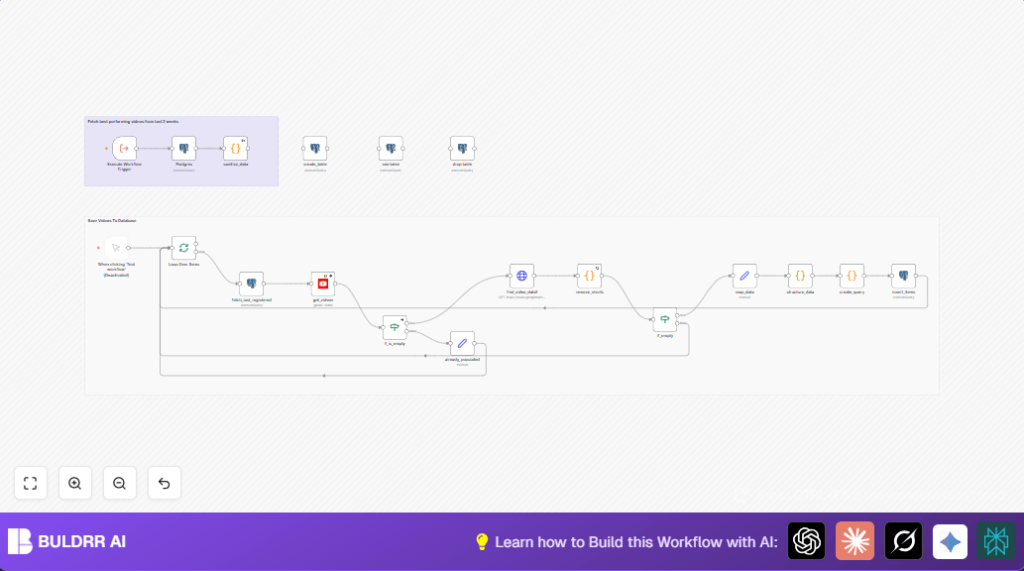

What This Automation Does ⚙️
This workflow helps you pull new videos from many YouTube channels automatically.
It skips very short videos under 3.5 minutes, so you get only full-length content.
You compare new video views to the usual average views of each channel.
Videos published in the last two weeks with more views than normal get saved into a PostgreSQL database.
This makes finding important trending videos easy without manual work.
Beginner Step-by-Step: How to Use This Workflow in n8n
Step 1: Import Workflow
- Download the workflow using the Download button on this page.
- Go to the n8n editor where you want to run the workflow.
- Use the “Import from File” option to load the downloaded workflow.
Step 2: Configure Credentials and Variables
- Add your Google API credentials into the YouTube node.
- Add your PostgreSQL database credentials into the Postgres nodes.
- Update YouTube channel IDs, database table names, or any emails if needed.
Step 3: Test and Activate
- Run the workflow manually once to check if it works right.
- Look for any errors or missing data.
- Activate the workflow for automatic running when ready.
If you want more control, consider self-host n8n to run on your own server.
Inputs, Processing, and Outputs
Inputs
- YouTube API with channel IDs and API key: For fetching recent video data.
- PostgreSQL database: For storing video stats and checking last stored publish times.
Processing Steps
- Use SplitInBatches node to handle each YouTube channel one by one.
- Query PostgreSQL to find the latest video publish time for that channel.
- Call the YouTube API to get videos published after that time or within last 3 months.
- Request video details (duration and stats) via an HTTP Request node.
- Use a Code node to skip videos shorter than 3.5 minutes (YouTube Shorts).
- If videos remain, map and format their data with Set nodes.
- Build a dynamic SQL Insert query to add new video stats to the PostgreSQL table.
- Insert the data using a Postgres node.
- Run a SQL query to find videos from last 14 days that have double the average views and good engagement.
Outputs
- Stored video statistics include views, likes, comments, publish times, and channel IDs.
- A list of top-performing recent videos ready for team review.
Why Build This Workflow
You save around 5 hours each week from manual searching and data copying.
It prevents mistakes that happen when copying data by hand.
The workflow keeps the database up to date with only new videos.
It points out videos that are doing much better than usual.
This quickens your response to trends and helps make better content plans.
Customization Ideas ✏️
- Change the 14-day filter in the SQL query to any timeframe wanted.
- Add more video details like tags or description by adjusting API calls and database.
- Process multiple channels at the same time by changing the batch size but watch API limits.
Troubleshooting ????
- Empty Video List from YouTube API
Check the date formats in PostgreSQL and in YouTube API filter.
Add buffer hours if needed to avoid missing videos due to timezone differences. - Duplicate Key Errors on Database Insert
Video IDs may already exist.
Use UPSERT (ON CONFLICT) logic or clear entries before insert if duplicates are not allowed.
Pre-Production Checklist ✅
- Have a valid Google API Key and OAuth2 credentials with YouTube Data API permissions.
- Make sure PostgreSQL connection works and table
video_statisticsis ready. - Run manual tests on small channel sets to verify workflow parts.
- Plan API quota usage carefully to avoid hitting limits.
Deployment Guide
Turn the workflow on in n8n by activating it.
Set a schedule for how often it runs (daily, weekly, or manual).
Watch logs regularly for errors.
Keep backups of the database and archive old data to keep performance smooth.
Tools and Services Used
- YouTube Data API v3: Fetches video metadata and statistics.
- PostgreSQL Database: Stores video info and calculates averages.
- n8n Automation platform: Runs and connects all parts.
Summary
✓ Automatically pulls new videos from many YouTube channels.
✓ Skips short videos to focus on meaningful content.
✓ Finds videos from last two weeks with higher views than normal.
✓ Saves detailed video statistics to PostgreSQL database.
✓ Saves you about 5 hours weekly and reduces errors.
✓ Makes it easier to spot trends and make fast decisions.
