
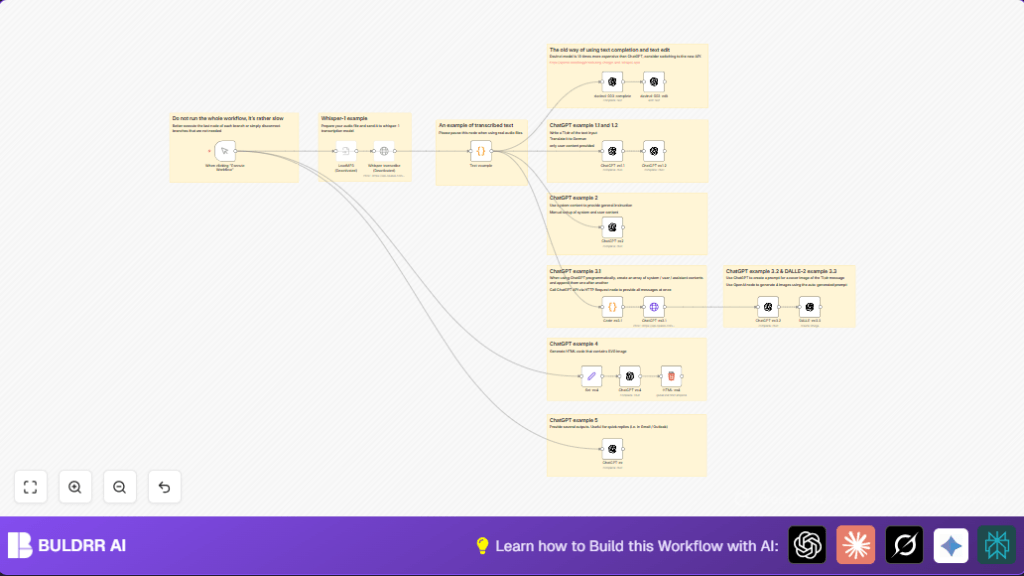

What this workflow does
This workflow uses OpenAI models in n8n to save time by automating content tasks.
It solves the problem of spending many hours manually summarizing, translating, transcribing, and creating images.
The result is quick summaries, accurate translations, transcribed audio text, and creative blog cover images.
Who should use this workflow
This workflow fits people managing digital content.
Anyone who wants to reduce manual work with AI for text and images benefits from it.
It helps even if English is not your first language, as prompts and outputs are clear and simple.
Tools and services used
- n8n Automation Platform: Runs the workflow and connects nodes.
- OpenAI API: Access to Davinci 003, ChatGPT, Whisper, and DALLE-2 models.
- JavaScript Code Nodes: Prepare data and customize prompts.
- HTTP Request Node: Calls ChatGPT API directly for flexible messaging.
- SVG graphics: Generated by GPT for extra creative outputs.
- Optional Audio Files: For Whisper transcription (disabled unless needed).
Workflow Inputs, Processing, and Outputs
Inputs
- User triggers workflow manually in n8n
- Sample text is provided by Code node
- Optional audio file input for transcription if enabled
Processing Steps
- Davinci 003 node summarizes text with a TL;DR prompt
- ChatGPT nodes create summaries, add emojis, and translate text
- Davinci Edit node translates original text to German
- Optional Whisper transcription converts audio to text for later steps
- JavaScript Code node formats messages for ChatGPT HTTP calls
- ChatGPT generates image prompts for DALLE-2
- DALLE-2 image node creates 4 comic-style images from the prompt
- Set and ChatGPT nodes create colorful SVG HTML images
Outputs
- Text summaries in English and German
- Translated text versions
- Transcribed text from audio if used
- Four comic-style AI-generated cover images
- HTML SVG code displaying colorful shapes
Beginner step-by-step: How to build this workflow in n8n for production
Download and Import
- Use the Download button on this page to save the workflow file to your computer.
- In the n8n editor, click on the menu and choose “Import from File”.
- Select the downloaded workflow file to load it into your workspace.
Configure Credentials and Settings
- Add your OpenAI API Key in n8n credentials to allow API calls.
- Check any node requiring IDs, emails, or channels and update them if you use integrations requiring customization.
- If the workflow contains Code or Prompt texts, you can copy or edit them directly if needed.
- Enable the Whisper transcription nodes only if you have audio files and API quota to use.
Test and Activate Workflow
- Run the workflow using the Manual Trigger node by clicking “Execute Workflow”.
- Check the output of each node for expected results.
- Fix any errors by reviewing the error messages and credentials.
- Once satisfied, activate the workflow by toggling it ON in n8n for ongoing production use.
Customizations and Ideas
- Change any OpenAI model or temperature to make responses more creative or focused
- Add more language translations by copying the translation nodes and changing prompts
- Enable Whisper transcription by adding your audio files and API quota
- Adjust the number of emojis in the ChatGPT node for more or less expressive summaries
- Modify the image style prompt for different art styles like watercolor or modern art
- Use self-host n8n to keep all this on your own server and protect your data
Edge cases and troubleshooting
- 401 Unauthorized errors: Means API Key is missing or invalid. Update credentials in n8n.
- ChatGPT outputs cut off: Increase max tokens in OpenAI nodes for longer replies.
- Audio transcription fails: Check MP3 file path and format before using Whisper node.
- HTTP Request JSON errors: Verify all JSON bodies and prompt formatting in HTTP Request nodes.
Summary of what this workflow delivers
✓ Saves hours on content processing tasks
✓ Creates summaries, translations, and transcripts easily
✓ Generates comic style images for blog covers automatically
✓ Produces colorful SVG graphics for more creative use
→ Reduces manual work and errors
→ Increases productivity for content managers
