

Pain Point: Writing a Hook That Stops the Scroll
The hardest part of any Twitter thread isn’t the content —
it’s Tweet 1. The hook. The first line someone sees before
they decide whether to click “read more” or keep scrolling.
Most thread generators ignore this entirely and produce
generic openers like “Here’s everything you need to know
about X — a thread ????”
This workflow’s AI agent is prompted to write hooks that
perform. The system prompt enforces:
→ No generic thread intros (“a thread ????” as the full opener)
→ Lead with the payoff — what will the reader gain?
→ Use tension, contrast, or a counterintuitive statement
→ Keep Tweet 1 under 180 characters for maximum impact
Examples of hooks the AI generates vs what to avoid:
❌ Weak: “Here’s everything about content repurposing. ????”
✅ Strong: “I repurposed 1 blog post into 47 pieces of content
in 2 hours. Here’s the exact system:”
❌ Weak: “AI tools are changing marketing. A thread.”
✅ Strong: “Most marketers are using AI wrong. They automate
output. The smart ones automate research. Big difference:”
To customize the hook style — edit the system prompt in
the Agente X node and add your preferred hook formula
or personal examples.
What this workflow does
Writing Twitter threads manually is the bottleneck every
content creator hits. The idea is there. The content exists.
But turning a blog post, YouTube video, or rough idea into
8–12 punchy connected tweets takes an hour minimum — every
single time.
This workflow is an AI thread generator. Give it any input
and it produces a complete, posted Twitter/X thread automatically.
It works with:
→ Blog posts — paste the URL or content and the AI
extracts the key insights, restructures them as tweets,
and posts the thread
→ YouTube videos— describe the video topic or paste
a summary and the AI turns it into a thread that drives
viewers back to the video
→ Articles — drop in any article text and get a thread
version ready to post in seconds
→ Raw ideas — type a topic or a single sentence and
the AI expands it into a full, connected thread
The AI writes each tweet under 270 characters, links them
as replies automatically, and posts the complete thread to
Twitter/X without any manual publishing.
Who should use this workflow
Any content creator who wants to save time making Twitter threads.
It helps people who want easy and natural tweets without writing every message themselves.
Also good for those who want regular posts but struggle with tone or flow in tweets.
Tools and services used
- n8n: Workflow automation tool to connect parts.
- OpenAI GPT-4o: AI language model to create tweets.
- Twitter API: To post tweets and threads.
- Simple Memory node: Keeps track of conversation for tweet context.
- Langchain nodes: Integrate AI and Twitter in n8n.
Inputs, processing, and output
Inputs
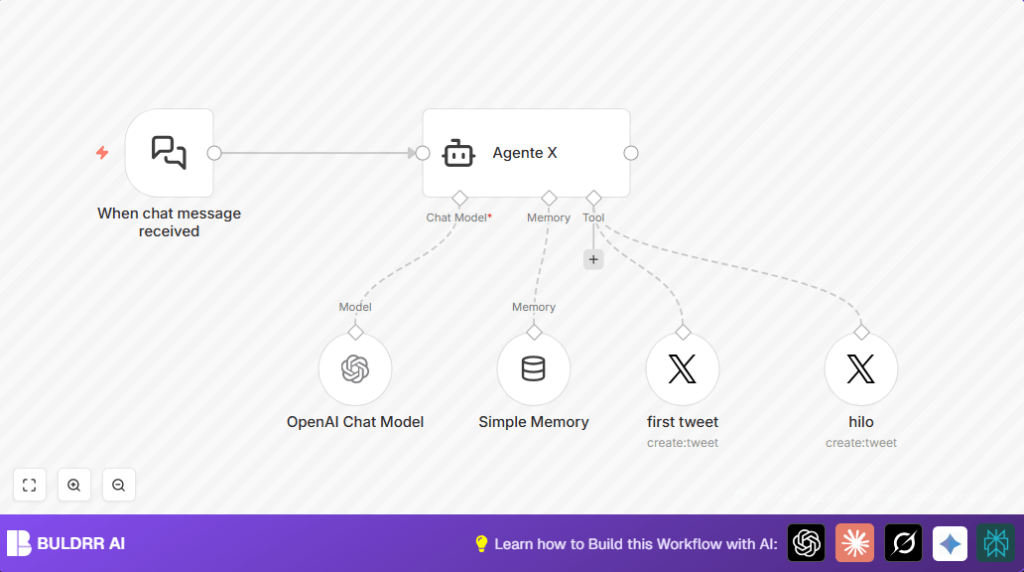
The flow starts when a chat message arrives at the When chat message received node.
This message contains the topic or idea for the Twitter thread.
Processing steps
- The Agente X node gets a system prompt to act like a friendly Twitter writer.
- The OpenAI Chat Model node (GPT-4o) creates tweets based on the prompt.
- The Simple Memory node stores previous tweets so the thread stays connected.
- The Twitter Tool nodes post tweets: one for the first tweet, another for replies.
Output
The final output is a posted Twitter thread.
It has tweets less than 270 characters each.
The tweets reply to each other to form a seamless narrative thread.
Beginner step-by-step: How to build this in n8n
Import the workflow
- Inside the n8n editor, use the “Import from File” option.
- Select the workflow file downloaded from this page.
Configure credentials
- Add your OpenAI API Key in n8n credential manager.
- Add Twitter API OAuth tokens with proper permission to post tweets and reply.
- Make sure all Langchain node credentials are linked to OpenAI and Twitter.
Adjust settings if needed
- Update any Twitter account IDs in the Twitter nodes if required.
- You can also change email, channels, or table IDs if you customized other parts.
- Paste provided system prompt into the Agente X node prompt field if needed.
Test the workflow
- Send a test chat message to the When chat message received webhook URL.
- Check if tweets post on Twitter as a thread.
Activate for production use
- Switch the workflow from draft to active status.
- Now every new chat message triggers creation of a Twitter thread.
Consider using self-host n8n for more control and security.
What to Send as Your Thread Input — Quick Reference
The workflow triggers from a chat message. Here’s exactly
what to send for each input type to get the best output:
From a Blog Post:
“Turn this into a Twitter thread: [paste blog post text
or key sections here]. Make it 8 tweets, hook first,
practical takeaways throughout.”
From a YouTube Video:
“Create a Twitter thread about this video topic:
. Drive readers
to watch the full video at the end.”
From an Article:
“Thread this article: [paste article text].
Extract the 3 most surprising insights and lead with
the most counterintuitive one as the hook.”
From a Raw Idea:
“Write a Twitter thread about [topic].
Target audience: [who]. Tone: [casual/authoritative/conversational].
Length: 8–10 tweets.”
The more context you give the AI, the better the thread.
Paste real content rather than just a topic name wherever possible.
Customizations
- Change max tweet length in the agent system prompt by editing the character limit.
- Modify the tone in the system prompt for formal, fun, or different styles.
- Add extra tools like Google Sheets or Gmail in the workflow for logging or notifications.
- Increase the Simple Memory node window size to hold longer context.
- Use delay or scheduling nodes to space tweets over time instead of instant posting.
Common problems and fixes
Problem: Webhook does not trigger
Cause is wrong webhook URL or inactive workflow.
Solution is check URL, enable webhook, activate workflow.
Problem: Tweets do not reply to each other
Cause is missing inReplyToStatusId in the “hilo” Twitter node.
Solution is set inReplyToStatusId with expression:
="={{ $fromAI('Reply_to_Tweet', `Debes hacer reply justo al tweet anterior`, 'string') }}"This must be exact for threads to link.
Problem: OpenAI API quota exceeded
Caused by too many requests or large model use.
Solution is check usage in OpenAI dashboard and reduce model or limit calls.
Pre-production checklist
- Test webhook URL with sample chat messages.
- Make sure AI agent writes clear, connected tweets.
- Verify Twitter OAuth credentials can post and reply.
- Check that replies use the right
inReplyToStatusId. - Back up the workflow file before big changes.
Deployment and monitoring
Activate workflow to run live after testing.
Share webhook URL for allowed users to trigger threads.
Watch for posted threads on Twitter and errors in n8n logs.
Adjust keys or node parameters when needed.
Summary of benefits and outcomes
✓ Saves many content creation hours weekly.
✓ Tweets have natural, personal style under 270 characters.
✓ Creates connected Twitter threads that invite interaction.
→ New Twitter threads post automatically from chat messages.
→ Workflow helps increase engagement and follower growth.
