

What this workflow does
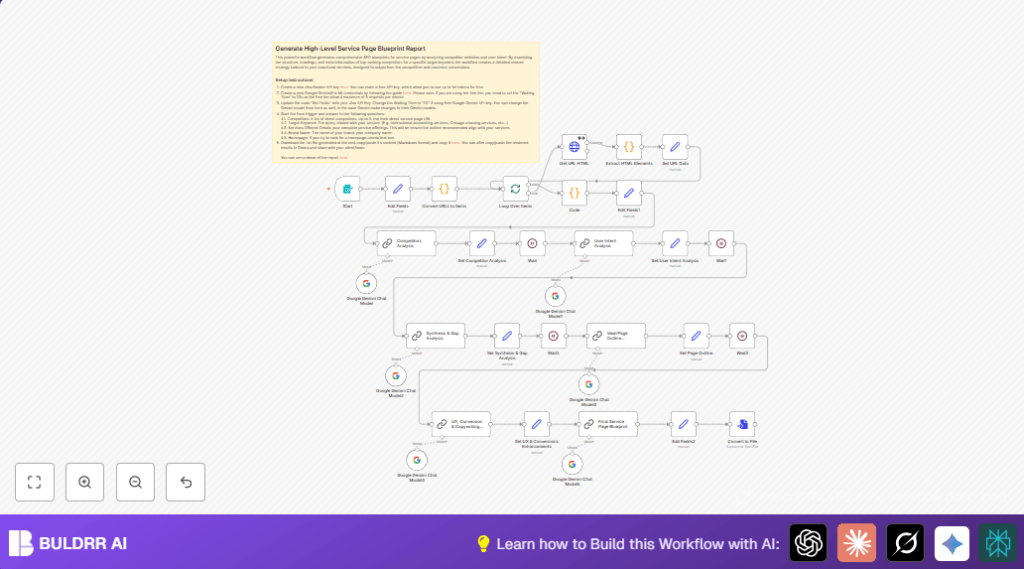
This workflow helps the user analyze up to 5 competitor service pages.
It grabs HTML headings, meta tags, and schema info from those pages.
Then it uses Google Gemini AI to make a full report comparing competitors and finding SEO patterns.
It also checks what users want with the target keyword.
Finally, it creates a clear SEO plan for a service page that can get more visitors and convert better.
The main problem fixed here is saving time and avoiding mistakes in manual competitor analysis.
The user gets a ready-to-use content blueprint with SEO and marketing tips.
Who should use this workflow
Anyone making service pages for websites and wanting to do SEO smarter can use this.
It fits digital marketers, content creators, and SEO teams.
No coding skills are needed, but some n8n knowledge helps.
The workflow works best for service or homepage SEO projects.
Tools and services used
- n8n automation platform: Runs the whole workflow.
- Jina Reader API: Scrapes and reads the competitors’ live HTML pages.
- Google Gemini AI (PaLM): Analyzes SEO data, user intent and generates content outlines and copy.
- HTTP Request node: Sends competitor URLs to Jina Reader.
- Code nodes: Process HTML and combine data.
- Form Trigger node: Accepts user inputs like URLs, keyword, brand name.
Inputs, Processing steps and Outputs
Inputs
- Up to 5 competitor service page URLs.
- Target SEO keyword.
- List of services offered.
- Brand name of the user.
- Page type indication (homepage or service page).
Processing Steps
- Split competitor URLs into separate items.
- Loop over each URL to fetch and scrape full HTML content using Jina Reader.
- Extract heading tags (H1-H6), meta tags, and JSON-LD schema from HTML.
- Count popular phrase patterns (2-grams to 4-grams) inside headings.
- Package competitor data in XML-like format for AI processing.
- Use Google Gemini AI to analyze competitor SEO structures and trends.
- Analyze user intent purely from the target keyword with Google Gemini.
- Combine competitor info and intent analysis to spot content gaps.
- Generate a recommended SEO-friendly page outline (H1-H4 headings).
- Produce tailored UX copywriting and conversion advice with AI.
- Compile a full markdown blueprint summarizing all findings and recommendations.
Output
- A detailed SEO blueprint markdown file.
- This file includes headings, meta summaries, UX copy tips, calls-to-action, and trust signals.
- User can download and share the file with their content or client teams.
Beginner step-by-step: How to use this workflow in n8n
1. Import the workflow
- Download the workflow file with the Download button on this page.
- Inside the n8n editor, choose “Import from File” in the menu.
- Select the downloaded workflow file to load it.
2. Configure credentials
- Open Credentials section in n8n.
- Add your Jina Reader API key.
- Add Google Gemini (PaLM) API credentials as per n8n GoogleAI instructions.
- Make sure API Keys have correct permissions and are active.
3. Adjust workflow details
- Review the formTrigger node fields.
- Add or edit any IDs, emails, or channels if the workflow uses external services.
- Check prompt texts or URLs if customized input is needed, copy-paste as is if from this guide.
4. Test and activate
- Run the workflow once manually or submit the form to test.
- Confirm all nodes complete without errors and output data as expected.
- Turn on the workflow live to make it ready for production runs.
If running multiple requests or heavy use, consider using self-host n8n for better control.
Edge cases and failures to watch
Sometimes the Jina Reader API calls fail because of wrong API key or too many requests.
Make sure the API key is correct and try adding delays or retries in the workflow if needed.
If Google Gemini AI nodes return no text or errors, check the Google PaLM API credentials and usage limits.
Increase delay time to avoid hitting quota limits if on a free tier.
If the heading or meta extraction shows empty or weird data, the competitor page might have special JavaScript or unusual HTML.
Check URLs manually and consider removing those causing issues.
Customization ideas
- Change the Google Gemini model or temperature to tweak creativity versus precision.
- Add more input fields to the formTrigger like location or page type filters.
- Modify the Extract HTML Elements code node to catch extra SEO details, like internal links or advanced schema types.
- Tweak final AI prompts to better reflect brand voice and style preferences.
- Control waiting time in delay nodes to manage API rate limits.
Summary and Outcome
✓ Saves many hours doing competitor SEO data gathering by hand.
✓ Gives a complete, clear, and actionable SEO content blueprint.
✓ Helps create service pages that target user intent and convert better.
✓ Reduces errors and missed SEO chances.
✓ Makes it easy to share structured plans with clients or teams.
→ The user works faster, smarter, and produces better SEO pages with less guesswork.
