

What this workflow does
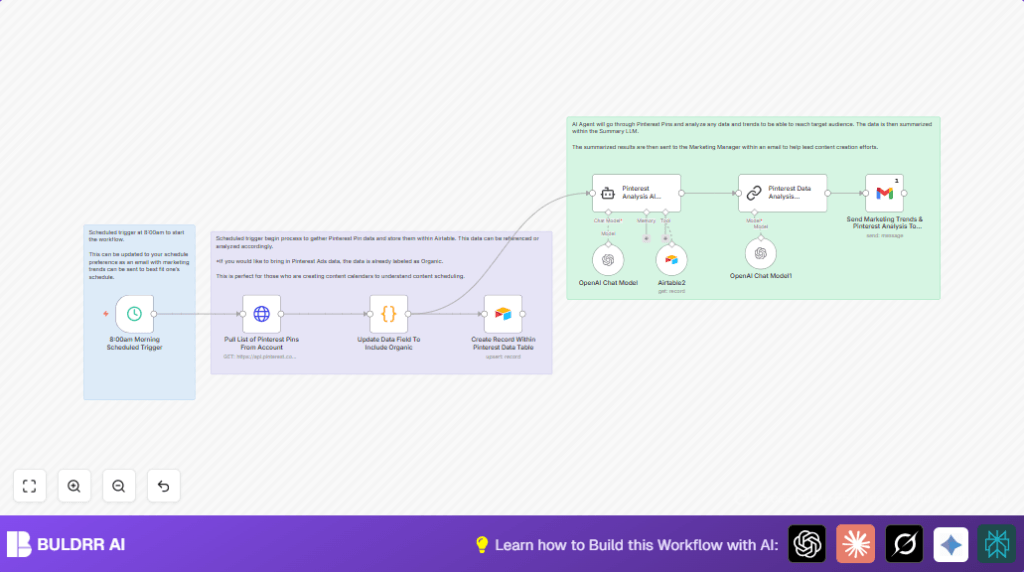
This n8n workflow pulls organic Pinterest pin data automatically using the Pinterest API. It cleans and tags the data, stores it in Airtable, and then uses AI to find trends and content ideas. Finally, it sends an email report with suggestions to help plan new pins easier and faster.
The problem solved is saving marketers many hours of manual work and giving faster, clear insights to improve Pinterest content strategy. This makes content decisions smarter and less guesswork.
Tools and services used
- n8n: Workflow automation platform to connect all steps.
- Pinterest API: Source of organic pin data.
- Code node in n8n: Processes raw pin data.
- Airtable: Stores and manages pin records.
- OpenAI GPT-4o-mini model: Analyzes pin data and suggests content ideas.
- Gmail with OAuth2: Sends summary emails to marketing staff.
How the workflow works: Inputs, process, and outputs
Inputs
- Automatically scheduled trigger every week.
- Authorized API request to Pinterest to get organic pins.
- OpenAI API key to access GPT-4o-mini.
- Airtable base setup for pin data storage.
- Gmail account credentials for sending results.
Processing steps
- Fetch Pinterest pins: Using HTTP Request node with authorization.
- Transform data: Using JavaScript in a Code node to pick needed fields and tag as “Organic”.
- Upsert to Airtable: Create or update pin records for easier management.
- AI analysis: Langchain Agent with GPT-4o-mini reviews pin data for trends and new content suggestions.
- Summarization: Langchain Chain Summarization makes a short, clear report.
- Email results: Gmail node sends the summary to the marketing manager.
Outputs
- Airtable base updated with fresh organic pin information.
- Summary email with AI-powered trends and content ideas sent to the marketing team.
Who should use this workflow
This workflow is best for social media marketers or content teams managing Pinterest accounts. It helps if manual data handling wastes many hours or causes errors. The user benefits by getting quick AI insights for better pin content strategies. Beginners who want automation without coding effort also find it useful.
Beginner step-by-step: How to use this workflow in n8n
Step 1 – Import the workflow
- Download the provided workflow file using the Download button on this page.
- Open your n8n editor and click on “Import from File”.
- Select the downloaded workflow file to load it inside n8n.
Step 2 – Configure credentials and settings
- Add your Pinterest API Key in the HTTP Request node under headers.
- Connect your Airtable account in the Airtable node and update your base and table IDs if needed.
- Set your OpenAI API key in the Langchain Agent node to use GPT-4o-mini.
- Set your Gmail account OAuth2 credentials in the Gmail node.
- Change the email recipient address to your marketing email.
Step 3 – Check and update code or prompts if needed
- Verify or paste this JavaScript code into the Code node to shape the Pinterest data:
// Initialize an array to hold the output formatted for Airtable
const outputItems = [];

for (const item of $input.all()) {
  if (item.json.items && Array.isArray(item.json.items)) {
    for (const subItem of item.json.items) {
      outputItems.push({
        id: subItem.id || null,
        created_at: subItem.created_at || null,
        title: subItem.title || null,
        description: subItem.description || null,
        link: subItem.link || null,
        type: "Organic"
      });
    }
  }
}

return outputItems;
- Make sure the Langchain Agent prompt contains this text for AI analysis:
You are a data analysis expert. You will pull data from the table and provide any information in regards to trends in the data.
Your output should be suggestions of new pins that we can post to reach the target audiences.
Analyze the data and just summary of the pin suggestions that the team should build.
- Ensure the Langchain Chain Summarization node has this prompt:
Write a concise summary of the following:
"{{ $json.output }}"
CONCISE SUMMARY:
Step 4 – Test and activate
- Run the workflow once manually inside n8n to make sure every node works and data flows as expected.
- Check Airtable if pin data appears and verify the marketing email received the summary.
- If all works, toggle the workflow to Active to run on schedule every week.
- Monitor logs for errors and adjust configuration as needed.
Customization ideas
- Change the Schedule Trigger interval to daily or monthly to get data more or less often.
- Modify the Code node to tag ad pins separately (e.g., “Ads”) if pulling paid pin data.
- Switch AI model in Langchain nodes to higher versions like GPT-4 or lighter ones like GPT-3.5 based on budget and needs.
- Add multiple recipients in the Gmail node or substitute it with a Slack node to send summaries to a team channel.
Troubleshooting common problems
- 401 Unauthorized when calling Pinterest API means API Key is invalid or expired. Renew key and update in HTTP Request node.
- Airtable upsert fails means API credentials or field mappings are wrong. Check Airtable token and field names.
- AI returns empty or wrong suggestions generally caused by incomplete prompt or missing data inputs. Refine prompt text and ensure data is passed correctly to Langchain nodes.
Pre-production checklist
- Confirm all API keys for Pinterest, Airtable, OpenAI, and Gmail are valid and set in n8n.
- Test the HTTP Request node separately to see if Pinterest data is fetched.
- Check the data output after the Code node to make sure data is organized as needed.
- Send a test email from the Gmail node.
- Verify AI nodes generate useful summaries and suggestions with sample data.
- Backup Airtable data before running full workflow to avoid data loss during tests.
Deploying the workflow
After testing successfully, switch the workflow to Active to run automatically on schedule. Check the execution logs in the n8n editor if any failures occur. Troubleshoot nodes like HTTP Request and AI nodes first.
For more control or security, consider self-host n8n on your server.
Summary of benefits and results
✓ Automates weekly Pinterest data collection saving hours of manual work.
✓ Cleans and organizes pin data into Airtable for easy tracking.
✓ Uses AI analysis for real trends and audience insights.
✓ Generates clear, concise content suggestions for marketing.
✓ Sends timely email reports to guide content planning.
→ Better content ideas faster with less effort.
→ More accurate Pinterest metrics improving decision-making.
