
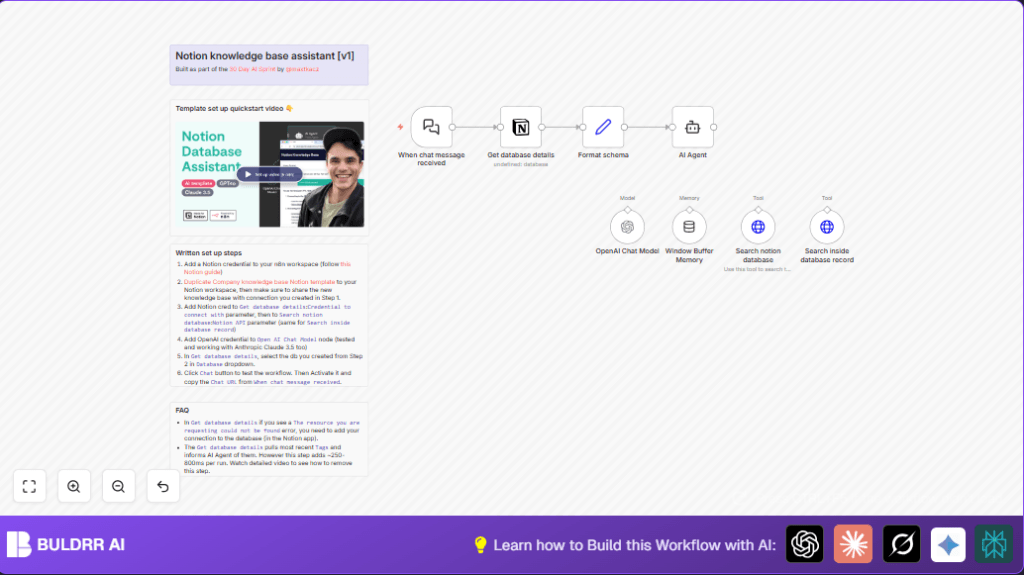

What this workflow does
This workflow helps you find exact answers fast from a Notion knowledge base right inside a chat window.
It solves the problem of slow and hard manual searches in Notion.
When a message comes in, it looks up related info in the Notion database and replies with clear, short answers plus links.
This saves time and gives correct results every time.
This automation uses AI to read and sort questions. It calls Notion API to search pages by keywords and tags.
Then it gathers content from matched pages to give detailed but easy summaries in chat.
Memory keeps track of past messages so answers stay on topic.
Who should use this workflow
This is good for knowledge managers, help desks, or teams with lots of info in Notion.
If people ask the same questions over and over, this stops repeated searching.
Anyone needing quick, accurate answers from a Notion database will find it useful.
Tools and services used
- Notion API: To read and search the knowledge base database.
- OpenAI GPT-4o model: To understand chat messages and generate clear answers.
- n8n Automation Platform: To run and connect API calls in a workflow.
- LangChain nodes: For chat triggers, AI agent processing, and conversation memory.
Beginner step-by-step: How to build this in n8n
Import the workflow
- Download the workflow file using the Download button on this page.
- Inside the n8n editor, click Import from File and select the downloaded worklow.
Configure credentials and IDs
- Add your Notion API Key in Credentials, if missing.
- Add your OpenAI API Key in Credentials.
- Check and update Notion database ID in the Format schema node.
- Make sure your Notion integration token has access to the database.
Test and activate
- Run the Webhook node manually or send a test chat message.
- Verify that answers come back with text and Notion page links.
- Activate the workflow toggle to run automatically in production.
- Share the public webhook URL with your team so they can start asking questions.
For self hosting n8n, check self-host n8n resources.
Inputs, processing steps, and output
Inputs
- User chat messages come through the LangChain chat trigger node.
- Notion database ID and tag info fetched using Notion node.
Processing steps
- Format incoming chat input and context in Format schema node.
- Use AI Agent node to parse the question and plan Notion search.
- Use OpenAI GPT-4o Chat Model node to help AI generate answers.
- Send HTTP Requests to Notion API to search database by keyword/tag.
- Retrieve content blocks of found pages for detailed info.
- Use LangChain Window Buffer Memory node to keep a short conversation history.
Output
- Clear, short answers generated by AI.
- Direct links to matching Notion pages added to the chat reply.
- Chat replies sent back through the webhook output node.
Edge cases or failures
- If the Notion integration token can’t access the database, an error says “resource not found.”
- If no search results are found, the AI suggests trying different keywords politely.
- Restrictive tags or empty filters cause empty search results.
- Too many live database detail requests slow response by 250–800 ms.
Check credentials and sharing, adjust filters, and consider caching database details to fix.
Customization ideas
- Add more specific tag filters in the Notion search JSON body for better targeting.
- Switch the AI model to Anthropic Claude 3.5 or adjust temperature for style.
- Increase memory window size in Window Buffer Memory node for longer chats.
- Add fallback messages in AI Agent for unclear queries.
- Use different Notion databases by changing the notionID value dynamically.
Summary and results
✓ Saves two+ hours daily spent on manual Notion searches.
✓ Gives fast, clear, and consistent answers inside chat.
✓ Includes URLs to Notion pages for easy reference.
✓ Maintains context in multi-message conversations.
✓ Reduces repeated work and human errors.
✓ Easy for beginners to use by importing and configuring.