

What this automation does
This workflow automatically backs up tagged n8n workflows to a GitLab repository.
It saves time by removing manual exports and stops version mistakes.
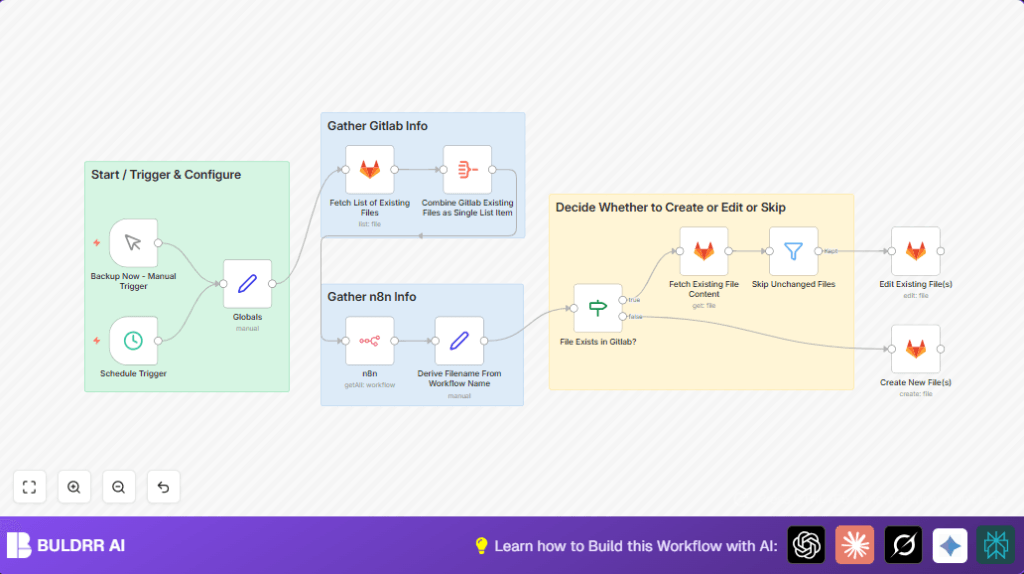
When it runs, it finds workflows with a special tag, makes sure file names are clean, checks if backups already exist on GitLab, and updates or creates files only if there are changes.
You can run backups on a schedule or by hand.
Inputs → Processing → Output Explained
Inputs
- n8n workflows tagged for backup: Only workflows with a set tag are processed.
- GitLab repository and folder: The target repo and path where backups are stored.
- Manual or scheduled trigger: To start the backup process on demand or automatically.
Processing Steps
- Load workflow list filtered by tag from n8n API.
- Clean workflow names to safe JSON file names.
- Get existing backup file list from GitLab folder.
- Check if each workflow backup file exists on GitLab.
- If exists, fetch and decode current file content.
- Compare new workflow JSON with current file content.
- Skip update if no changes; create or update file otherwise.
- Commit changes with detailed messages including timestamp and trigger type.
Output
Clean JSON backup files of active workflows are saved or updated in GitLab.
Commit history records all backups with execution info.
Who should use this workflow
This workflow helps anyone who runs many n8n workflows that must be backed up regularly.
If manual backup takes too long or backups get missed, this automation saves hours.
It also fits users who want a solid backup history and less manual work.
Tools and Services used
- n8n platform API: To list workflows and fetch details.
- GitLab API: For repository file checks, creates, and updates.
- n8n nodes: Manual Trigger, Schedule Trigger, Set, n8n, GitLab, If, Filter.
Optionally running self-host n8n helps control backup timing and security.
Beginner step-by-step: How to use this workflow in n8n
Import and Setup
- Download the workflow JSON using the Download button on this page.
- In the n8n editor, go to Import from File and upload the downloaded JSON.
- Open the imported workflow and add your API Key credentials for n8n and GitLab.
- Update key variables in the Globals node: fill in
gitlab_owner,gitlab_project,gitlab_workflow_path, andtags_to_match_for_backup. - Check if the Schedule Trigger timing fits or update the CRON expression for desired backup frequency.
Test and Activate
- Run the workflow manually using the Manual Trigger to confirm backups are created in GitLab.
- Check GitLab repository to see JSON files created or updated with correct names and content.
- If successful, activate the workflow by toggling the workflow “on” in n8n editor for production backup.
- Monitor workflow executions from n8n UI and logs to catch possible errors early.
Customization ideas
- Change backup schedule by adjusting the Schedule Trigger CRON expression.
- Back up to a different GitLab repo or folder by updating
gitlab_projectandgitlab_workflow_pathin the Globals node. - Add tags to filter for backing up multiple groups of workflows.
- Make commit messages show more info like your GitLab branch or user name.
- Skip workflows based on last change date or owner by adding filter nodes before filename processing.
Troubleshooting common issues
- No workflows found to backup: Check that the tag in Globals exactly matches tags on n8n workflows.
- GitLab API permissions error: Verify GitLab personal access token used in n8n has correct repository read/write scopes.
- Backup files don’t update when workflows change: Confirm JSON comparison runs correctly, watch for whitespace or formatting that may cause false matches.
Pre-production checklist
- Confirm GitLab token used has repo read and write access.
- Verify n8n API credentials can list workflows with tags.
- Run workflow manually to check if files create or update on GitLab as expected.
- Check logs in n8n Editor for any errors during commit or fetch nodes.
- Backup existing GitLab repo part before first automated run to be safe.
Deployment guide
After setup, turn the workflow “on” in n8n Editor.
If schedule is set, backups run automatically at cron times.
Watch execution logs and fix any API errors or token problems quickly.
Optional: Add notifications to alert a team on backup success or failure.
Summary
✓ Automates backup of selected n8n workflows to GitLab without manual exports.
✓ Saves time and avoids lost workflow changes or missed backups.
→ Produces clear, timestamped GitLab JSON files with commit history.
→ Works on manual trigger or schedule to fit user needs.
