
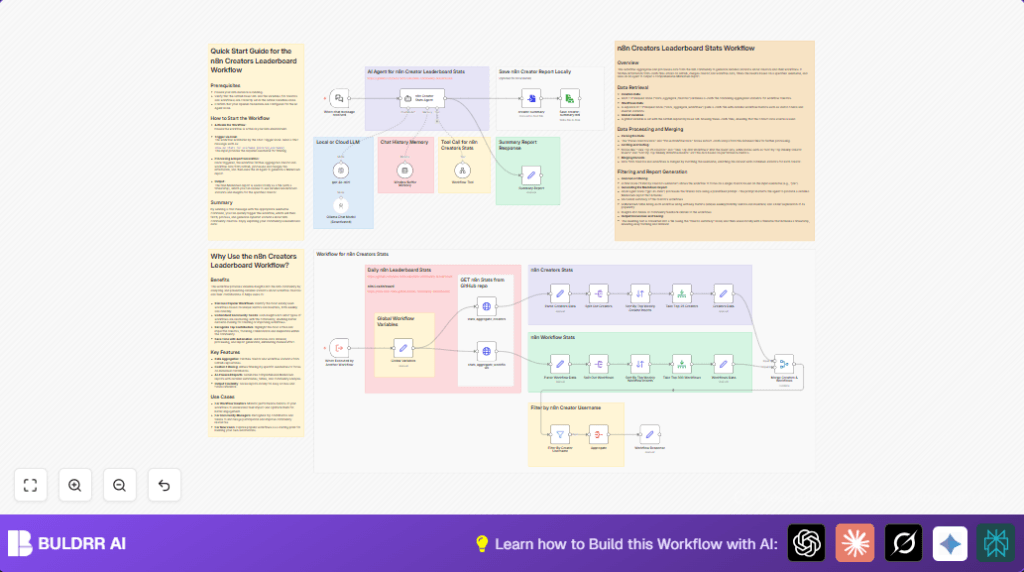

What this workflow does ????
This workflow collects data on workflow creators in the n8n community from GitHub JSON files.
It organizes and combines this data to find out who the most popular creators and workflows are.
Using AI, it makes a detailed Markdown report about one specific creator’s stats and saves the report locally.
This saves users hours of work and gives quick, correct community insights.
Who should use this workflow
This is for community managers and workflow creators who want quick reports on top contributors.
It helps those who track many JSON data lines and want automatic, error-free analysis.
It works well for users with basic n8n skills who want to reduce manual data work.
Tools and services used
- GitHub: Hosts creator and workflow JSON data files.
- OpenAI GPT-4o Mini: Generates a Markdown summary report.
- n8n automation platform: Runs and connects all nodes.
Beginner step-by-step: How to use this workflow in n8n
Download and Import
- Download the workflow file using the Download button on this page.
- Inside the n8n editor, click “Import from File” and select the downloaded workflow file.
Set Credentials and Inputs
- After import, open credentials settings and add the required API keys, including OpenAI API key.
- Update any IDs, emails, channels, folders, or filenames in the workflow nodes if the defaults don’t match your data.
- For example, check the Global Variables node and update the
path,workflows-filename, andcreators-filenamevariables if needed.
Test the Workflow
- Run the workflow manually once to confirm it fetches and processes data correctly.
- Input a valid creator username when triggered, either through a chat message or execution node.
Activate for Production
- Once tested successfully, activate the workflow in your n8n dashboard.
- Use the Webhook node or other triggers to run the workflow automatically when new stats are needed.
- If using self-host n8n, consider this self-host n8n resource for setting up stable hosting.
Inputs, Processing Steps, and Output
Inputs
- GitHub URLs pointing to JSON stats files for workflow creators and workflows.
- Username input to filter and generate personalized creator stats.
Processing Steps
- HTTP Request nodes pull raw JSON data from GitHub.
- Parsing and splitting nodes divide the data into individual creator and workflow records.
- Sorting nodes rank creators and workflows by weekly and monthly popularity metrics.
- Merge node connects creator records with their workflows by matching usernames.
- Filter node narrows down data to the specified username’s stats.
- Aggregate node combines filtered records into a single data object.
- The OpenAI GPT-4o Mini node takes this data and creates a detailed Markdown report.
- File nodes convert this report to text and save it locally with a timestamped filename.
Output
- A Markdown report file giving summary insights on the selected workflow creator.
- Report includes workflow listings, usage trends, and community impact analysis.
Common issues and fixes
HTTP Request fails
Check the URLs in the Global Variables node for typos or missing slashes.
Verify internet connection before retrying.
Merge node results empty
Make sure usernames match exactly between the data sets.
Check the merge node’s matching field and join mode settings.
AI agent creates incomplete report
Ensure the input data passed to the AI node is complete.
Try using a known username with enough data for testing.
Customization ideas
- Change the GitHub URLs in the Global Variables node to use stats from another community or fork.
- Adjust the limits in the sorting nodes to control how many top creators and workflows are included.
- Swap the OpenAI gpt-4o-mini node with other AI models or add local LLM nodes like Ollama.
- Save reports to cloud storage like Google Drive instead of locally by adding respective nodes.
- Modify the AI prompt system instructions to change report style or add new metrics and charts.
Pre-production checklist ✅
- Confirm GitHub URLs in the Global Variables node are accessible.
- Test OpenAI API credentials by running the gpt-4o-mini node with sample input.
- Trigger a test run for a valid username and verify data is pulled and processed properly.
- Check permissions on local folders for saving Markdown report files.
Deployment guide
Enable the workflow inside the n8n dashboard to have it ready for use.
Triggers like chat messages or execution nodes can start the workflow automatically.
Watch logs and runtime for errors.
Set retries on HTTP nodes to handle GitHub API limits.
If saving reports locally, plan backups of the save folder.
Summary of results
✓ Saves hours of manual time weekly
✓ Creates accurate and detailed reports
✓ Shows top workflow creators and their impact
✓ Automatically fetches and processes public community data
→ Gives managers and creators clear insights fast
