
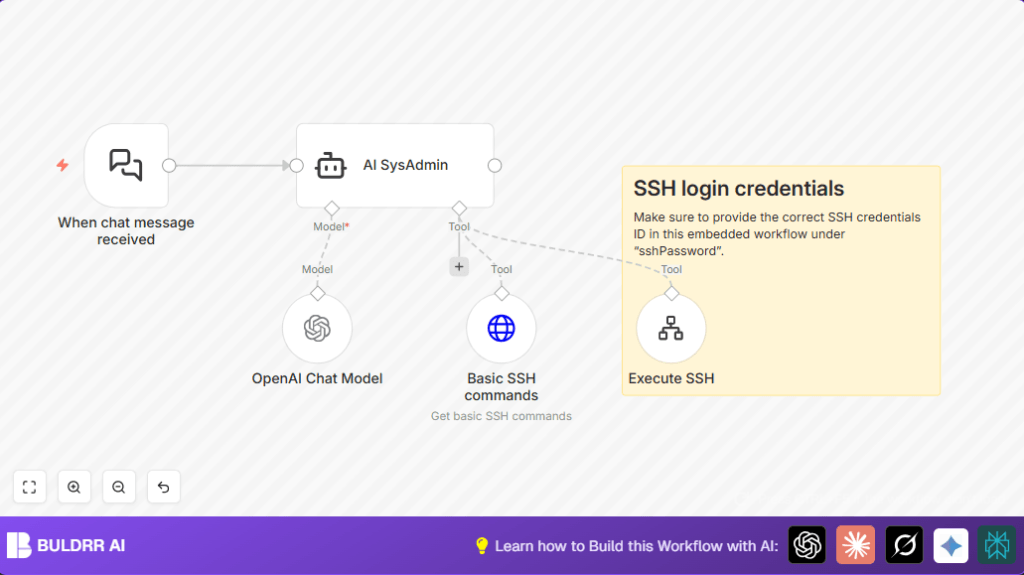

1. What This Automation Does
This workflow listens for Linux admin requests sent as chat messages.
It uses AI (GPT-4 via LangChain) to understand these requests and turn them into safe Linux commands.
The commands run directly on a remote Linux VPS through SSH for real-time execution.
Users get readable responses showing the results from their server.
It blocks risky commands, making server management safer and faster.
2. Beginner step-by-step: How to Use This Workflow in n8n
Download and Import
- In the n8n editor, click the Download button on this page to get the workflow file.
- Go back to n8n and select “Import from File” to load the workflow you downloaded.
Configure Credentials and IDs
- Open the workflow and add your OpenAI API Key in the OpenAI Chat Model node’s credentials.
- Insert your SSH username and either password or private key in the Execute SSH node’s credential fields.
- If there are any IDs like webhook ID, emails, or folders used in the chat trigger or elsewhere, update them to match your setup.
- Check the Basic SSH Commands node to confirm the URL or content references are correct. This helps AI generate commands properly.
Test the Workflow
- Send a simple Linux admin chat request to the webhook URL, for example, “Show disk space usage”.
- Watch as the AI generates a command, the SSH node runs it, and the reply reaches you.
Activate for Production
- Turn on the workflow toggle to enable it permanently.
- Use the webhook URL anytime you want to manage your Linux VPS through chat.
If you want full control or better performance hosting your automations, consider self-host n8n.
3. Tools and Services Used
- n8n: Automation platform running the workflow.
- LangChain Chat Trigger node: Receives Linux admin chat requests.
- OpenAI Chat Model node (GPT-4): Understands user input and creates commands.
- Basic SSH Commands node: Provides AI with Linux command references.
- Execute SSH workflow and node: Runs commands on the remote VPS securely.
4. Inputs, Processing, and Outputs
Input
- User sends a Linux system administration request as a chat message via webhook.
Processing
- Chat message is captured by LangChain Chat Trigger node.
- OpenAI’s GPT-4 model interprets request at OpenAI Chat Model node.
- The Basic SSH Commands node supplies AI with safe Linux commands context.
- The AI SysAdmin agent decides necessary Linux commands to run.
- Commands sent securely via SSH nodes to execute on VPS.
Output
- User receives command results converted into easy to read chat feedback.
- Destructive commands are blocked to keep the system safe.
5. Customization Ideas
- Add More Knowledge Nodes: Include more HTTP request nodes with Linux guides so AI gets richer info.
- Change AI Safety Rules: Adjust AI prompts to be stricter or more flexible on command limits.
- Expand Remote Capabilities: Add workflows that run scripts, monitoring, or backups on the VPS.
- Support Multiple Languages: Change prompts and chat nodes to handle languages other than English.
6. Common Problems and Fixes
Invalid Linux command generation
The AI misunderstood the request or lacks enough command examples.
Fix by updating the Basic SSH Commands node with clear Linux command references and improve user prompt clarity.
SSH connection issues
Could be wrong SSH credentials or firewall settings blocking access.
Check SSH username/password or keys in credentials and verify VPS firewall allows SSH connections.
Destructive commands run accidentally
Cause is missing or weak AI safety instructions.
Strengthen AI SysAdmin agent’s prompt to forbid dangerous commands like rm -rf. Test carefully before use.
7. Pre-Production Checklist
- Confirm OpenAI API Key is valid and quota allows use.
- Verify SSH credentials are correct with test connection.
- Ensure webhook URL from LangChain Chat Trigger node is active.
- Run safe Linux commands like
lsordf -hduring tests. - Backup the workflow JSON and server data before actual deployment.
8. Deployment Guide
Switch the workflow on by enabling its toggle inside n8n.
Use the webhook from the chat trigger node to send Linux admin requests.
Review logs in n8n execution history to confirm commands succeed or see errors.
Optionally, schedule tests or add logs to track server status automatically.
9. Conclusion
This workflow creates an AI assistant for Linux VPS admin via chat plus SSH.
It saves time and cuts human mistakes by converting natural language to real commands safely.
You don’t need deep Linux skills to manage servers this way.
The system gives readable feedback and blocks risky commands to protect your VPS.
Future upgrades could automate backups, monitoring, or handle many servers.
Overall, this makes Linux server management simpler and safer.
