
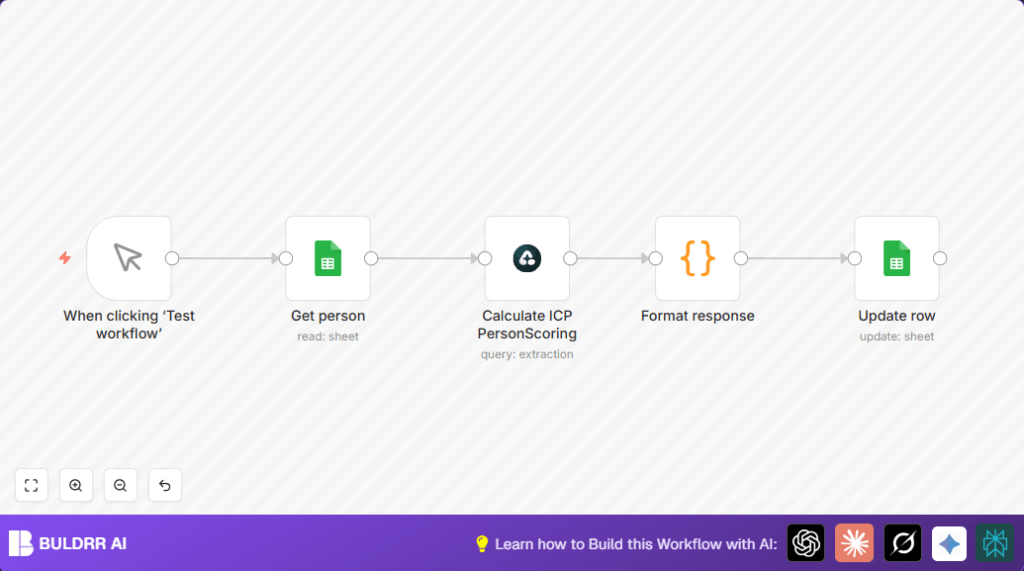

What this workflow does
This workflow reads LinkedIn profile URLs from a Google Sheet.
It sends each URL to Airtop AI, which extracts data like name, job title, company, location, and some special scores showing the person’s interest in AI and their seniority.
The workflow then calculates a score called ICP (Ideal Customer Profile) based on those details.
After that, it updates the Google Sheet with the new score for each person.
This process helps sales teams quickly find the best leads without spending hours reading profiles manually.
Who should use this workflow
This automation is good for sales managers or marketing teams who want to save time.
It works if there is a list of LinkedIn profile links in a Google Sheet needing scoring based on AI interest, seniority, and technical knowledge.
This tool makes it easier to prioritize leads who match your company’s ideal customer.
Tools and services used
- Google Sheets: Stores LinkedIn URLs and updates ICP scores.
- Airtop AI: Extracts detailed profile data and calculates scores.
- n8n: Runs the automation workflow connecting Google Sheets and Airtop AI.
Inputs, processing steps, and output
Inputs
- LinkedIn profile URLs in a Google Sheet with a row number for each entry.
- API credentials for Airtop AI and Google Sheets access.
Processing steps
- Reads each LinkedIn URL from the Google Sheet.
- Sends the URL to the Airtop AI node. The prompt requests name, job title, company, location, connections, followers, About section, AI interest level, seniority, and technical depth.
- Airtop returns the data and an ICP score calculated using weighted points for AI interest, seniority, and technical depth.
- A Code node reformats the response so it includes only row number, LinkedIn URL, and ICP score for updating the sheet.
- Updates the matching Google Sheet row with the new ICP score.
Output
The Google Sheet is updated with fresh ICP scores per LinkedIn profile, easy to see and prioritize.
Beginner step-by-step: How to build this in n8n
Step 1: Import the workflow
- Download the workflow file using the Download button on this page.
- Inside the n8n editor, click on “Import from File” and select the downloaded workflow file.
Step 2: Configure credentials and details
- Add your Google Sheets API credentials so n8n can read and update your spreadsheet.
- Provide your Airtop AI API Key in the Airtop node settings.
- Check and update your Google Spreadsheet ID and sheet/tab names if needed.
- Verify the prompt in Airtop node matches your needs, or copy the exact prompt below to maintain scoring:
{ "task": "Extract LinkedIn profile data:", "fields": ["name", "job title", "company", "location", "connections", "followers", "About section", "AI interest level", "seniority", "technical depth"], "scoring": {"AI interest": {"expert": 35, "moderate": 20, "low": 5}, "seniority": {"manager": 30, "director": 40, "VP": 50}, "technical depth": {"high": 30, "medium": 20, "low": 10}} }Step 3: Test the workflow
- Click the Manual Trigger node and run the workflow to ensure each step works without errors.
- Check your Google Sheet updates the ICP score correctly after run.
Step 4: Activate for daily use
- Keep the Manual Trigger if you want to update scores on demand.
- Or replace the Manual Trigger with a Cron node to schedule automatic runs (for example weekly).
- Activate the workflow so it runs as set.
If self hosting n8n, consider self-host n8n for more control and security.
Edge cases and common problems
- Google Sheets node can fail if Spreadsheet ID is wrong or credentials lack permissions.
- Airtop AI might return empty or wrong data if the prompt is incorrect or LinkedIn URLs are invalid.
- Code node errors happen if node or field names used do not match actual workflow data.
Verify all IDs, field names, and API credentials carefully before running.
Customization ideas
- Change scoring points inside the Airtop prompt to weigh AI interest, seniority, or technical skills differently.
- Add new fields in the Airtop prompt for education, certifications, or recent activities.
- Edit the Code node to include these new fields for updating the Google Sheet.
- Schedule the workflow run automatically using a Cron node instead of manual trigger.
Summary.
✓ Saves hours by automating LinkedIn profile analysis.
✓ Scores leads based on AI interest, seniority, and technical depth.
✓ Updates Google Sheet rows with fresh ICP scores for easy prioritization.
→ Enables sales teams to focus on the best prospects faster.
