

What This Automation Does
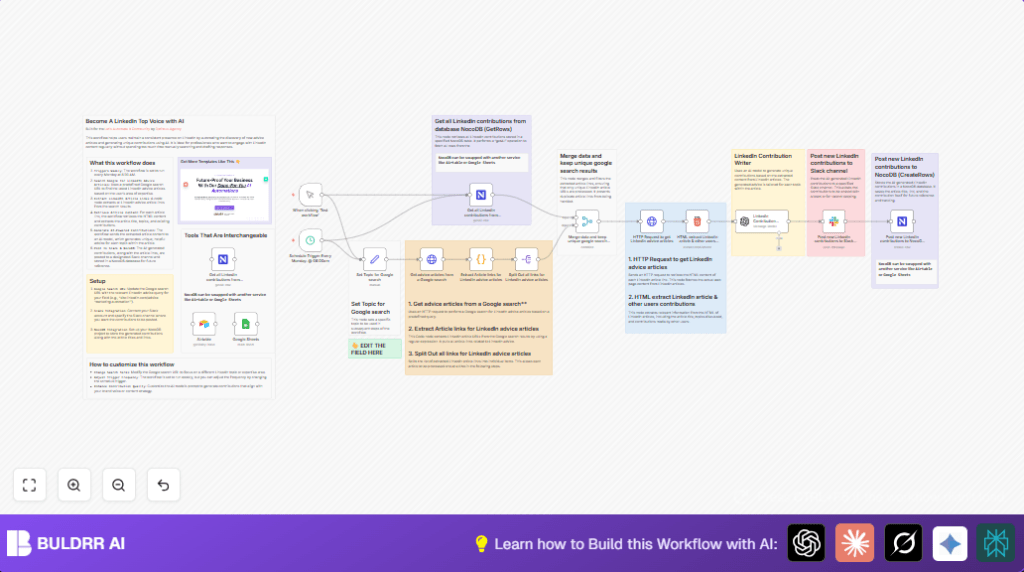
This workflow finds new LinkedIn advice articles every Monday at 8:00 AM.
It reads the articles, creates fresh, unique advice using AI, then shares posts in Slack and saves them in a database.
This saves you time and helps keep your LinkedIn presence active.
Tools and Services Used
- Google Search: To find fresh LinkedIn advice articles.
- n8n Automation Platform: Runs the workflow and connects all parts.
- OpenAI GPT-4o-mini Model: Creates unique AI-generated advice.
- NocoDB: Stores LinkedIn contributions with all details.
- Slack API: Posts contributions to team channels.
Inputs, Processing, Outputs
Inputs
- Search topic entered by user (e.g., Paid Advertising).
- Existing stored contributions from NocoDB database.
Processing Steps
- Search Google for LinkedIn advice articles matching topic.
- Extract LinkedIn article URLs using code and regex.
- Split URLs for individual processing.
- Merge new URLs with stored ones to avoid duplicates.
- Fetch HTML content from each unique article URL.
- Extract article titles, main topics, and community advice using HTML selectors.
- Use GPT-4o-mini model with prompt to generate unique advice for each topic.
- Post the AI-generated advice to a Slack channel for team visibility.
- Save advice and metadata as new rows in NocoDB for tracking.
Outputs
- Slack messages showing new AI-written LinkedIn advice.
- Database records holding advice, article info, and metadata.
Who Should Use This Workflow
Professionals wanting to keep LinkedIn profiles active without spending hours.
Users who want smart automation to find and post unique advice.
Teams needing to track and share LinkedIn engagement in Slack.
Beginner Step-by-Step: How to Use This Workflow in n8n
Importing the Workflow
- Download the workflow file using the Download button on this page.
- In the n8n editor, click “Import from File” and choose the downloaded file.
- The workflow loads into n8n, ready to use.
Configuring the Workflow
- Add required API Keys and credentials:
- OpenAI API Key for the GPT model.
- NocoDB API Key and Project/Table IDs.
- Slack OAuth token and set Slack channel ID.
- Check and update any fixed IDs, emails, channels, tables, or URLs inside nodes.
- Review the code in the Code node for link extraction.
- Confirm the prompt text in the LangChain OpenAI node; copy and paste it if needed.
Testing and Activating
- Run the Manual Trigger to test the workflow. Watch for errors or missing steps.
- Fix any issues, then activate the Schedule Trigger to run every Monday at 8:00 AM.
- Optional: Use self-host n8n options for stable, server-based running.
Edge Cases & Failures to Watch For
- Google search may sometimes return unexpected HTML, causing no links found.
- Regex in the Code node might need adjusting if links are missed.
- Slack posts fail if API tokens or channel IDs are incorrect.
- OpenAI prompts may return low-quality output if prompt is incomplete.
- NocoDB storage errors if API credentials or table names are wrong.
Customization Ideas
- Adjust search topic in the Set node to explore new LinkedIn advice fields.
- Change trigger schedule for different automation frequency (daily, weekly, monthly).
- Switch database nodes from NocoDB to Airtable or Google Sheets.
- Modify AI prompt in the LangChain OpenAI node to match your style or type of advice.
Example Code and Prompt Snippets
Regex in Code Node to Extract LinkedIn Article URLs
const text = $json.data;
const regexPattern = /https:\/\/www\.linkedin\.com\/advice\/[^%&\s"']+/g;
const matches = text.match(regexPattern);
return { matches: matches || [] };
This code looks inside Google search HTML and finds links starting with linkedIn.com/advice.
Google Search URL Template in HTTP Request Node
=https://www.google.com/search?q=site:linkedin.com/advice+{{ $json.Topic }}This URL searches LinkedIn advice pages on the chosen topic.
Summary
✓ Finds fresh LinkedIn advice articles on your chosen topic weekly.
✓ Creates unique AI advice per article using OpenAI.
✓ Posts advice automatically to Slack channels.
✓ Stores everything neatly in NocoDB for tracking.
✓ Saves hours of manual research and content creation.
