

What This Workflow Does
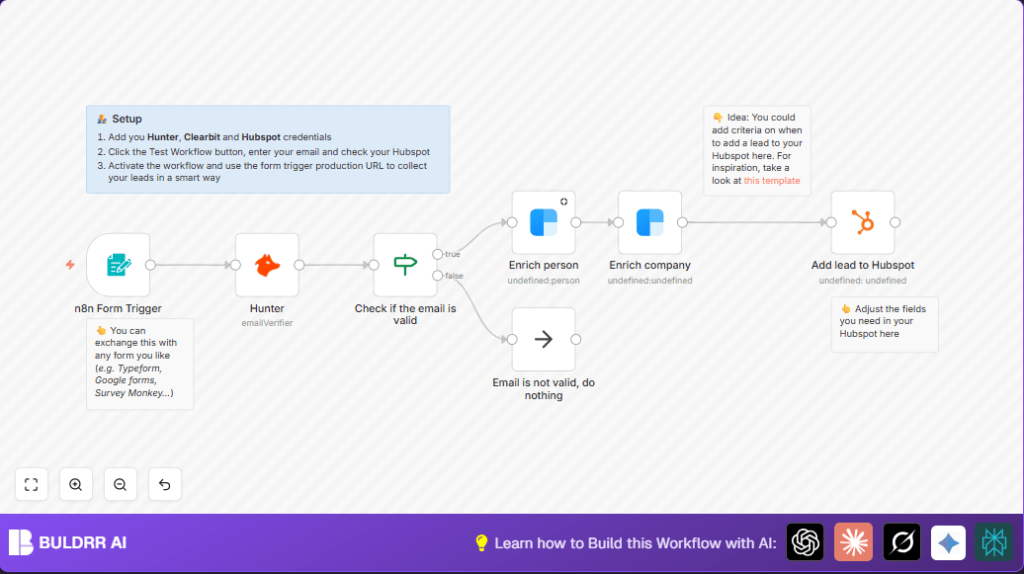
This workflow helps check and improve leads coming from a website form. It looks at the business email, makes sure it works, gets more info about the person and company, then saves this info in HubSpot CRM. The main problem it solves is saving time and stopping mistakes when adding new contacts to the CRM.
It works like this: when someone sends their email through the contact form, the workflow checks if the email is real using Hunter. If the email is good, it fetches more details about the person and company using Clearbit. Then it adds all this info into HubSpot. If the email is bad, the workflow just stops quietly without adding anything.
Tools and Services Used
- n8n Form Trigger: Captures email input from the web form.
- Hunter API: Verifies if the email address is deliverable and valid.
- Clearbit Person Enrichment API: Gathers detailed info about the person using the email.
- Clearbit Company Enrichment API: Gets information about the company using the email domain.
- HubSpot CRM API: Adds the enriched lead data into the CRM.
- No Operation node: Stops the workflow safely when emails are invalid.
How the Workflow Works: Input → Process → Output
Input
- Someone fills in the web form with a business email.
Processing Steps
- Use the Form Trigger to get email data.
- Verify the email with Hunter to check if it is valid.
- Use an If node to continue only if the email is valid.
- Fetch person details using Clearbit Person API.
- Fetch company info using Clearbit Company API based on the person’s email domain.
- Add the full enriched data into HubSpot CRM as a new contact.
- If the email is not valid, end the workflow quietly using No Operation.
Output
- New leads are added in HubSpot CRM with verified and detailed info.
- Invalid emails do not create any records, preventing bad data.
Who Should Use This Workflow
This setup is good for sales teams and businesses that get leads from web forms. It suits those who want to stop wasting time checking emails by hand and want cleaner, more complete data in their CRM.
It fits well if using HubSpot as CRM and has Hunter and Clearbit API access. Sales managers, marketing teams, and lead processing staff can benefit.
Beginner Step-by-Step: How To Use the Workflow in n8n
Step 1: Download and Import
- Download the workflow file using the Download button on this page.
- Open the n8n editor, click top-right menu, choose “Import from File”.
- Select the file you downloaded to add the workflow.
Step 2: Add Credentials
- Go to each API node, add your Hunter API Key credential.
- Enter your Clearbit API Key in both person and company nodes.
- Connect your HubSpot account using OAuth2 in the HubSpot node.
Step 3: Configure IDs and Fields
- Update any email fields or form field names if your form uses different labels.
- Check if HubSpot fields match your CRM setup like firstName, lastName, companySize.
Step 4: Test the Workflow
- Submit a sample email via the form or post data to the webhook URL.
- Look at workflow logs to see if the email verifies and data enriches.
- Check HubSpot to see if the lead appears properly.
Step 5: Activate for Production
- Turn on the workflow toggle to enable it.
- Connect your live form’s webhook to the URL from the Form Trigger node.
- Monitor runs and fix errors if they happen.
You can switch the form input node easily without changing other parts.
For better data control, consider self-host n8n to keep data private.
Customization Ideas
- Add more fields to the form like phone or company name and map them in enrichment nodes.
- Put extra If nodes to qualify leads by company size or industry before HubSpot.
- Send notifications to Slack or email if invalid emails happen.
- Add social media links from Clearbit into HubSpot custom fields.
- Use other form services by swapping the Form Trigger node.
Troubleshooting
Hunter or Clearbit Nodes Show “Invalid Credentials”
Check API Keys carefully for exact entry.
Make sure keys are active and have permissions.
HubSpot Leads Do Not Appear After Running
Re-login in HubSpot OAuth2.
Check field mapping matches CRM fields.
Email Always Shows Invalid
Confirm email field name matches form label exactly.
Check API usage limits and if Hunter is online.
Pre-Production Checklist
- Verify all API credentials work and test individually.
- Try submitting valid and invalid emails to see correct workflow paths.
- Confirm person and company data fill in properly before HubSpot.
- Make sure HubSpot leads show complete info after tests.
- Save backups of workflow and credentials settings safe.
Result Summary
✓ Saves time by automating lead processing.
✓ Cleans lead data by filtering invalid emails.
✓ Improves lead quality with detailed person and company info.
✓ Updates HubSpot CRM with rich, verified contacts.
→ Stopping bad data stops errors and sales misses.
→ Users get reliable leads faster without manual work.
