

What this workflow does
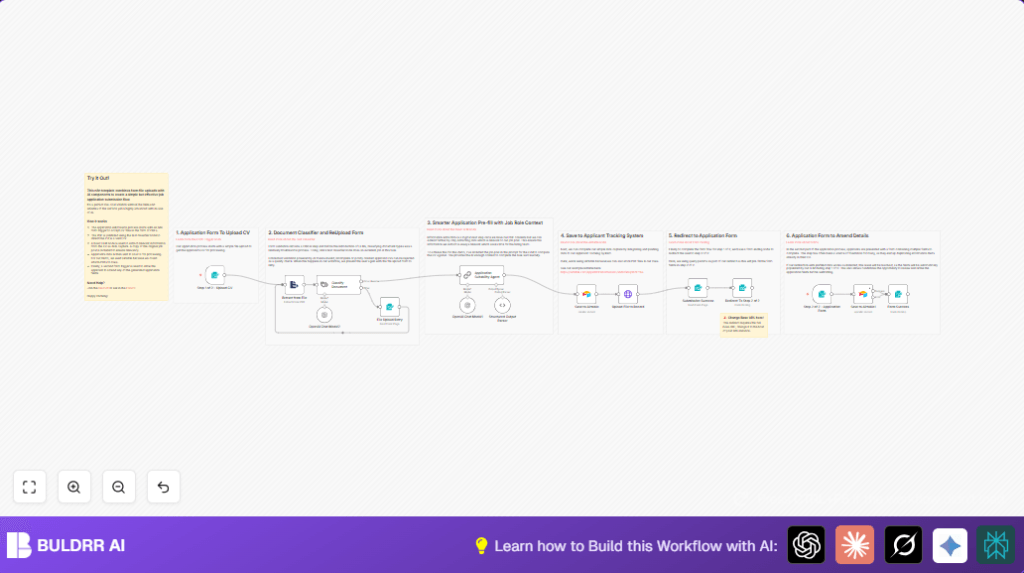
This workflow helps an HR team automate processing job application PDFs. It checks if uploaded files are real CVs, pulls out needed candidate info, saves it with the original PDF into Airtable, and lets candidates review details before final submission. This saves many hours of manual work and makes applying easier.
The main problem this solves is reducing time spent manually reading resumes and entering data. The outcome is a faster, more accurate, candidate-friendly hiring process using AI and automation.
Who should use this workflow
HR teams who get many PDF resumes and want to automate data entry can use this. Also good if applicants upload various PDF formats and you want to confirm those files are actually CVs.
It is helpful for teams wanting to store applicant info centrally in Airtable and speed up candidate follow-up.
Tools and services used
- n8n: Automates the workflow and handles form triggers.
- OpenAI API: Used twice — first to check if the file is a CV, then to extract relevant candidate details.
- Airtable: Stores extracted candidate info and uploads the original PDF for tracking.
- Online Forms: Used for candidates to upload CVs and later review and submit their application data.
Workflow inputs, processing, and outputs
Inputs
- Candidate submits a CV as a password-free PDF via an online form.
- Basic info entered alongside the file, like name and agreement to terms.
Processing steps
- The file’s text is extracted to get content for validation and parsing.
- OpenAI classifies the text to confirm it is a CV or resume, rejecting other files.
- Valid CVs are sent to AI again to extract specific details like name, contact, education, skills, experience, and a cover letter.
- All extracted data and the original PDF are saved into Airtable.
- The system shows a confirmation form and then redirects candidates to a second form pre-filled with extracted info for review.
- Applicants amend or confirm details, which update the Airtable record.
Outputs
- Airtable stores structured candidate data plus attached PDF resumes.
- Applicants get a pre-filled form to confirm their data and a thank you message at the end.
Beginner step-by-step: How to build this in n8n
Step 1: Import the workflow
- Download the workflow file using the Download button on this page.
- In the n8n editor, click “Import from File” and select the downloaded workflow file.
Step 2: Configure credentials
- Add your OpenAI API Key in the credentials settings for nodes that call AI.
- Add your Airtable API Key and set the Base ID and Table Name where candidates will save.
Step 3: Update configurations if needed
- Check and update form paths if hosting forms on your own web platform or n8n cloud.
- Update IDs, emails, or URLs for redirects to use your domain.
Step 4: Test and activate
- Run the workflow test by submitting a sample PDF CV to ensure text extracts and AI classify properly.
- Check that Airtable records create correctly with attached PDFs.
- Activate the workflow to start handling live applications.
If hosting the workflow on your own server, consider self-host n8n for stable operation.
Common edge cases and failures
- Uploading password-protected PDFs will fail during text extraction. This must be prevented at form upload.
- AI document classification may mislabel files if categories are not well set or insufficient example data is provided.
- Airtable upload fails if API Key is wrong or has insufficient permissions in the base.
- Redirect URLs that are not updated after import cause broken links to the next form step.
Suggestions for customization
- Change the job description in the AI extraction prompt to match new roles for better data relevance.
- Switch Airtable to other ATS software or Google Sheets by changing nodes and API settings.
- Add more validation categories in AI classification to filter cover letters or other document types.
- Allow other CV formats like DOCX or TXT by updating extraction node options and upload validations.
- Edit form trigger fields to add or remove inputs or support multiple file uploads.
Summary of results
✓ Saves over 80% of time spent manually reading and entering CV data.
✓ Automatically validates PDF resumes to reduce errors.
✓ Extracts only relevant candidate details based on job context.
✓ Stores data and original files centrally in Airtable.
✓ Lets applicants review and correct their info before final submission.
→ Improves hiring speed and candidate experience.
