

Automate Incident Alerts with TheHive and SIGNL4 Using n8n

Struggling to efficiently manage security incidents? This n8n workflow automates alert creation and resolution between TheHive and SIGNL4, saving you hours and reducing missed updates during critical security events.
theHive
signl4
webhook
+2
Workflow Identifier: 1591
NODES in Use: TheHive, IF, SIGNL4, Webhook, Manual Trigger
Automate incident alerts with TheHive and n8n

Press CTRL+F5 if the workflow didn't load.

Learn how to Build this Workflow with AI:

What this workflow does

This workflow connects TheHive and SIGNL4 to handle security alerts automatically. When TheHive sends or updates an alert, the workflow sends notifications to SIGNL4 or resolves alerts there. This removes manual work and helps teams respond faster and with fewer mistakes.

You get real-time alert notifications on SIGNL4 for open incidents and automatic resolution when incidents close in TheHive.


Who should use this workflow

This workflow is helpful for security teams using TheHive to track incidents and SIGNL4 for mobile alert notifications. It fits teams wanting to save time and avoid manual message sending.

No deep coding needed, but some basic API and webhook familiarity is helpful.


Tools and services used

  • TheHive API: Sends alert updates via webhooks.
  • SIGNL4 API: Sends and resolves mobile alert notifications.
  • n8n: Runs the workflow connecting TheHive and SIGNL4.

How this workflow works: Inputs → Process → Outputs

Inputs

  • TheHive sends alert details to the Webhook node via POST.
  • A manual trigger can send test alerts to TheHive.

Processing steps

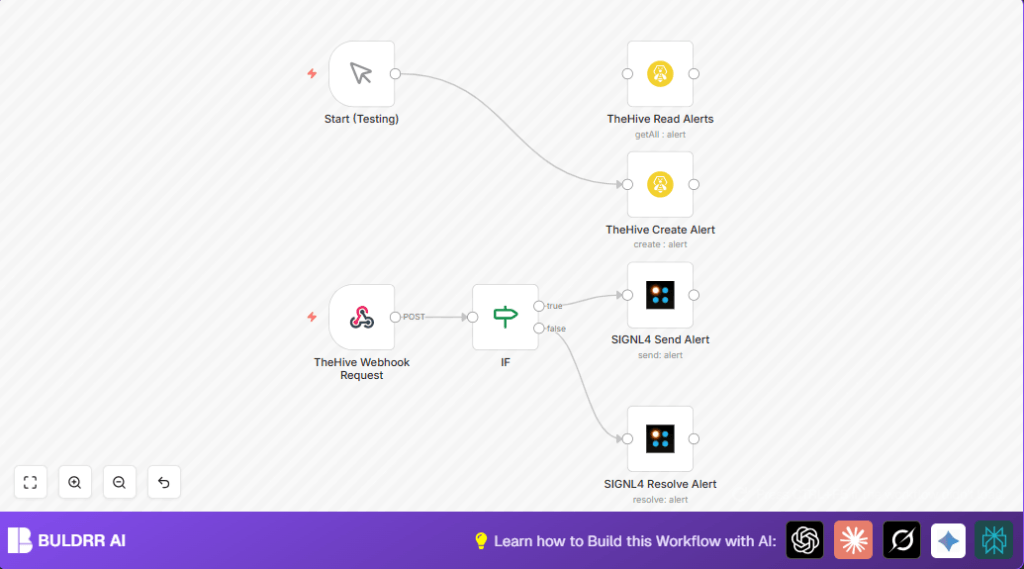
  • The Webhook node receives TheHive alert JSON.
  • The IF node checks if alert stage is ‘Closed’.
  • If not closed, SIGNL4 Send Alert node sends a notification with alert description and ID.
  • If closed, SIGNL4 Resolve Alert node tells SIGNL4 to clear the alert matching TheHive alert ID.
  • Manual Trigger node starts a test alert creation in TheHive.

Outputs

  • New alerts reach SIGNL4 for immediate team notification.
  • Closed alerts in TheHive automatically resolve in SIGNL4.
  • Test alerts created manually in TheHive to verify workflow.

Beginner step-by-step: How to use this workflow in n8n

Importing and setup

  1. Download the workflow file using the Download button on this page.
  2. Open your n8n editor (including self-host n8n if you run n8n on your own server).
  3. Click “Import from File” and select the downloaded workflow.
  4. After import, go to each node requiring credentials (TheHive API and SIGNL4 API keys) and add your API Key or credentials.
  5. If needed, update fields like alert IDs, email addresses, or tags inside the nodes to match your environment.

Testing the workflow

  1. Trigger the Manual Trigger node to create a test alert in TheHive.
  2. Confirm that a SIGNL4 alert shows up and resolves correctly when TheHive alert status changes.

Activate for production

  1. Turn on the workflow using the active toggle in n8n.
  2. Ensure TheHive is set to send alerts to the Webhook node URL.
  3. Monitor for errors and check SIGNL4 dashboard for alert notifications.

Customization ideas

  • Change alert tags in the TheHive alert creation to fit organizational needs.
  • Add severity or timestamps from TheHive to SIGNL4 message content.
  • Filter which alerts to process based on their source or other attributes.
  • Add an email notification for alerts open longer than a set time.

Troubleshooting common issues

  • Webhook not receiving alerts: Check HTTP method is POST and TheHive uses correct webhook URL.
  • Alerts not sent to SIGNL4: Check API credentials are added and valid.
  • Alerts not resolved in SIGNL4: Confirm external ID matches TheHive alert object ID exactly.

Summary: What the user gets

✓ Automatic alert notifications sent from TheHive to SIGNL4.

✓ Alerts marked closed in TheHive will clear in SIGNL4 automatically.

✓ Saves time by removing manual alert forwarding and reduces errors.

✓ Allows easy testing with a manual trigger to create alerts.

Automate incident alerts with TheHive and n8n

Visit through Desktop to Interact with the Workflow.

Frequently Asked Questions

The workflow uses an IF node to check if TheHive alert status is ‘Closed’. If not, it sends a new alert; if closed, it resolves the alert in SIGNL4.
The user needs API credentials for TheHive and SIGNL4 services to connect their APIs in n8n.
Yes, the workflow includes a Manual Trigger node to create test alerts in TheHive and check the notification flow.
Verify that the external ID field used in the resolve node matches exactly the alert object ID from TheHive.
Author
Written By
Ritu Sanjali

Related Workflows

Automate Twist Channel Creation and Messaging with n8n

This workflow automates creating and updating a channel in Twist and sending a personalized message to specific users. It eliminates manual setup errors and saves time managing Twist communications.

Automate Ideogram Image Generation with Google Sheets & Gmail

This workflow automates graphic design image generation via Ideogram AI, storing image data in Google Sheets and Google Drive, with email alerts via Gmail. It saves designers hours by automating image creation, remixing, review, and record-keeping.

Automate IT Support with Slack and OpenAI in n8n

Streamline IT support by automating Slack message handling using n8n and OpenAI. This workflow handles Slack DMs, filters bots, queries a Confluence knowledge base, and delivers AI-generated responses, improving support efficiency and response time.

Automate Crypto Analysis with CoinMarketCap & n8n AI Agent

Discover how this unique n8n workflow leverages CoinMarketCap’s multi-agent AI to deliver precise, real-time cryptocurrency insights directly via Telegram. Manage crypto data analysis efficiently with automated multi-source API integration.

Automate Gumroad to Beehiiv Subscriber Sync with n8n

Learn how to automatically add new Gumroad sales customers as Beehiiv newsletter subscribers using n8n automation. This workflow saves time by syncing sales data to Google Sheets CRM and notifying your Telegram channel instantly.

Generate On-Brand Blog Articles Using n8n and OpenAI

This workflow automates the creation of on-brand blog articles by analyzing existing company content using n8n and OpenAI. It extracts article structures and brand voice to produce consistent draft articles, saving significant content creation time.
1:1 Free Strategy Session
Your competitors are already automating. Are you still paying for it manually?

Do you want to adopt AI Automation?

Every hour your team does repetitive work, you're burning real money.
While you wait, faster businesses are cutting costs and moving quicker.
AI and automations aren't the future anymore — they're the present.

Book a live 1-on-1 session where we show you exactly which of your daily tasks can be automated — and what it’s costing you not to.