
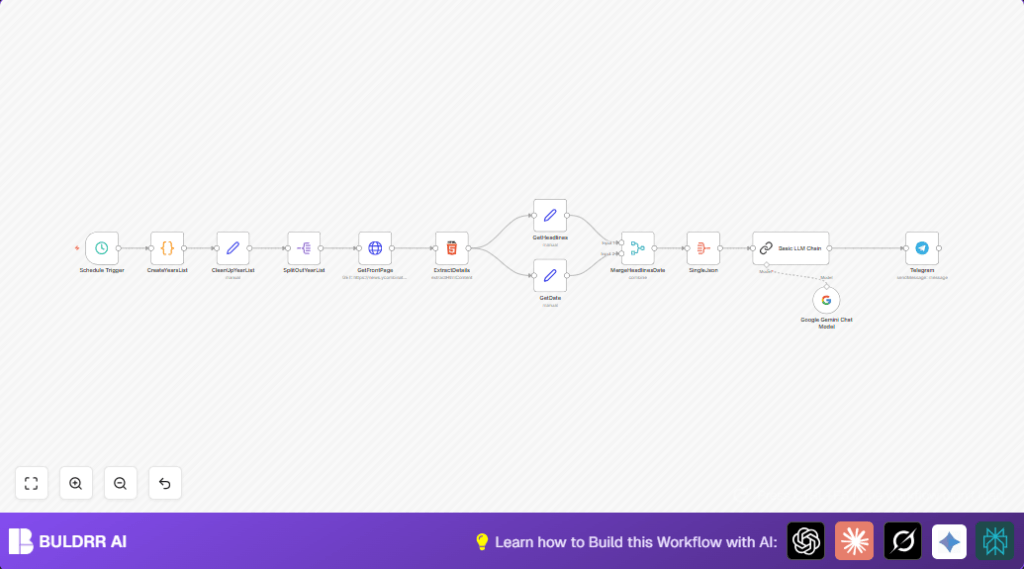

What This Workflow Does
This workflow fetches top Hacker News headlines from the same calendar day across past years.
It solves the problem of manually searching old headlines by automating the process from fetching to sharing.
After running, it gives a summary message categorized by tech themes sent to Telegram.
Who Should Use This Workflow
This workflow is for anyone who wants to share or analyze historical tech headlines easily.
It fits well for content creators, bloggers, or social media managers focused on tech trends.
Tools and Services Used
- n8n Automation Platform: runs the workflow jobs.
- Hacker News Archive: source for front page HTML data.
- Google Gemini Chat Model: analyzes and summarizes headlines intelligently.
- LangChain LLM Chain node: runs custom prompts to categorize and format summaries.
- Telegram Bot API: delivers summary messages.
Inputs, Processing, and Outputs
Inputs
- Current day timestamp from schedule trigger.
- HTML pages of Hacker News front pages for that day across years.
Processing Steps
- Generate a list of target dates from current year back to 2007.
- Split the dates array into single date items.
- Fetch front page HTML for each date.
- Extract headlines and date text using CSS selectors.
- Separate headlines and dates for clear data handling.
- Merge headlines with their respective dates.
- Aggregate all combined items into one JSON for LLM input.
- Use Google Gemini-backed LangChain LLM to analyze, categorize, and format headlines in Markdown.
- Send the final Markdown summary message to Telegram channel.
Outputs
- Markdown formatted headline summary grouped by tech themes.
- Automated daily Telegram posts with historical tech insights.
Beginner Step-by-Step: How to Use This Workflow in n8n
Step 1: Import the Workflow
- Download the provided workflow file from this page.
- Open the n8n editor where the workflow will run.
- Use the Import from File option to load the workflow.
Step 2: Configure Credentials and IDs
- Add required API Keys for Google Gemini and Telegram in the credential settings.
- Update Telegram channel ID to your target chat.
- Check any other IDs like user emails or folder names, and update as needed.
- Paste the prompt code into the Basic LLM Chain if not already included.
Step 3: Test the Workflow
- Run the workflow manually once to verify steps work as expected.
- Check Telegram channel for the summary message.
Step 4: Activate for Production
- Turn the workflow toggle ON to enable scheduled daily runs.
- Verify the schedule trigger runs each day at designed hour.
- Adjust batch sizes or delays if needed based on API limits.
Optionally, explore self-host n8n to run this workflow on your own server for greater control and cost savings.
Customization Ideas
- Modify years range by editing the CreateYearsList code node.
- Switch Telegram node to other platforms like Slack or Email.
- Tweak prompt in Basic LLM Chain for different categorization focuses.
- Change HTTP request batch size or delay for better rate limit handling.
- Add custom emoji or Markdown formatting for more visual style.
Troubleshooting Common Problems
- Empty or error HTTP responses: Check date parameter validity and respect Hacker News archive limits.
- Incorrect HTML extraction: Update CSS selectors in ExtractDetails node to match current site structure.
- Google Gemini API errors: Confirm API key validity and usage quotas.
Pre-Production Checklist
- Verify Schedule Trigger runs at correct time.
- Test output of CreateYearsList code node with a sample date.
- Check GetFrontPage fetches valid HTML per date.
- Ensure ExtractDetails pulls correct headlines and date.
- Confirm Basic LLM Chain returns proper Markdown outputs.
- Test Telegram bot posting in a private channel.
Deployment Guide
Enable the workflow switch in n8n to start daily runs.
Use execution logs to monitor success and errors.
Adjust batch delays to avoid rate limits.
For more workload, consider splitting date ranges or load balancing.
Check self-host n8n if interested in hosting on own server.
Summary of Benefits and Outcome
✓ Saves hours by automatically fetching historical tech headlines.
✓ Provides clear, categorized summaries ready to share.
✓ Sends daily posts directly on Telegram for audience engagement.
→ Produces reliable historical insights without manual work.
