
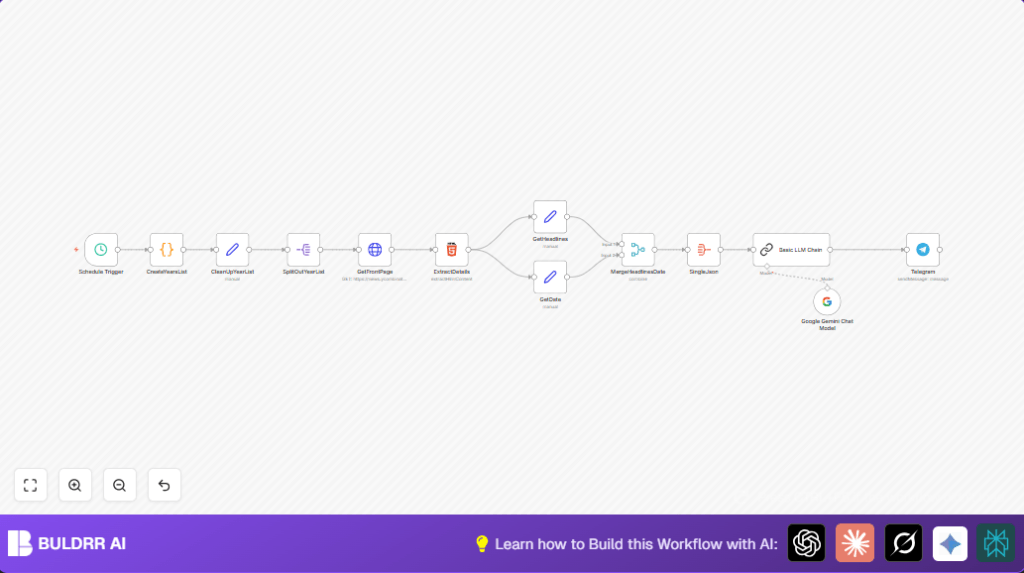

What This Workflow Does
This workflow runs every day at 9 PM to get headlines from Hacker News front pages on the same calendar date across many years, starting from 2007. It collects these headlines, cleans the data, groups headlines by year, and asks an AI model to find tech themes and patterns. The summary is then sent automatically to a Telegram channel.
The process saves time by removing the need for manual copy-paste and helps understand how tech news changed on this date over years.
Who Should Use This Workflow
This is good for anyone who wants daily tech news trends with historical views without doing boring work manually. It helps content curators, newsletter editors, or researchers who want summaries showing tech changes yearly.
You do not need to be a programmer, just basic knowledge of running workflows in n8n and have some API keys ready.
Tools and Services Used
- n8n Automation Platform: Sets schedule and runs all workflow nodes.
- Google Gemini AI via Google PaLM API: Categorizes headlines and creates markdown summaries.
- Telegram Bot API: Sends summarized themes to a Telegram channel.
- Hacker News Front Page URLs: Source of headline data fetched via HTTP requests.
How This Workflow Works (Input → Process → Output)
Inputs
- Date of the day to collect headlines on (current date).
- API keys for Google Gemini and Telegram Bot.
- Access to Hacker News front page URLs.
Processing Steps
- Start every day at 9 PM from the scheduler.
- Generate list of dates by going back from current year to 2007 for the same month and day.
- Send HTTP requests to get front page HTML from Hacker News for those dates.
- Use HTML extraction to pull out headlines and URLs from the page content.
- Collect headlines for all years in a single dataset.
- Send aggregated headlines to Google Gemini AI for theme analysis and formatting in markdown.
- Send the AI-generated summary text to the configured Telegram channel.
Output
- Daily Telegram message with a markdown report of tech news headlines organized by year and theme.
- Easy to read history of tech news for the calendar date showing patterns across years.
Beginner Step-by-Step: How to Run This Workflow in n8n Production
Step 1: Import the Workflow
- Download the workflow file using the Download button on this page.
- Open n8n editor where you want to use the workflow.
- Click on the top-left menu and choose Import from File.
- Select the downloaded workflow JSON file and import it.
Step 2: Add Credentials
- Go to Google Gemini node and add your Google PaLM API Key under Credentials.
- Set up Telegram Bot credentials (API Key and Chat ID) inside the Telegram node.
- Verify HTTP Request node targets the right Hacker News URL (usually https://news.ycombinator.com/front).
Step 3: Verify and Update Settings
- In CreateYearsList node, check the code to confirm date range suits needs (starts from 2007 or later).
- In Telegram node, update Chat ID if the target Telegram channel identifier changed.
- If the monthly or daily frequency is to be changed, modify the Schedule Trigger node accordingly.
Step 4: Test the Workflow
- Run the workflow manually once in the n8n editor.
- Check output logs to make sure headlines are retrieved and AI outputs summary.
- Look in the configured Telegram channel for the message delivery.
Step 5: Activate for Production
- Toggle the workflow’s active switch to turn on the daily automation.
- Monitor Telegram and n8n logs for smooth operation.
- If self hosting n8n is needed, consider using self-host n8n with a VPS to ensure the workflow runs on stable infrastructure.
Code and Prompt Samples
CreateYearsList Node Code (JavaScript)
This code builds an array of dates from current year back to 2007 on the same month and day.
for (const item of $input.all()) {
 const currentDateStr = item.json.timestamp.split('T')[0];
 const currentDate = new Date(currentDateStr);
 const currentYear = currentDate.getFullYear();
 const currentMonth = currentDate.getMonth();
 const currentDay = currentDate.getDate();

 const datesToFetch = [];
 for (let year = currentYear; year >= 2007; year--) {
  let targetDate;
  if (year === 2007) {
   if (currentMonth > 1 || (currentMonth === 1 && currentDay >= 19)) {
    targetDate = new Date(2007, 1, 19);
  } else {
    continue;
  }
  } else {
   targetDate = new Date(year, currentMonth, currentDay);
  }
  const formattedDate = targetDate.toISOString().split('T')[0];
  datesToFetch.push(formattedDate);
 }
 item.json.datesToFetch = datesToFetch;
}
return $input.all();
Basic LLM Chain Prompt Example
This prompt instructs AI to read headlines and sort them into themes with markdown and links.
Analyze the following JSON array of Hacker News headlines across years.
Group the headlines by themes.
Format the result in markdown, include clickable links and year before each headline.
Use clear, simple language.
Provide a list of main tech themes with headlines beneath.

Input JSON:
{{ $json.data }}
Customization Ideas
- Change the start year from 2007 in CreateYearsList node’s code to gather more or fewer years.
- Modify Telegram message formatting in the Telegram node for style changes.
- Add more analysis features like sentiment or trend guesses in the Basic LLM Chain AI prompt.
- Increase or decrease the schedule frequency in Schedule Trigger node.
- Add extra HTTP request nodes to fetch other news site headlines for broader view.
Common Problems and Fixes
- Empty headlines from HTML extract node: Hacker News page structure likely changed. Update CSS selectors in ExtractDetails node accordingly.
- Google Gemini API errors or no output: Check if Google PaLM API Key is valid and if quota is not exceeded.
- Telegram message not sent: Verify correct chat ID format and that Telegram Bot API Key is active in Telegram node credentials.
Pre-Production Checklist
- Check Schedule Trigger is set to 9 PM with correct timezone.
- Confirm dates list generates as expected in CreateYearsList node.
- Test HTTP requests fetch the correct Hacker News HTML page.
- Verify ExtractDetails pulls headlines correctly.
- Run whole workflow manually to see AI output and Telegram message look right.
- Backup workflow before activating live.
Deployment Guide
Once setup is complete, enable the workflow in n8n by toggling on the active switch. Ensure the Telegram channel receives daily posts to confirm success.
Monitor runtime logs for errors and keep an eye on API usage limits in Google Gemini and Telegram.
Using self-host n8n can help make workflow running more reliable by avoiding shared cloud execution limits.
Summary and Results
✓ Saves many hours of manual headline checking and copying.
✓ Provides full historic tech news view for today’s date.
✓ Delivers clean, categorized AI summaries daily.
✓ Posts directly to Telegram for easy sharing.
✓ Reduces errors and saves time.
→ Daily automated historical tech headline report.
→ Easier insight into tech trends across years.
→ Reliable data fetching from Hacker News.
→ Seamless AI summary without manual work.
