
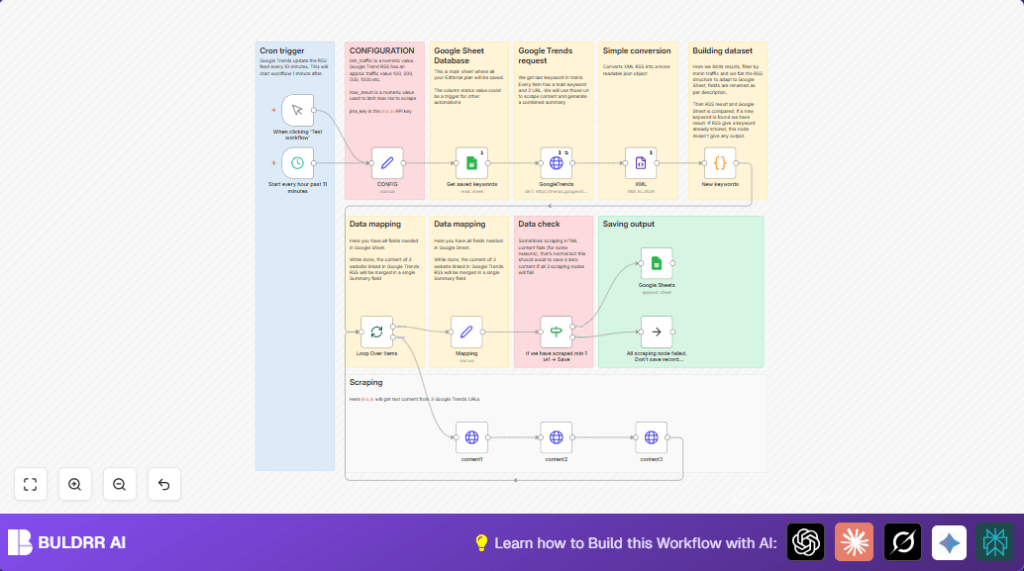

What This Automation Does
This workflow gets the newest keywords from Google Trends Italy every hour.
It stops manual work by automatically finding, filtering, and saving keywords with news summaries.
This saves time and gives fresh content ideas quickly.
The workflow inputs the Google Trends RSS feed in XML format.
Then it processes and filters the keywords.
It fetches related news articles’ URLs.
It scrapes the article content using Jina.ai API.
Finally, it combines all data and saves it neatly in Google Sheets.
Who Should Use This Workflow
Content marketers tracking trending keywords in Italy.
SEO specialists needing fast, error-free keyword data.
Anyone wanting to cut down manual keyword research work.
Tools and Services Used
- Google Trends RSS Feed: Source of fresh trending keywords in Italy.
- n8n Workflow Automation: Runs the sequence every hour.
- Google Sheets via OAuth2: Stores and checks keywords database.
- Jina.ai API: Scrapes related news article contents for summarizing.
Beginner Step-by-Step: How to Use This Workflow in n8n
Import Workflow
- Download the workflow file using the Download button on this page.
- Open the n8n editor and click “Import from File.”
- Select the downloaded workflow file to import.
Configure Credentials and IDs
- Set your Google Sheets OAuth2 credentials in the Google Sheets nodes.
- Enter your Jina.ai API Key in the Set node named CONFIG.
- Update any Google Sheets document or sheet IDs if different from the defaults.
Test Workflow
- Run the workflow manually once to check for errors.
- Verify that new keywords appear in your Google Sheets.
Activate Workflow
- Toggle the workflow to active to enable hourly automatic runs.
- Monitor initial runs in the executions tab for smooth operation.
- Set further alert nodes like Slack or Email if desired.
Note: For users running n8n on server, see self-host n8n for setup help.
Inputs, Processing Steps, and Output
Inputs
- Google Trends Italy RSS feed XML data.
- Existing keywords from Google Sheets.
- Jina.ai API key for scraping.
Processing Steps
- Fetch Google Trends RSS feed hourly using an HTTP request.
- Convert XML feed to JSON format for data handling.
- Filter keywords by minimum traffic to focus on relevant trends.
- Check keyword duplicates against existing Google Sheets entries.
- Extract up to three related news article URLs per keyword.
- Scrape content from those URLs using Jina.ai API.
- Merge scraped content into one summary.
- Only save keywords with summaries longer than 100 characters.
Output
- Appended rows in Google Sheets with keyword, traffic, publication date, news metadata, and combined summary.
Customizations
Adjust Traffic Threshold
Change min_traffic in the Set CONFIG node to target more or less popular keywords.
Expand News URLs Count
Modify the filtering code to handle more than three related news URLs if needed.
Change Region
Update geo=IT in the HTTP Request node URL to another country like geo=US.
Add More Filters
Use additional date or content-based filters inside the Code node.
Add Notifications
Include Slack or Email nodes after saving to alert teams of new trends.
Troubleshooting Common Issues
Jina.ai Request Fails
Check if the API Key in Set CONFIG node is correct.
Verify Authorization header uses “Bearer YOUR_KEY” format.
Google Sheets Write Errors or Duplicates
Make sure OAuth2 credentials are valid.
Confirm correct Sheet ID and proper filtering in the Code node.
Pre-Production Checklist
- Test reading and writing permissions on Google Sheets.
- Confirm Google Trends RSS URL returns proper XML.
- Validate Jina.ai API key is active.
- Run manual workflow test to check JSON conversion.
- Set cron schedule correctly to trigger every hour at 11 minutes.
Summary / Result
✓ Automatically fetches trending keywords from Google Trends Italy
✓ Filters and avoids duplicate keywords
✓ Scrapes news articles and combines content for summary
✓ Saves clean data into Google Sheets for editorial planning
✓ Saves hours weekly of manual research and reduces errors
→ Fresh keyword insights delivered every hour
→ Ready-to-use keyword and news summaries for marketing teams
