
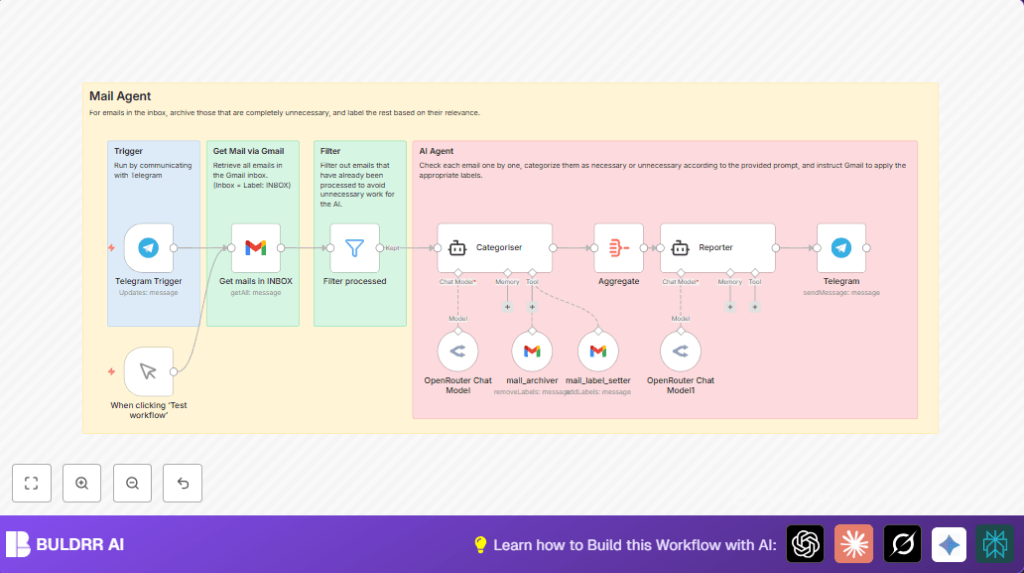

What this workflow does
This workflow sorts Gmail inbox emails automatically. It uses AI to decide which emails to keep and which to archive. The workflow starts when a user sends a message to a Telegram bot. Then, it scans all inbox emails, checks if they are already sorted, and uses AI to label or archive them. Finally, it sends a summary back through Telegram. This saves time by reducing manual email sorting and helps find important emails faster.
Who should use this workflow
Users with busy Gmail inboxes can benefit from this automation. It suits people who get many emails every day and struggle to organize them. Anyone wanting to stop missing important emails or wasting time on manual sorting will find it helpful. Users comfortable sending simple messages in Telegram and connecting their Gmail and AI accounts also fit well.
Tools and services used
- Telegram Bot API: Receives messages that trigger the workflow.
- Gmail API with OAuth2: Accesses inbox emails and manages labels.
- OpenRouter GPT-4.1 AI Model: Analyzes email content to decide sorting.
- n8n Platform: Runs the workflow automation and connects all services.
- Optional self-hosting: Users can self-host n8n for more control.
How this workflow works
Inputs
The workflow starts when the Telegram bot receives any user message. It then accesses all Gmail emails labeled “INBOX”. It filters out emails already labeled as “NotNeed” or “MustRead”.
Processing steps
Each remaining email is sent to the AI model. The AI reads the email’s details and decides if it should be archived or labeled as important. Appropriate Gmail actions run: archive (remove INBOX label) or apply labels from the AI result. All AI decisions are collected for a report.
Outputs
The workflow sends a summary message back to the Telegram chat. This report shows how many emails were archived or labeled and any notes from AI.
Beginner step-by-step: How to use this workflow in n8n
1. Import the workflow
- Download the workflow file using the Download button on this page.
- Inside the n8n editor, click “Import from File” and select the downloaded file.
2. Add your credentials
- Fill in Telegram Bot API credentials to connect the Telegram Trigger and Telegram nodes.
- Add Gmail OAuth2 credentials with modify scope for the Gmail nodes.
- Enter your OpenRouter API key in the OpenRouter Chat Model node.
3. Update settings if needed
- Check and update Gmail label names or IDs in the label setter and archiver nodes if custom labels exist.
- Confirm the Telegram chat ID for summary messages matches your bot conversations.
4. Test the workflow
- Use the manualTrigger node or send a message to your Telegram bot to start the workflow.
- Watch node executions in n8n to verify emails are categorized correctly.
5. Activate for production
- Switch the workflow from draft to active mode.
- Monitor logs for errors and adjust as needed.
Customization ideas
- Change AI instruction prompt in the Agent node to fit personal email patterns.
- Add more Gmail labels for different projects by updating label setter logic.
- Modify Telegram message format to include links or detailed summaries.
- Add a scheduled trigger node to run sorting automatically without Telegram.
- Integrate with Slack or Google Sheets to notify teams or log results.
Possibilities and failures to watch for
- Telegram trigger may fail if the bot webhook URL is not set up correctly.
- Gmail nodes require proper OAuth scopes; missing scopes cause label or archive failures.
- AI output depends on clear instructions. If labels or archive results are wrong, review the prompt.
- Incorrect label IDs cause Gmail errors; verify labels exist in the Gmail account before use.
Summary of expected results
✓ Saves daily hours otherwise spent on manual email sorting.
✓ Automatically archives junk emails and labels important ones.
✓ Sends summaries so users know what changed in their inbox.
✓ Reduces missed emails and inbox stress.
✓ Works triggered by simple Telegram messages, easy to control.
