
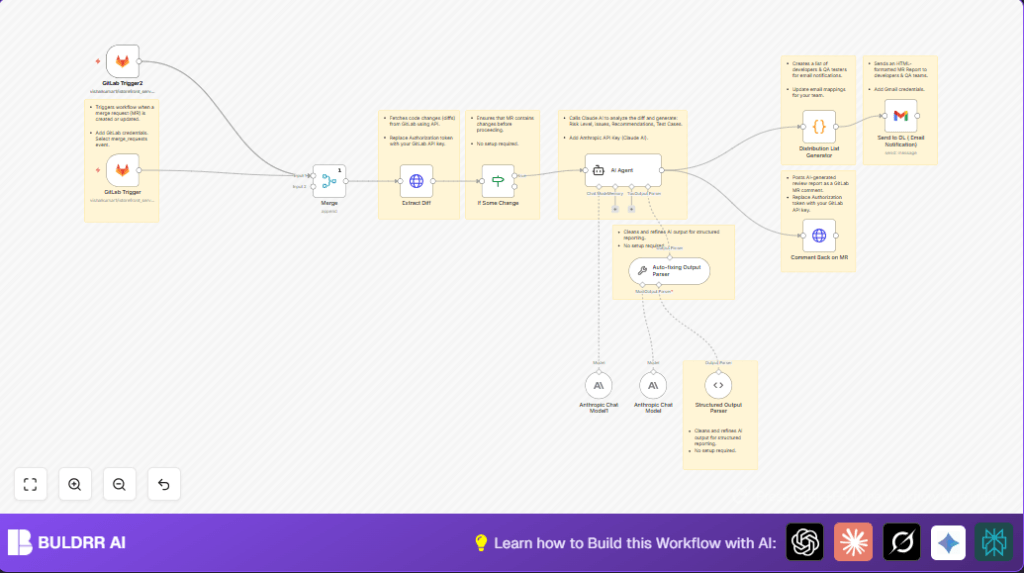

What This Automation Does
This workflow watches for new or updated merge requests in GitLab.
When it sees one, it gets the code changes and asks Claude AI to check them for risk and give advice.
It also finds who should get a notification email and sends a clear report with the AI review.
Then it adds the AI’s comments right inside the GitLab merge request.
This saves many hours of manual checking and helps teams find issues sooner.
Tools and Services Used
- GitLab API: To listen for merge request events and fetch code diffs.
- Anthropic Claude AI: To analyze code changes and create risk assessments and recommendations.
- n8n Automation Platform: Runs the workflow with all connectors and logic.
- Gmail via OAuth2: Sends emails with the AI review results to selected teams.
Inputs, Processing Steps, and Outputs
Inputs
- GitLab merge request create or update events via webhook trigger.
- GitLab API token for authenticating requests.
- Anthropic Claude AI API key for sending code diffs to the AI.
- Gmail OAuth2 credentials for sending emails.
Processing Steps
- Trigger: The workflow starts when a MR is created or updated in GitLab using the GitLab Trigger node.
- Data Merge: The Merge node combines webhook data streams, ensuring a single source for processing.
- Fetch Diffs: The HTTP Request node calls GitLab API to get the detailed changed files and diffs for the MR.
- Check for Changes: An If node confirms if the MR has any real code changes to analyze.
- Analyze Diff: The Langchain Agent node sends the diff to Claude AI with a prompt asking for risk evaluation, issues, improvement suggestions, test cases, and code snippets in HTML.
- Parse AI Output: Two Langchain Output Parser nodes correct and format the AI’s response into clean JSON.
- Generate Email List: The Code node creates a list of developer, QA, admin, and MR author emails based on project mapping, avoiding duplicates.
- Send Email: The Gmail node sends a rich HTML email summarizing the AI’s findings to the generated list.
- Comment on MR: Another HTTP Request posts the AI review as a comment inside the GitLab MR.
Outputs
- Email notifications with detailed AI review reports.
- Inline comments inside GitLab merge requests summarizing risks and recommendations.
Beginner Step-by-Step: How to Use This Workflow in n8n
1. Download and Import the Workflow
- Use the Download button on this page to get the workflow file.
- Open your n8n editor (including self-host n8n if applicable).
- Choose Import from File and pick the downloaded workflow.
2. Configure Required Credentials and Settings
- Add your GitLab API Key in the GitLab Trigger and HTTP Request nodes that talk to GitLab.
- Insert your Anthropic Claude AI API Key in the Langchain Agent node.
- Set up Gmail OAuth2 credentials in the Gmail node to enable email sending.
- Update the Code node called Distribution List Generator if you want to add your own project email mappings or contacts.
3. Test the Workflow
- Trigger a test merge request or update in your GitLab project.
- Watch the workflow run inside n8n and confirm the AI review executes.
- Check for an email in your inbox if you are in the distribution list.
- Verify the AI comment appears on the GitLab MR.
4. Activate for Production Use
- After testing, activate the workflow by toggling the switch at the top right in n8n.
- Ensure the GitLab webhook is set up to call this workflow on MR changes.
- Monitor for errors in the n8n execution dashboard as your team uses it.
Customization Ideas
- Change developer or QA email lists by editing the Code node named Distribution List Generator.
- Tweak the AI prompt in the Langchain Agent node to focus on specific code style rules or security checks.
- Edit the HTML email template in the Gmail node to match company branding or to add extra info.
- Add rules to block merge requests or alert when AI gives a high risk score.
Handling Edge Cases and Failures
- GitLab API errors: Happens if API Key is wrong or expired. Regenerate key and check scopes including reading code and writing comments.
- AI response issues: May happen if API quota is reached or prompt is malformed. Check API usage, refine prompt, and review parser nodes.
- Email not sending: Verify the email list generation code and Gmail OAuth2 setup. Test sending emails separately.
Summary
✓ Saves 4+ hours weekly by automating merge request reviews.
✓ Reduces human errors in spotting code risks.
✓ Quickly informs developers, QA, and admins by email and comments.
→ Gets fast, structured AI feedback on code diffs.
→ Helps keep code quality high and speeds up release cycles.
