
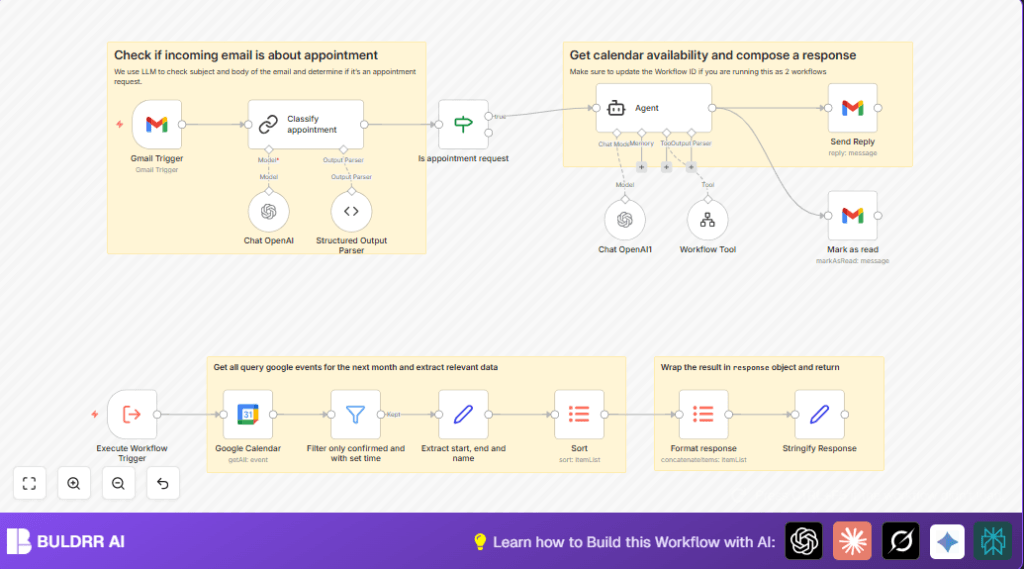

What This Workflow Does
This workflow watches unread Gmail messages for meeting requests.
It uses GPT-4 to check if an email asks for an appointment.
Then, it gets Google Calendar events for the next month.
It finds free times between meetings with 15 minutes buffer.
Finally, it writes and sends a meeting proposal reply and marks the email as read.
This saves many hours and prevents double bookings.
Who Should Use This Workflow
Anyone who gets many meeting requests by email.
This is useful if manually checking calendar availability is slow or error-prone.
It suits executive assistants, managers, or busy professionals.
You need Gmail and Google Calendar with OAuth2 access.
You must have OpenAI API keys for GPT-4.
Tools / Services Used
- Gmail: To watch unread emails and send replies.
- Google Calendar: To get upcoming confirmed events.
- OpenAI GPT-4: To read email text and decide if it is about a meeting.
- n8n Automation Platform: To run and connect all nodes.
Beginner Step-by-Step: How to Use This Workflow in n8n
1. Import Workflow
- Download the workflow using the “Download” button on this page.
- Inside the n8n editor, use “Import from File” to load the workflow.
2. Configure Credentials
- Add Gmail OAuth2 credentials.
- Add Google Calendar OAuth2 credentials.
- Add OpenAI API Key with GPT-4 access.
3. Update Settings
- Check Gmail node inbox and filters match your email account.
- Set the correct Google Calendar ID if different.
- Review prompts for email classification and responses if needed.
4. Test Workflow
- Send test appointment emails to your inbox.
- Watch n8n execute the nodes.
- Make sure replies send and original emails marked read.
5. Go Live
- Activate the workflow by toggling the active switch.
- Monitor logs in n8n for errors or missed emails.
If hosting n8n yourself, consider self-host n8n for better control.
Inputs, Processing Steps, and Outputs
Inputs
- Unread Gmail emails with potential meeting requests.
- Google Calendar events from yesterday to 1 month ahead.
Processing Steps
- Use GPT-4 to classify emails as meeting requests or not.
- Parse and filter calendar events that are confirmed and timed.
- Sort upcoming events chronologically.
- Prepare a JSON summary of calendar availability.
- Use AI agent to suggest meeting slots with 15-minute gaps.
- Write a personalized email reply proposing times.
- Mark the original email as read.
Outputs
- Email reply sent proposing meeting times.
- Updated Gmail email status to read.
Customizations
- You can change the calendar look-ahead window by adjusting timeMin and timeMax in the Google Calendar node.
- Modify the AI “temperature” setting to get more creative or precise email replies.
- Add sender filters in the Gmail Trigger node to limit which emails start the workflow.
- Change the meeting buffer (currently 15 minutes) by editing the Agent node’s system prompt.
- Check multiple Google Calendars by adding more Calendar nodes and combining their events.
Troubleshooting Common Problems
- Gmail Trigger does not start: Check if Gmail OAuth is expired or missing permission for reading email.
- OpenAI returns errors: Review prompt formatting and confirm API key limits are not exceeded.
- Google Calendar fetch empty: Confirm calendar ID is correct and OAuth token is valid.
Pre-Production Checklist
- Ensure Gmail Trigger monitors correct inbox and unread emails.
- Test email classification succeeds with sample emails.
- Confirm calendar events are fetched accurately.
- Verify reply emails are sent and formatted well.
- Check if OpenAI API keys have enough quota.
- Back up workflow and credentials before going live.
Summary and Results
✓ Saves you multiple hours weekly by automating email reading and calendar checks.
✓ Avoids double bookings by applying a buffer between meetings.
✓ Sends quick, personalized replies proposing meeting times.
✓ Keeps email inbox clean by marking processed emails as read.
✓ Lets you focus on work, not scheduling.
