
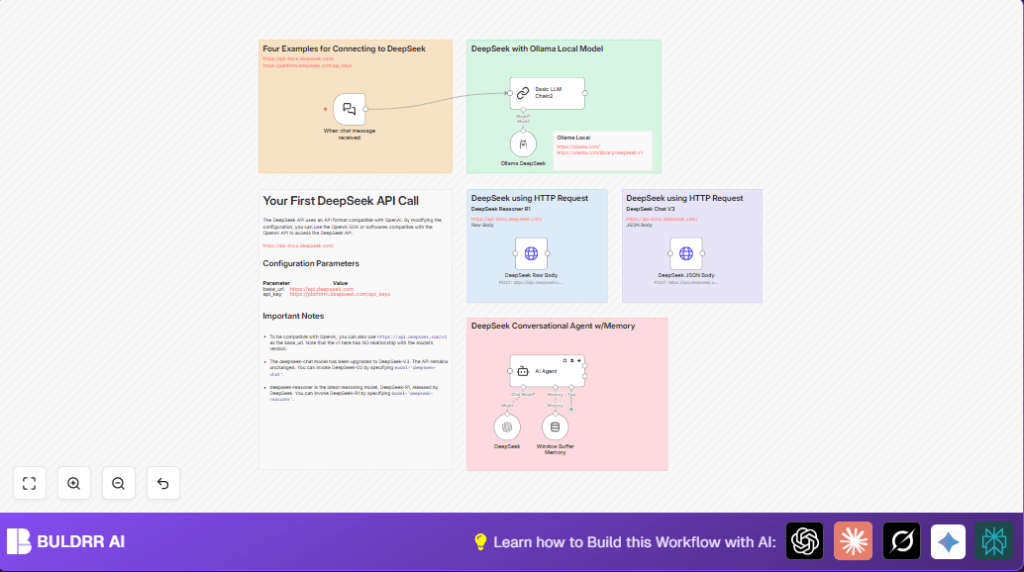

What This Workflow Does
This workflow helps to answer chat messages using DeepSeek AI models inside n8n. It solves the problem of slow and hard-to-manage manual AI replies. The result is faster, smarter answers that keep track of conversation history without extra effort.
The workflow starts when a chat message arrives. It uses DeepSeek’s “deepseek-reasoner” model to think deeper and respond with context. It remembers past messages with a memory node. It can switch to a local Ollama model if online is not available. There is also a backup AI step if the main call fails. Finally, it sends the AI answer back as a chat response.
Who Should Use This Workflow
Anyone who wants to automate complex AI chat replies inside n8n can use this. Users who find manually managing AI conversations slow or confusing will benefit. It suits people with some n8n knowledge who want to save time and improve chat answers.
It works well for cloud or self-hosted n8n setups and supports switching between DeepSeek online and Ollama local AI models.
Tools and Services Used
- n8n: Automates the workflow and runs Langchain nodes.
- DeepSeek API: Provides advanced AI models like “deepseek-reasoner” for deep reasoning.
- Ollama API (optional): Runs local AI models for offline or flexible use.
- Langchain nodes in n8n: Connect and manage AI models and memory.
Inputs, Processing Steps, and Output
Inputs
- Chat message received via the Langchain Chat Trigger webhook node.
- API keys for DeepSeek and optionally Ollama to access AI models.
Processing Steps
- Trigger starts when chat message arrives.
- DeepSeek lmChatOpenAi node uses the “deepseek-reasoner” model to generate replies.
- Window Buffer Memory node keeps recent conversation context for better answers.
- AI Agent node set to “conversationalAgent” type handles dialogue flow with system tone defined.
- Basic LLM Chain2 node acts as a fallback if the main AI service fails.
- Optional Ollama DeepSeek node for local AI inference.
- HTTP Request nodes allow direct calls to DeepSeek API with raw or JSON bodies.
Output
The workflow sends back a chat response with deep reasoning and context from the AI model.
Beginner Step-by-Step: How to Use This Workflow in n8n
Import the Workflow
- Download the workflow file from this page.
- Open the n8n editor canvas.
- Click the menu and select “Import from File”.
- Upload the downloaded workflow.
Configure the Workflow
- Add your DeepSeek API Key credentials to the relevant nodes.
- If using Ollama local model, add Ollama API credentials.
- Check webhook node settings and update webhook ID if needed.
- Update any channel, email, or folder IDs if your chat system requires it.
Test and Activate
- Send a chat test message to the webhook URL shown in the Langchain Chat Trigger node.
- Check the workflow runs and confirm AI replies appear.
- Activate the workflow to run live.
For self hosting n8n, see self-host n8n resources.
Common Problems and Failures
- API key authentication failed: API keys are invalid or expired. Fix by updating keys in n8n credentials.
- No conversation context: The Window Buffer Memory node disconnected or misconfigured. Reconnect and keep defaults.
- Workflow not triggering: The webhook URL is not active or wrong. Activate it and use correct URL.
- Ollama API access blocked: Incorrect Ollama API credentials used. Update credentials.
Customization Ideas
- Change the DeepSeek model name in the AI node to “deepseek-chat” to adjust AI behavior.
- Modify buffer memory size to keep more or less past messages.
- Update system message in AI Agent node to change AI tone or role.
- Toggle “continueOnFail” in AI nodes to decide if workflow stops on errors.
Summary of Results
✓ Reduces manual chat replying time.
✓ Keeps chat history for better AI answers.
✓ Supports switching between online and local AI models.
→ Offers smoother and smarter chat conversations.
→ Automates complex AI reasoning with little user effort.
