
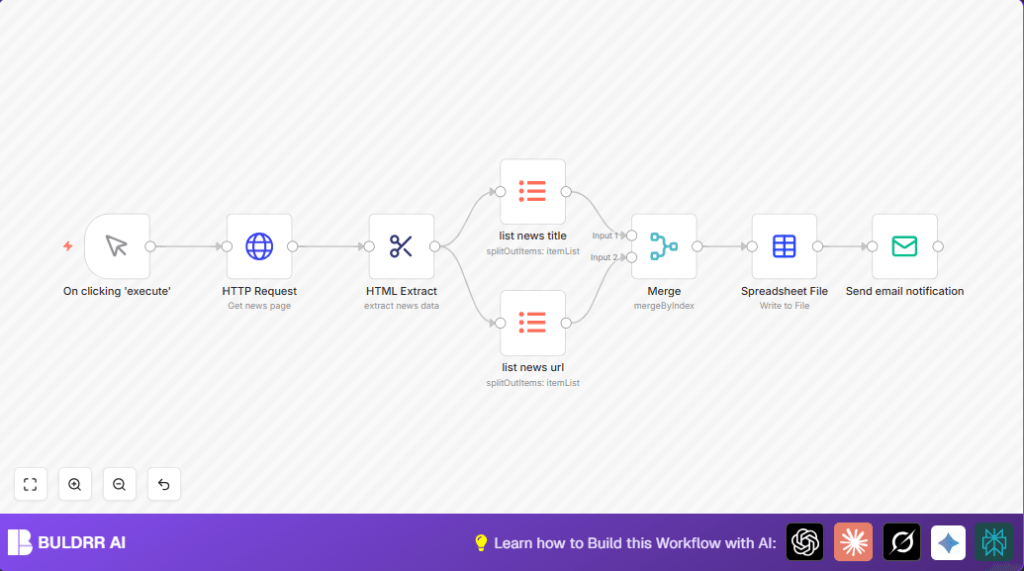

What this workflow does
This workflow grabs the latest top stories from Hacker News and sends them by email as an Excel file.
This fixes the problem of copying news manually every day, which wastes time and can miss links.
After running, you get an email with a spreadsheet showing news titles matched with their URLs by date.
Who should use this workflow
Anyone who reads Hacker News regularly and wants to save time collecting headlines.
It helps if you want daily email updates or want an archive of news in a file.
Tools and services used
- n8n automation platform: To build and run the workflow.
- HTTP Request node: To download the Hacker News homepage.
- HTML Extract node: To get news titles and URLs using CSS selectors.
- Item Lists nodes: To split the arrays of titles and URLs into lists.
- Merge node: To combine titles and URLs by their order.
- Spreadsheet File node: To make an Excel file with todays’ news and date in filename.
- Email Send node: To email the spreadsheet as attachment.
Inputs, processing steps, and output
Inputs
The workflow gets no input from the user but pulls the Hacker News homepage URL: https://news.ycombinator.com/
Processing steps
1. The HTTP Request node fetches the full Hacker News page as binary.
2. The HTML Extract node reads this binary and extracts two arrays: news titles from .storylink text and corresponding URLs from .storylink href attributes.
3. Two Item Lists nodes split these arrays into separate items for titles and URLs.
4. The Merge node combines titles and URLs by their index, linking each headline to the correct link.
5. The Spreadsheet File node turns merged data into an Excel file named with the current date for easy archiving.
6. The Email Send node sends this Excel file to your email inbox.
Output
The email has an attached Excel spreadsheet named like “Ycombinator_news_YYYY-MM-DD.xlsx” containing all current news headlines and their URLs.
Beginner step-by-step: How to use this workflow in n8n
Download and Import the Workflow
- Use the Download button on this page to save the workflow file.
- Open your n8n editor. Click “Import from File” and upload the saved workflow file.
Configure Credentials and Settings
- Add your SMTP email credentials in the Email Send node to enable sending emails.
- Check and update any recipient email addresses or sender addresses as needed.
- Verify the HTTP Request node’s URL is set to https://news.ycombinator.com/ unless you want to change news sources.
Test and Activate
- Run the workflow manually by clicking Execute to test everything works.
- Check your email inbox for the news spreadsheet attachment.
- If the test works, activate the workflow to use it regularly.
- To run automatically, add a Cron node trigger before the HTTP Request node and set the schedule.
For users running their own server, consider self-host n8n to avoid cloud limits.
Customization ideas
- Change the email text or subject in the Email Send node to fit your style.
- Modify the HTTP Request URL to scrape news from other websites with similar layout and adjust CSS selectors in the HTML Extract node accordingly.
- Switch the spreadsheet format by changing the file extension in the Spreadsheet File node, like to .csv if preferred.
- Add a Cron node before the HTTP Request node to schedule daily or hourly runs without manual trigger.
Handling common issues
Issue: No news titles or URLs found by the HTML Extract node.
Reason: Hacker News changed their website design or CSS classes. .storylink no longer exists.
Fix: Inspect the new page elements and update CSS selectors in the HTML Extract node.
Issue: Emails fail to send from the Email Send node.
Reason: Incorrect SMTP credentials or network blocks.
Fix: Review SMTP settings, test with another email account, or check firewall.
Summary of results and benefits
✓ Saves 15+ hours monthly by automating news collection.
✓ Eliminates copy-paste errors and missing links.
✓ Provides daily timestamped archive of Hacker News stories.
→ Delivers convenient Excel spreadsheets directly to email.
→ Lets users customize and schedule automated news updates.
