

What This Automation Does
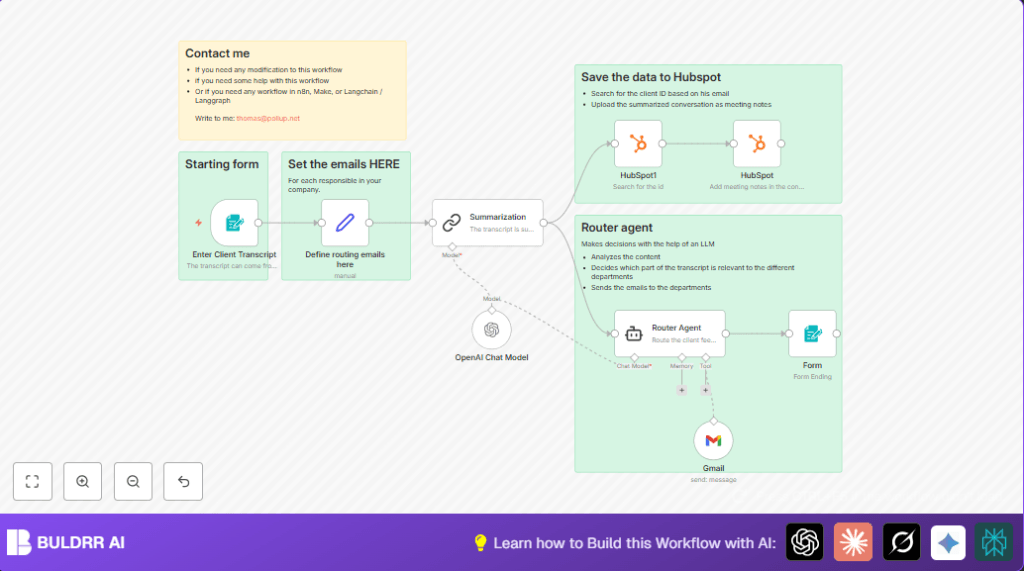
This workflow in n8n takes client conversation transcripts as input.
It reads long emails or chats from clients and makes short summaries.
Then it decides which team should get the message, like support or billing.
The summary and email get sent to the right team automatically.
It also finds and updates the client info in HubSpot CRM so records stay fresh.
This saves hours of manual work every week and helps teams reply faster.
How the Workflow Works (Input → Process → Output)
Inputs
- Client Transcript Form: User fills out a form with client email and conversation text.
- Routing Emails: Pre-set email addresses for Support, Admin, Product, Commercial teams.
Processing Steps
- Summarization: The long conversation text is shortened to 2-3 sentences using AI GPT-4o-mini.
- HubSpot Search: The client email is used to find matching contacts in HubSpot.
- HubSpot Meeting Note: The summary is saved as a meeting note linked to the client record.
- Routing Agent: AI analyzes the conversation and picks one department email to send the message to.
- Email Sending: Gmail node sends the formatted email to the chosen department.
- Confirmation: A form node displays the routing result for clarity.
Outputs
- Email sent to exact department based on conversation topic.
- Client record updated with recent meeting note summarizing conversation.
- User sees a confirmation with routing details.
Who Should Use This Workflow
This automation fits team members who handle many client messages.
People who spend lots of time reading and tracking client issues.
Especially helpful in SaaS or service businesses with separate departments.
It works well for anyone wanting to save time and reduce mistakes in processing client feedback.
Tools and Services Used
- n8n: Workflow automation platform.
- OpenAI GPT-4o-mini: AI for summarizing text and routing decisions.
- HubSpot CRM: To search and update client contact records.
- Gmail: Sending emails with OAuth2 authentication.
- Mailjet: Indirectly used for email delivery options.
- Form Trigger Node: For receiving client conversation data.
Beginner Step-by-Step: How to Use This Workflow in n8n
1. Import the Workflow
- Click the Download button on this tutorial page to get the workflow file.
- Open n8n editor and choose Import from File option.
- Select the downloaded workflow file to load it inside n8n.
2. Configure Credentials and Settings
- Add or update necessary API Keys and OAuth2 credentials for HubSpot and Gmail.
- Check the Set node for routing emails and update with correct department email addresses.
- If needed, adjust other IDs such as folder or channel IDs specific to your setup.
- Review the Summarization prompt inside the LangChain Summarization node for language or style changes.
3. Test the Workflow
- Submit a sample client conversation through the form trigger to see results.
- Verify that the summary is generated and emails go to the right department.
- Check HubSpot if the client record updates with a meeting note.
4. Activate for Production
- Once tests are successful, toggle ON the workflow in the n8n dashboard.
- Monitor initial runs to catch any errors or routing mistakes.
- Optionally add monitoring or logging to track large volumes after deployment.
If running on your own server, consider using self-host n8n resources to manage workflow uptime and scaling.
Customization Ideas
- Add more department emails in the Set node and update the Router Agent’s instructions for new categories.
- Switch from Gmail to Mailjet or SendGrid nodes to match preferred email services.
- Change summarization length or style by editing the prompt in the summarization node.
- Attach original transcripts as files using Google Drive or Dropbox nodes for archiving.
Common Issues and Fixes
- Client ID not found in HubSpot search: Check if client email exists correctly in CRM.
Add missing contacts or create a fallback step for new clients. - Wrong department receives email: Improve Router Agent prompt for clearer instructions.
Add manual review fallback if AI output is uncertain. - Empty or wrong summaries: Verify OpenAI API usage limits and input format.
Check for special characters or blanks in transcript field.
Pre-Production Checklist
- Submit both valid and invalid emails to test form validation.
- Confirm HubSpot search returns correct client IDs.
- Make sure summaries accurately capture conversation points.
- Check Router Agent chooses correct department for different inputs.
- Test that emails arrive properly formatted using Gmail node.
- Verify OAuth2 credentials for HubSpot and Gmail are connected.
Summary of Benefits and Outcome
✓ Save over 10 hours per week by automating manual client feedback processing.
✓ Avoid missed details or late responses by automatic routing.
✓ Keep HubSpot CRM records updated with concise client meeting notes.
✓ Ensure emails reach correct departments without human error.
✓ Easy monitoring of workflow with confirmation displays.
