

What This Automation Does
This workflow helps a user practice Chinese vocabulary using a Telegram chatbot. It solves the problem of spending much time creating flashcards and quizzes manually. The system reads vocabulary from a Google Sheet, creates quiz questions, and gives fast feedback within Telegram chat. This makes learning easier and saves time.
When a user sends a message on Telegram, the workflow triggers an AI to find a vocabulary word and make a multiple-choice question. The AI checks the user’s answer, then replies with encouragement or corrections. It remembers the chat history to keep the conversation clear and personal.
The user gets a smooth quiz game experience inside Telegram. They don’t need extra apps or tools. The vocabulary comes from an easy-to-edit Google Sheet. This keeps content fresh and simple to update.
Tools and Services Used
- Telegram Bot API: Receives user messages.
- Google Sheets API: Stores and provides vocabulary words.
- OpenAI API (GPT-4o-mini): Generates quiz questions and evaluates answers.
- n8n Platform: Orchestrates the workflow automation.
- LangChain Simple Memory Node: Maintains chat context per user.
Inputs, Processing Steps, and Outputs
Inputs
- User messages sent on Telegram chat.
- Vocabulary data from Google Sheets including English and Chinese words.
Processing Steps
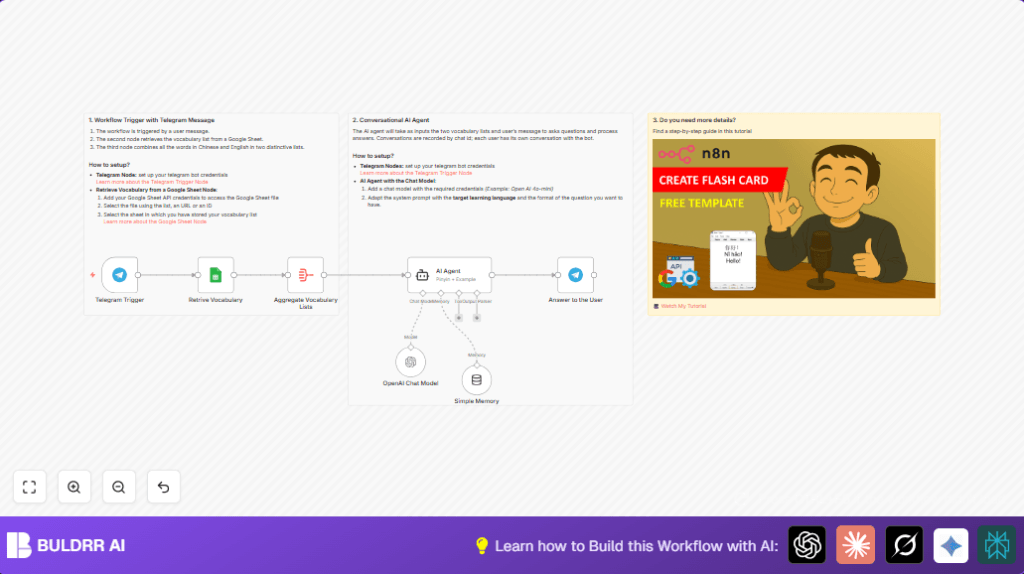
- Telegram Trigger catches incoming user messages.
- Google Sheets node fetches current vocabulary list.
- Aggregate node compiles vocabulary into English and Chinese arrays.
- Simple Memory node tracks conversation history using chat ID.
- OpenAI Chat Model generates quiz content and evaluates answers.
- LangChain AI Agent formats quiz questions and feedback.
- Telegram node sends quiz questions or feedback messages.
Outputs
- Interactive multiple-choice quiz questions sent to the user in Telegram.
- Instant feedback messages for correct or incorrect answers.
- Maintained session memory for personalized learning.
Beginner Step-by-Step: How to Use This Workflow in n8n Production
Step 1: Import the Workflow
- Download the workflow file using the Download button on this page.
- Open the n8n editor and click “Import from File.”
- Select the downloaded workflow file to import.
Step 2: Configure Credentials and Settings
- Add your Telegram Bot API Key in the Telegram Trigger and Telegram nodes.
- Set your Google Sheets API credentials in the Google Sheets node.
- Enter your OpenAI API Key in the OpenAI Chat Model node.
- If needed, update Google Sheet IDs, sheet names, or chat IDs to match your setup.
Step 3: Test the Workflow
- Send a test message on Telegram to your bot.
- Watch the execution log in n8n to verify the workflow triggers and sends a quiz question.
Step 4: Activate for Production
- Turn on the workflow by switching it to “Active” in n8n.
- Check logs regularly and adjust prompts or settings as needed.
Note: For privacy or control, consider self-host n8n to run the workflow on your own server.
Customizations
- Add extra columns in Google Sheets like audio URLs or example sentences for richer quiz content.
- Change the AI prompt in the LangChain AI Agent node to adjust quiz difficulty or question style.
- Track user progress by saving answers and scores to a new Google Sheets or database node.
- Swap the OpenAI model in the OpenAI Chat Model node for different balance of cost and performance.
- Use multiple language vocabularies by switching sheets or tables based on user preferences.
Troubleshooting
- Issue: No quiz answers sent back after sending messages.
Fix: Check that the chat ID in the Telegram reply node is set exactly to{{ $('Telegram Trigger').item.json.message.chat.id }}. - Issue: Google Sheets node shows authentication errors.
Fix: Re-connect the Google Sheets credentials with correct permission scopes. Verify the spreadsheet sharing settings. - Issue: AI agent gives questions not related to vocabulary.
Fix: Confirm the Aggregate node correctly sends complete and accurate vocabulary arrays.
Pre-Production Checklist
- Send messages on Telegram to verify that the Telegram Trigger node activates.
- Verify the Google Sheets node outputs correct vocabulary lists.
- Check the Aggregate node produces arrays named “initialLanguage” and “targetLanguage”.
- Test the AI agent node generates relevant quiz questions.
- Ensure the Telegram bot sends back well formatted questions and feedback.
- Backup your vocabulary Google Sheet data regularly.
Deployment Guide
Set the workflow status to Active in n8n. Make sure the Telegram bot webhook is correctly configured. Monitor workflow execution logs for errors or unexpected responses.
Because sessions keep user context, the quiz adapts over time. Regularly update vocabulary data to keep learning fresh.
Using self-host n8n can help if improved control or privacy is needed.
Conclusion
✓ The workflow turns Telegram into a simple, automated Chinese vocabulary tutor.
✓ It saves users time by creating and grading quiz questions automatically.
✓ It gives immediate personalized feedback using AI and maintains chat context.
→ Users can practice anytime with no extra apps or manual quiz making.
→ The vocabulary is easy to update using a Google Sheet, keeping learning content fresh.
