
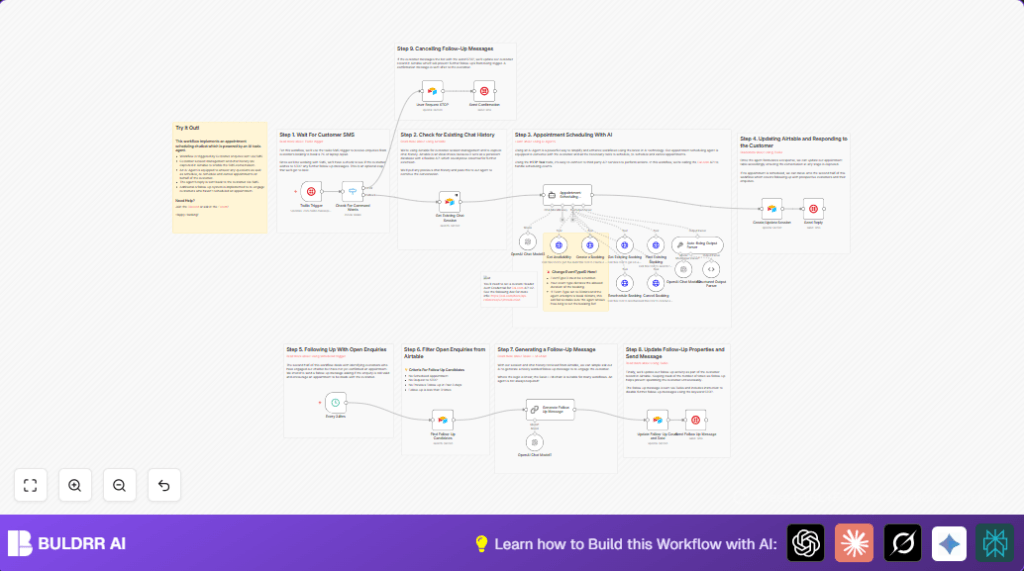

What This Workflow Does
This workflow handles SMS appointment booking requests automatically for a PC and laptop repair company. It stops customer service agents from doing manual replies, booking errors, and lost messages. The system talks with customers by SMS, understands their messages using AI, books or changes appointments using a calendar API, saves chats in a database, and sends automatic reminders and follow-ups.
The workflow respects “STOP” commands to avoid unwanted SMS. It frees hours of manual work and increases confirmed bookings.
Who Should Use This Workflow
Small businesses that get many SMS appointment requests can use this. It fits repair shops, health clinics, or service providers that want to save time manually scheduling.
Users who want simple automated replies, AI chat handling and link to calendar bookings in one system.
Tools and Services Used
- Twilio: Receives and sends SMS messages.
- Airtable: Stores chat sessions, customer data, and appointments.
- Cal.com: Used for making, rescheduling, or cancelling bookings via API.
- OpenAI GPT through Langchain: Understands customer SMS and manages appointment dialogue.
- n8n: Runs and connects all these services in an automated workflow.
How This Workflow Works (Inputs → Process → Output)
Inputs
- Incoming SMS messages via Twilio Trigger.
- Customer phone numbers and message texts.
- Data from Airtable about existing chat sessions and appointments.
- Booking parameters received by AI from customer requests.
Processing Steps
- Check if incoming message contains “STOP” to handle opt-outs.
- Look up any active chat sessions in Airtable to get ongoing conversation history.
- Send conversation context and SMS to AI Appointment Scheduling Agent running GPT to decide next reply.
- Schedule, reschedule, or cancel appointments via Cal.com API through n8n HTTP nodes.
- Update Airtable records with new chat messages and appointment data.
- Send replies and confirmations back to customer using Twilio.
- Each day, find customers without appointments who had enquires and send AI-generated personalized follow-ups.
- Respect and process any “STOP” commands by marking status accordingly in Airtable and replying confirmation.
Outputs
- SMS replies and booking confirmations sent back to customers.
- Updated Airtable records showing chat history, appointment info, and opt-out status.
- New or modified appointments scheduled in Cal.com.
- Automated follow-up SMS messages sent to open leads.
Beginner Step-by-Step: How to Use This Workflow in n8n
Download and Import Workflow
- Download the workflow file using the Download button provided on this page.
- Open your n8n editor (assumed already logged in and ready).
- In n8n, click “Import from File” in the main menu.
- Select the downloaded workflow file and load it into your workspace.
Configure the Workflow
- Add your API credentials: Twilio, Airtable, Cal.com, and OpenAI keys in their respective credential sections.
- Update any IDs or field names inside nodes if your accounts use different table names or eventTypeIds.
- Review system prompt in the AI agent node to adjust any business-specific info like appointment duration or company name.
- Check the Airtable filter formulas for follow-up messages to match your desired frequency.
Test and Activate
- Send a test SMS to your Twilio number to verify the workflow triggers.
- Watch the workflow execution in n8n to confirm no errors and correct responses.
- Once tested, toggle the workflow ON to activate it for everyday use.
For self hosting n8n, check out self-host n8n options for better stability and security.
Edge Cases and Failures
- If a phone number comes in a format not matching Airtable records, session lookups can fail.
- Missing or wrong API keys for Cal.com or OpenAI cause booking failures or AI errors.
- If filter formulas exclude proper “STOP” flagged customers, follow-ups may annoy opted-out users.
- Heavy SMS volume may require scaling n8n with queuing to avoid overload.
Customization Ideas
- Change appointment slot length by editing the AI system prompt.
- Adjust follow-up message frequency by modifying Airtable filter formulas.
- Add answers for common customer questions in the AI prompt.
- Switch out Twilio nodes for other SMS services if preferred.
- Update Cal.com eventTypeId in HTTP Request nodes to match your own service offerings.
Code Snippet to Create a Booking (Cal.com HTTP Request node example)
This JSON is used to create a new booking for a customer:
{
  "eventTypeId": 648297,
  "start": "2024-01-01T09:00:00Z",
  "attendee": {
    "name": "John Doe",
    "email": "[email protected]",
    "timeZone": "Europe/London"
  },
  "bookingFieldsResponses": {
    "title": "PC repair enquiry"
  }
}
Summary of Results
✓ Saves over 3 hours per day of manual SMS scheduling work.
✓ Cuts mistakes like double bookings or missed messages.
✓ Respects customer STOP requests automatically.
✓ Increases appointment bookings through personalized AI follow-ups.
✓ Keeps complete chat and appointment history organized in Airtable.
