
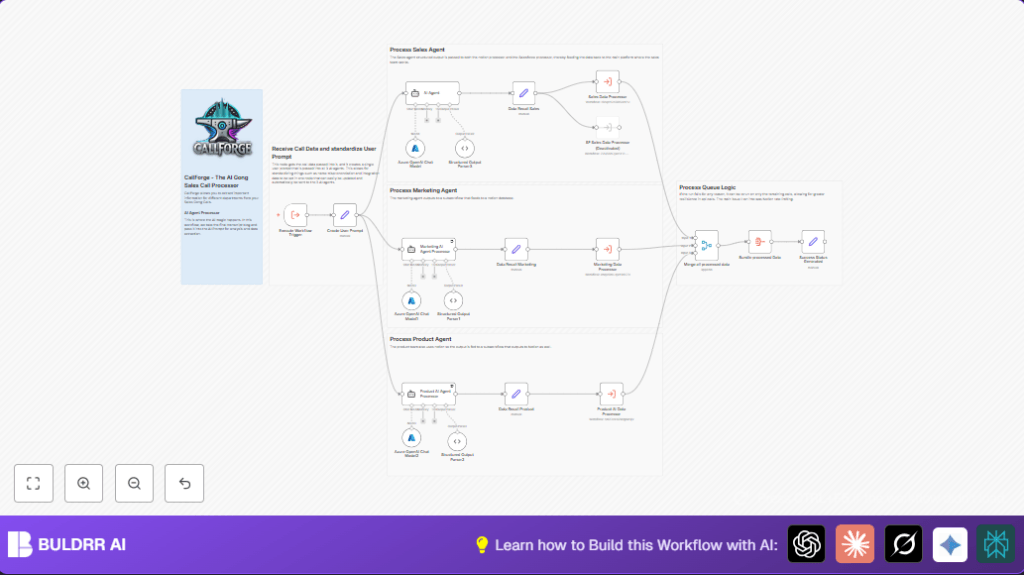

What This Workflow Does
This workflow takes a raw sales call transcript and uses AI to find clear, useful insights for Sales, Marketing, and Product teams.
It solves the problem of spending too much time reading long transcripts by making a simple, organized summary.
The result is fast, actionable information that helps teams make better decisions and work together better.
Who Should Use This Workflow
Managers or team members who handle many recorded sales calls and need quick summaries of what was said.
People who want to save hours each month by automating transcript analysis.
Teams needing structured insights sent to tools like Notion and Salesforce without manual work.
Tools And Services Used
- Azure OpenAI API: Runs AI models to analyze call transcripts.
- n8n Workflow Automation: Coordinates the data flow and AI processing.
- Notion API: Stores final structured insights for Marketing and Product teams.
- Salesforce Integration: Updates sales-related data in the CRM system.
- Webhook or API Trigger: Receives sales call transcripts.
Workflow Inputs → Processing → Outputs
Inputs
- Raw sales call transcript text with metadata like call time, participants, and account details.
- API credentials for Azure OpenAI, Notion, Salesforce.
- Configuration data such as domain names and competitor info.
Processing Steps
- Trigger node receives raw transcript data.
- Create User Prompt node combines transcript and metadata into a clear prompt for AI.
- Three AI agents run separately: Sales, Marketing, and Product-focused analysis.
- Structured output parser nodes convert AI JSON outputs to structured data.
- Set nodes package data per department, including metadata and CRM info.
- Department-specific subworkflows update Notion and Salesforce with insights.
- Data merged and bundled for final reporting.
- Success status message is generated to confirm workflow completion.
- Error handling and queue logic manage API rate limits and retries.
Outputs
- Clear, structured insights for Sales, Marketing, and Product teams.
- Entries in Notion for marketing themes and product feedback.
- Updated Salesforce records with sales objections, use cases, and next steps.
- Status report for workflow monitoring.
Beginner Step-by-Step: How To Use This Workflow In n8n
Download And Import
- Click the Download button on this page to get the workflow file.
- In n8n editor, click Import from File.
- Select the downloaded workflow file to add it to n8n.
Configure Credentials And Settings
- Add Azure OpenAI API Key credentials in n8n.
- Setup Notion API credentials and verify database access.
- Add Salesforce credentials if Salesforce integration is needed.
- Update IDs, emails, channels, or folder paths in configuration nodes as needed.
- Make sure webhook or API trigger is set to receive your sales call transcript data.
- Verify prompt text in Create User Prompt node to include correct company and competitor details.
Testing The Workflow
- Run the workflow manually with sample transcript data to check outputs.
- Confirm structured outputs appear in Notion or Salesforce as expected.
Activate For Production
- Activate the workflow trigger to listen for live call transcripts.
- Monitor execution through n8n interface and check logs for errors.
- Set up alerts or logs if desired to track workflow health.
For those using self-host n8n setups, see this resource to optimize hosting for production.
Customization Ideas
- Add extra AI agents for other teams like Support.
- Modify AI prompts to fine-tune what data is extracted.
- Integrate other CRM or document management systems besides Salesforce or Notion.
- Add support for multiple languages by localizing prompts.
- Expand competitor analysis with updated market data.
Common Edge Cases And Failures
- Malformed AI JSON output: Can cause parsing errors. Fix by refining the prompt or system messages.
- Notion API rate limits: Too many requests can block updates. Use retry and queue logic to avoid lost data.
- Wrong transcript mapping: Incorrect variable use in prompt causes wrong AI results. Check all expressions carefully.
Summary Of Benefits And Results
→ Automates tedious transcript reading into clear, structured insights.
→ Saves dozens of work hours each month for Sales, Marketing, and Product teams.
→ Updates Notion and Salesforce automatically with relevant data.
→ Reduces errors from manual note taking and speeds up response times.
→ Creates a consistent, reliable process for sales call intelligence processing.
