

What This Automation Does
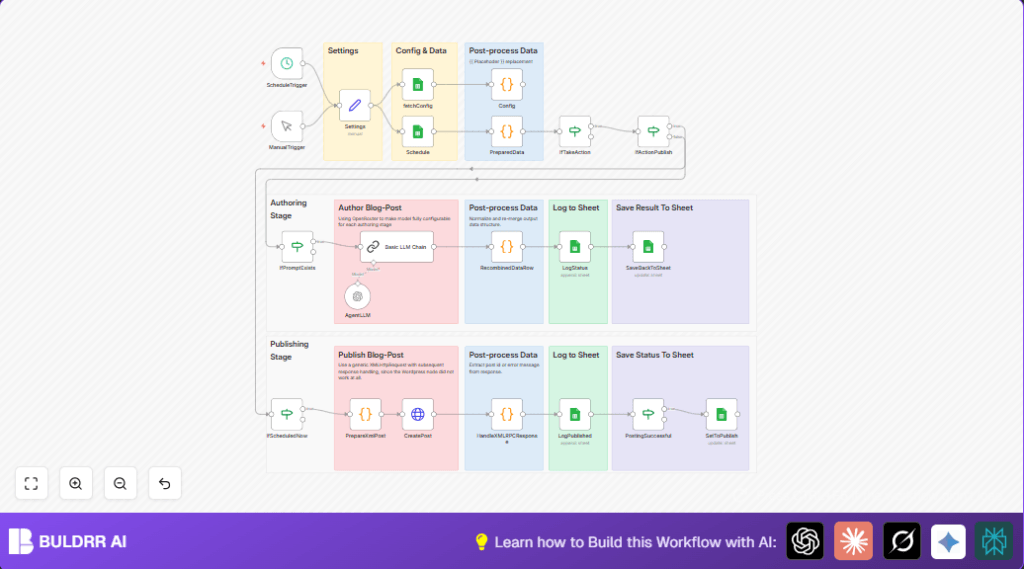
This workflow automates publishing blog posts on a WordPress site using n8n.
It reads draft posts and scheduling info from Google Sheets.
Then, it uses OpenAI to generate blog content for each post type based on prompts stored in a config sheet.
The workflow normalizes the AI output, converts it to XML-RPC format, and sends it to WordPress for publishing.
It records all actions and results back to Google Sheets for easy tracking.
This automation saves time and reduces errors by replacing manual post publishing steps.
Workflow Inputs, Processing, and Outputs
Inputs
- Google Sheets Schedule Sheet: List of blog posts with drafts, titles, status, and publish dates.
- Google Sheets Config Sheet: Prompts and settings for generating AI content per post type.
- OpenAI API Key: Used to request blog content generation.
- WordPress Credentials: Username and application password for XML-RPC publishing.
Processing Steps
- Fetch config and schedule data from Google Sheets.
- Match config prompts to posts by type.
- Fill prompts with blog data by replacing placeholders.
- Check if posts need action based on status and prompt availability.
- Send prompts to OpenAI to generate blog content.
- Parse and clean AI output to prepare for WordPress.
- Convert post data to XML-RPC request format.
- Send XML-RPC request to WordPress to publish posts.
- Record success or errors back in Google Sheets logs.
- Update post status as “publish” after successful posting.
Outputs
- Published blog posts on WordPress site.
- Logging entries in Google Sheets for tracking.
- Status updates in the schedule sheet.
Who Should Use This Workflow
This workflow fits content managers or editors who post regularly on WordPress.
It helps users who track post ideas and schedules in Google Sheets and want AI help creating content.
The workflow is good for non-technical users who want to avoid manual copy-pasting and formatting errors.
Tools and Services Used
- Google Sheets: Stores blog schedule and AI prompt configs.
- OpenAI API (via OpenRouter): Generates blog text from prompts.
- WordPress XML-RPC API: Publishes posts remotely.
- n8n Automation Platform: Runs the workflow and connects all parts.
- Optional Hosting: Use self-host n8n services to run safely and reliably.
Beginner Step-by-Step: How to Use This Workflow in n8n
Importing the Workflow
- Download the workflow using the Download button on this page.
- Open the n8n editor.
- Use the Import from File option to load the downloaded workflow JSON.
Setting Credentials and IDs
- Add or update Google Sheets credentials with OAuth2.
- Enter the OpenAI API Key for accessing AI services.
- Configure WordPress username and application password in the Settings node.
- Update Google Sheets URL, sheet tab names, and WordPress subdomain in the Settings node as needed.
Testing and Activation
- Run the workflow manually using the ManualTrigger node to check connectivity and logs.
- Review logs in the Google Sheets Log tab for success or errors.
- Activate the ScheduleTrigger node to have the workflow run automatically per set interval.
- Save the workflow to enable production use.
How the Workflow Works Inside n8n
1. Inputs
Google Sheets nodes fetch blog schedules and prompt config data.
Credentials and settings come from the Settings node.
2. Processing
The Code nodes prepare prompts by filling template placeholders.
Conditional If nodes check if blog posts need AI generation and publishing.
The Langchain node connects to OpenAI, sending prompts and receiving generated content.
Another Code node cleans AI output into usable formats.
The workflow builds XML-RPC post requests and sends them via the HTTP Request node.
3. Outputs
Posts appear on WordPress site.
Status and logs update in Google Sheets.
Customization Options
- Change post status handling by updating the Settings node values (like “publish” or “draft”).
- Switch AI models in the Config sheet to control tone and length of generated text.
- Add links or keywords to prompts by editing the Config sheet and passing fields through Code nodes.
- Adjust the time interval in the ScheduleTrigger node to control publishing frequency.
Troubleshooting Common Issues
- XML-RPC post failures: Check WordPress username and application password in Settings node.
- Google Sheets access errors: Ensure OAuth2 credentials are valid and sheets are shared with the right account.
- OpenAI API errors: Validate the API key and review prompts for syntax mistakes.
- Malformed AI output: Check prompt templates for correct placeholders and good formatting.
Pre-Production Checklist
- Verify Google Sheets URLs, tab names, and IDs in Settings node.
- Test OpenAI API with a simple prompt in the Langchain node.
- Manually test WordPress XML-RPC posting outside n8n to confirm credentials.
- Check placeholder replacements by reviewing output from PreparedData node.
- Run a manual test of the entire workflow and review logs in Google Sheets Log tab.
Deployment Guide
Once tested, activate the ScheduleTrigger node for automated runs.
Monitor operations in n8n and check logs in Google Sheets for any errors.
Adjust trigger timing for balance between server load and post frequency.
If hosting n8n on a server, consider self-host n8n options for reliability.
Summary
✓ Saves over 4 hours weekly by automating blog publishing tasks.
✓ Minimizes errors from manual post formatting and scheduling.
✓ Keeps editorial calendar and content synced via Google Sheets.
→ Publishes AI-generated blog posts directly to WordPress via XML-RPC.
→ Provides clear logs and status updates for easy tracking and review.
