
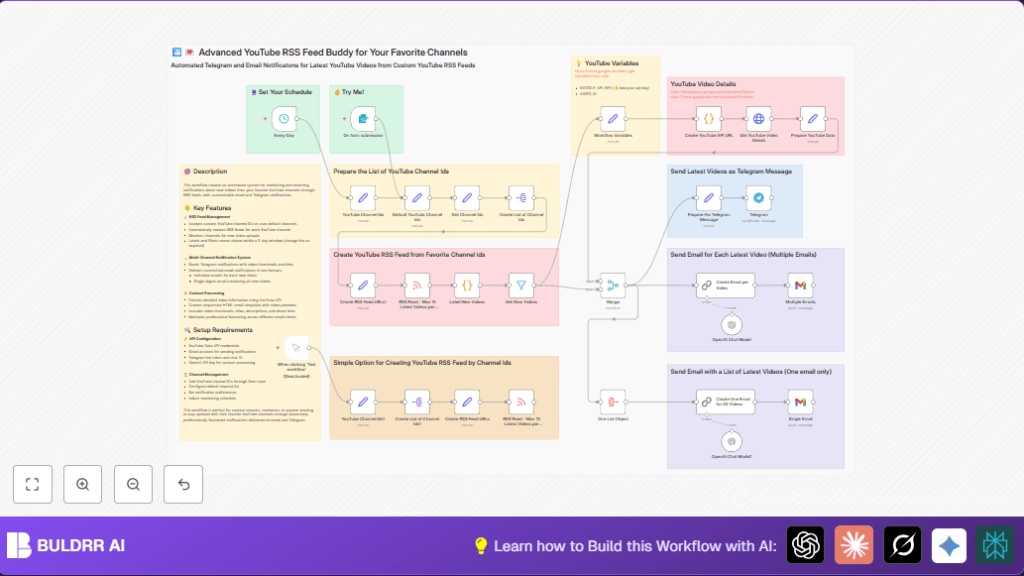

What This Workflow Does
This workflow watches specific YouTube channels for new videos.
It finds videos made in the last 3 days and gets extra details from YouTube’s API.
It sends emails and Telegram messages to notify about these new videos.
This saves time and stops users from missing important updates.
The system creates RSS feed URLs from a list of channel IDs, reads video feeds, filters recent posts, and enriches data with API calls.
Then it builds nice HTML emails and Telegram posts with thumbnails and links.
The Advanced Part: AI Summarizes and Distributes For You
Most YouTube RSS workflows just send you a link. This one goes further.
Once new videos are detected, OpenAI GPT-4o-mini reads the video
metadata — titles, descriptions, thumbnails — and generates a
professionally formatted HTML email digest automatically. No
manual writing. No copy-paste.
Then it distributes across two channels simultaneously:
→ Gmail — A polished HTML email with thumbnails and video links
lands in your team’s inbox, ready to read or forward.
→ Telegram — A clean message with thumbnail previews and clickable
links goes straight to your chat group for instant awareness.
This is what separates it from a basic RSS alert. Instead of raw
feed data, your team gets a curated, AI-written update — formatted,
branded, and delivered automatically the moment a new video goes live.
Basic YouTube RSS vs This Advanced Workflow — What’s the Difference?
If you’ve seen basic YouTube RSS automations before, here’s exactly
what this workflow adds on top:
| Feature | Basic RSS Workflow | This Advanced Workflow |
| Detects new videos | ✓ | ✓ |
| Filters by recency | ✗ | ✓ (last 3 days) |
| Enriches with YouTube API | ✗ | ✓ (thumbnails, metadata) |
| AI-generated email content | ✗ | ✓ (GPT-4o-mini) |
| HTML formatted emails | ✗ | ✓ |
| Telegram notifications | ✗ | ✓ |
| Supports multiple channels | ✗ | ✓ (batch via channel ID list) |
The basic version tells you a video exists.
This version tells you what it is, shows you a preview, and
delivers it formatted — across email and Telegram — without
you touching anything.
Use this if you’re monitoring multiple channels, need team-ready
digests, or want AI to handle the formatting work for you.
Who Should Use This Workflow
People who follow many YouTube channels and want to get video updates without checking manually.
Marketers, content teams, or anyone needing fast alerts about new videos.
This is for users who want neat, well-formatted notifications by email and Telegram.
Users need basic n8n skills and API access to set it up.
Tools and Services Used
- n8n: Orchestrates the entire workflow.
- YouTube Data API: Retrieves detailed video information.
- Gmail SMTP: Sends the notification emails.
- Telegram Bot API: Posts messages with video updates.
- OpenAI GPT-4o-mini: Generates professional HTML email templates.
Inputs, Processing, and Outputs
Inputs
- Predefined array of YouTube channel IDs or user input via a form in JSON format.
- API keys for Google YouTube Data API, Gmail, Telegram, and OpenAI.
Processing Steps
- Create RSS feed URLs for each YouTube channel.
- Fetch up to 15 latest videos per channel from RSS.
- Filter videos published in the last 3 days using JavaScript.
- Extract video IDs and form YouTube Data API requests.
- Retrieve enriched video metadata: titles, descriptions, thumbnails, embed links.
- Generate Telegram messages with thumbnails and clickable links.
- Aggregate video data to create one or multiple HTML emails using OpenAI.
- Send individual or digest email notifications via Gmail.
- Send video posts to Telegram chats via bot.
Outputs
- Professional HTML emails about recent videos sent to team inboxes.
- Telegram messages with video thumbnail and links to notify chat groups.
Beginner Step-by-Step: How to Use This Workflow in n8n
1. Download and Import the Workflow
- Click the Download button on this page to get the workflow file.
- Inside the n8n editor, click “Import from File” and upload the downloaded workflow.
2. Configure Required Credentials and Settings
- Set up Google API Key with YouTube Data API enabled.
- Add Gmail SMTP credentials to the Multiple Emails and Single Email nodes.
- Enter Telegram Bot Token and Chat ID into the Telegram node.
- Input OpenAI API Key in the designated nodes for generating email templates.
- Update YouTube channel IDs in the YouTube Channel Ids node or prepare to submit via the form.
3. Test the Workflow
- Run the workflow manually or submit channel IDs through the form trigger.
- Check if videos are fetched, emails are created, and messages are sent.
4. Activate for Production
- Enable the schedule trigger node if daily automation is desired.
- Monitor workflow runs in n8n for any errors or issues.
- Adjust inputs or API keys as needed.
For users managing their own server, consider self-host n8n for full control.
Edge Cases and Common Failures
- If a video ID is empty, the Label New Videos code may parse IDs incorrectly. Verify splitting logic for video ID extraction.
- Gmail email failures often come from expired or incorrect OAuth2 credentials. Re-authentication fixes this.
- Telegram notifications fail if bot token or chat ID is wrong. Confirm environment variables and bot chat membership.
- Empty or invalid YouTube channel ID lists cause no RSS feeds to generate. Double-check input formats.
Customization Ideas
- Add Slack or other messaging channels by inserting corresponding nodes and changing payloads.
- Change the “days” value in the Label New Videos code node to widen or narrow the new video window.
- Extend video data fields to include view counts or comments from YouTube API for richer email content.
- Modify the form trigger to mark dynamic recipients or input validation.
- Tweak OpenAI prompt templates in the LangChain nodes to match brand colors or layouts.
Summary of Results
✓ Saves hours daily by automating YouTube video monitoring.
✓ Delivers timely, well-structured email and Telegram notifications.
✓ Reduces manual errors and missed updates.
✓ Makes video updates easy to consume with rich HTML templates.
