What Is n8n? A Simplest-English Guide for Non-Technical People
Updated: August 27, 2026
You keep hearing people mention n8n, but every time you try to read about it, the explanation is packed with words like “nodes”, “webhooks”, and “self-hosted instances.”
You just want to know what it actually is and whether you should care. This post is going to explain n8n in the plainest English possible – no jargon, no stress, no tech background needed.
By the end, you’ll know exactly what n8n is, what it can do for you, and how to get started today.
So… What Is n8n, Exactly?
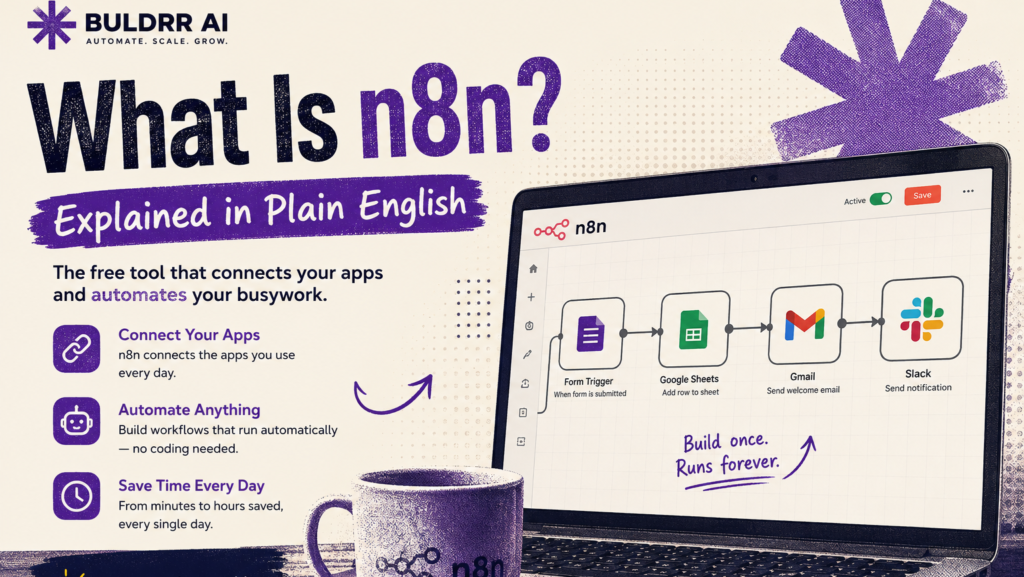
n8n (pronounced “n-eight-n”) is a free tool that connects your apps and makes them work together automatically.
So you don’t have to do boring, repetitive tasks by hand anymore.
Think of it like having a really reliable assistant at work. Every time a new customer fills out your contact form, this assistant automatically saves their info to a spreadsheet, sends them a welcome email, and adds a task to your to-do list. All without you lifting a finger.
That’s exactly what n8n does. Except it never sleeps, never makes mistakes, and costs nothing if you set it up the right way.
And a lot of them are regular people, freelancers, and small business owners. Not just developers.
What Does n8n Actually Do? (With a Real Example)
n8n lets you build automations. That’s just a fancy word for “a task that runs itself.”
Here’s a simple real-world example to make that concrete.
Before n8n:
Every time someone fills out your website’s contact form, you open your email, copy their name and email address, open a Google Sheet, paste the info in, go back to Gmail, and send them a welcome message.
That’s five steps. Done manually. Every. Single. Time.
After n8n:
The moment someone fills out that form, n8n automatically saves their info to your spreadsheet AND sends them a welcome email.
All while you’re doing something else entirely, or even sleeping.
In n8n, these automated processes are called workflows. A workflow is basically a recipe card – it says “when this happens, do that, then do this other thing.”
You build it once. n8n follows the recipe every time, perfectly.
Real example: new contact form submission
Without n8n
You do every step yourself
1
Open your email and read the new form notification
Okay so this is the one term you need to understand. And it’s genuinely simple.
In n8n, everything is built out of nodes. A node is just one small step in your workflow.
Think of nodes like LEGO bricks. Each brick does one specific thing. You click them together to build something bigger.
There are two main types:
Trigger node – the “when this happens” part. It watches for something, like a motion sensor light that detects movement and reacts on its own. Example: “When a new row is added to my Google Sheet.”
Action node – the “do that” part. It performs a task. Example: “Send an email” or “Post a message to Slack.”
So a simple n8n workflow might look like this:
Trigger: New row added to Google Sheet. Action: Send a Slack message to my team.
That’s it. Two nodes. One workflow. Runs automatically, forever.
n8n officially offers 400+ pre-built integrations, so you can connect it to hundreds of popular apps. Gmail, Google Sheets, Slack, Notion, WhatsApp, HubSpot, and many more.
Why Do People Choose n8n Over Zapier?
This is where n8n gets really interesting, honestly.
Tools like Zapier do the same general thing – they connect apps and automate tasks. But there’s a big difference.
Zapier charges you based on how many automations you run. If you want more workflows or faster run times, you pay more. Month after month.
n8n? When you set it up on your own server, it’s completely free. No monthly limits. No per-task charges. It just runs forever.
Here’s a quick comparison:
n8n (self-hosted)
Zapier
Price
Free (you own it)
Paid monthly subscription
Workflow limits
Unlimited
Limited by plan
Your data
Stays on your server
Stored on Zapier’s servers
Complexity
More powerful
Easier to start
n8n is the tool that serious learners, small business owners, and freelancers are switching to.
Because once it’s set up, it costs almost nothing to run and you’re never locked out of your own automations.
Do You Need to Know How to Code?
Short answer: No.
For the basics, and honestly even for most intermediate stuff, you don’t need to write a single line of code.
If you’re worried about being “too non-technical” for this – lol, I hear you. Most people feel that way at first.
But n8n was built to be visual. You drag, click, and connect. It looks more like building a flowchart than writing code.
And here’s the best part: you don’t have to build your workflows from scratch.
There are two main ways to use n8n. Here’s what you need to know.
Option 1: Self-Hosted n8n on a VPS (Recommended)
This means you install n8n on a small online server that runs 24/7 in the background.
You own it completely. It costs around $4 to $6 per month for the server, and n8n itself is free forever.
“Self-hosting” sounds complicated. lol, I thought so too at first.
But honestly? It’s just installing a program on a small online computer. You don’t need to know coding. It takes about 15 minutes and then it just works.
If you want to go this route, the easiest way to start is to grab an affordable hosting plan. We recommend Hostinger’s VPS for beginners because it’s cheap, fast to set up, and works great with n8n.
Once you have that, check out our full beginner’s guide to n8n which walks you through the whole setup step by step.
⚠️ Nothing you do during setup will break your other apps or delete anything. You’re just creating a new account on a new server. You can turn it off anytime.
Option 2: n8n Cloud (Great for Trying It Out)
n8n.io offers a cloud version where you sign up and start building right in your browser.
No server needed. It has a free trial so you can explore it with zero commitment.
Keep in mind that after the trial, the cloud version is a paid subscription. So it’s best as a “let me just look around” option before committing.
For most people who want to use n8n seriously long-term, self-hosting is the smarter move.
But if you just want to see what it looks like right now? n8n Cloud is perfect for that.
Common Questions People Ask About n8n
Is n8n free to use?
Yes. n8n is free when you self-host it.
The community edition gives you unlimited workflows, unlimited runs, and full access to all integrations. You only pay for the server, which costs around $4 to $6 per month.
Do I need coding skills for n8n?
No coding is needed to build basic and intermediate workflows in n8n.
The interface is visual. You connect nodes by clicking and dragging. If you want to do more advanced things later, basic JavaScript can help. But it’s completely optional and not required to start.
What’s the difference between n8n and Zapier?
Both tools connect your apps and automate tasks between them.
The main differences: n8n is free when self-hosted and gives you unlimited workflows. Zapier is easier for absolute beginners but charges monthly and limits how many automations you can run.
Quick Recap
n8n is a free tool that connects your apps and automates repetitive tasks so they run by themselves.
It works through workflows, which are recipes that say “when this happens, do that.”
Workflows are built from nodes, small building blocks that work like LEGO bricks.
n8n is free forever when you self-host it on a cheap VPS.
No coding required to get started.
What Should You Do Next?
Your one action right now: go to n8n.io, click “Get started free”, and just look around the dashboard.
You don’t have to build anything. You don’t have to connect any apps. Just open it and click around to see what it looks like.
Nothing will break. Nothing will send any emails you didn’t ask for. You’re just exploring.
And when you’re ready to take the next step, our full beginner’s guide to n8n walks you through building your very first workflow from scratch. You’ll have something running in under 30 minutes. Pretty cool, right?
FAQ
What does n8n stand for?
n8n stands for “nodemation.” The 8 replaces the 8 letters between the two n’s. It’s pronounced “n-eight-n.”
Is n8n open source?
Yes. n8n is open-source under a fair-code license. You can download the code, modify it, and self-host it for free.
Can n8n connect to Google Sheets and Gmail?
Yes. Google Sheets and Gmail are two of n8n’s most popular integrations. You can automate tasks between them without writing any code.
Is n8n safe to use?
Yes. When you self-host n8n, your data never leaves your own server. That’s actually more private than cloud-based tools like Zapier, where your data passes through their systems.
How long does it take to set up n8n?
n8n Cloud takes about 2 minutes. Self-hosted n8n on a VPS takes about 15 minutes for a first-timer following a step-by-step guide.
Can I use n8n for my small business?
Absolutely. n8n is especially popular with freelancers, small business owners, and solopreneurs who want to automate tasks like lead capture, email follow-ups, and social media posting without paying for expensive software.
You keep hearing people mention n8n, but every time you try to read about it, the explanation is packed with words like “nodes”, “webhooks”, and “self-hosted instances.”
You just want to know what it actually is and whether you should care. This post is going to explain n8n in the plainest English possible – no jargon, no stress, no tech background needed.
By the end, you’ll know exactly what n8n is, what it can do for you, and how to get started today.
So… What Is n8n, Exactly?
n8n (pronounced “n-eight-n”) is a free tool that connects your apps and makes them work together automatically.
So you don’t have to do boring, repetitive tasks by hand anymore.
Think of it like having a really reliable assistant at work. Every time a new customer fills out your contact form, this assistant automatically saves their info to a spreadsheet, sends them a welcome email, and adds a task to your to-do list. All without you lifting a finger.
That’s exactly what n8n does. Except it never sleeps, never makes mistakes, and costs nothing if you set it up the right way.
And a lot of them are regular people, freelancers, and small business owners. Not just developers.
What Does n8n Actually Do? (With a Real Example)
n8n lets you build automations. That’s just a fancy word for “a task that runs itself.”
Here’s a simple real-world example to make that concrete.
Before n8n:
Every time someone fills out your website’s contact form, you open your email, copy their name and email address, open a Google Sheet, paste the info in, go back to Gmail, and send them a welcome message.
That’s five steps. Done manually. Every. Single. Time.
After n8n:
The moment someone fills out that form, n8n automatically saves their info to your spreadsheet AND sends them a welcome email.
All while you’re doing something else entirely, or even sleeping.
In n8n, these automated processes are called workflows. A workflow is basically a recipe card – it says “when this happens, do that, then do this other thing.”
You build it once. n8n follows the recipe every time, perfectly.
Real example: new contact form submission
Without n8n
You do every step yourself
1
Open your email and read the new form notification
Okay so this is the one term you need to understand. And it’s genuinely simple.
In n8n, everything is built out of nodes. A node is just one small step in your workflow.
Think of nodes like LEGO bricks. Each brick does one specific thing. You click them together to build something bigger.
There are two main types:
Trigger node – the “when this happens” part. It watches for something, like a motion sensor light that detects movement and reacts on its own. Example: “When a new row is added to my Google Sheet.”
Action node – the “do that” part. It performs a task. Example: “Send an email” or “Post a message to Slack.”
So a simple n8n workflow might look like this:
Trigger: New row added to Google Sheet. Action: Send a Slack message to my team.
That’s it. Two nodes. One workflow. Runs automatically, forever.
n8n officially offers 400+ pre-built integrations, so you can connect it to hundreds of popular apps. Gmail, Google Sheets, Slack, Notion, WhatsApp, HubSpot, and many more.
Why Do People Choose n8n Over Zapier?
This is where n8n gets really interesting, honestly.
Tools like Zapier do the same general thing – they connect apps and automate tasks. But there’s a big difference.
Zapier charges you based on how many automations you run. If you want more workflows or faster run times, you pay more. Month after month.
n8n? When you set it up on your own server, it’s completely free. No monthly limits. No per-task charges. It just runs forever.
Here’s a quick comparison:
n8n (self-hosted)
Zapier
Price
Free (you own it)
Paid monthly subscription
Workflow limits
Unlimited
Limited by plan
Your data
Stays on your server
Stored on Zapier’s servers
Complexity
More powerful
Easier to start
n8n is the tool that serious learners, small business owners, and freelancers are switching to.
Because once it’s set up, it costs almost nothing to run and you’re never locked out of your own automations.
Do You Need to Know How to Code?
Short answer: No.
For the basics, and honestly even for most intermediate stuff, you don’t need to write a single line of code.
If you’re worried about being “too non-technical” for this – lol, I hear you. Most people feel that way at first.
But n8n was built to be visual. You drag, click, and connect. It looks more like building a flowchart than writing code.
And here’s the best part: you don’t have to build your workflows from scratch.
There are two main ways to use n8n. Here’s what you need to know.
Option 1: Self-Hosted n8n on a VPS (Recommended)
This means you install n8n on a small online server that runs 24/7 in the background.
You own it completely. It costs around $4 to $6 per month for the server, and n8n itself is free forever.
“Self-hosting” sounds complicated. lol, I thought so too at first.
But honestly? It’s just installing a program on a small online computer. You don’t need to know coding. It takes about 15 minutes and then it just works.
If you want to go this route, the easiest way to start is to grab an affordable hosting plan. We recommend Hostinger’s VPS for beginners because it’s cheap, fast to set up, and works great with n8n.
Once you have that, check out our full beginner’s guide to n8n which walks you through the whole setup step by step.
⚠️ Nothing you do during setup will break your other apps or delete anything. You’re just creating a new account on a new server. You can turn it off anytime.
Option 2: n8n Cloud (Great for Trying It Out)
n8n.io offers a cloud version where you sign up and start building right in your browser.
No server needed. It has a free trial so you can explore it with zero commitment.
Keep in mind that after the trial, the cloud version is a paid subscription. So it’s best as a “let me just look around” option before committing.
For most people who want to use n8n seriously long-term, self-hosting is the smarter move.
But if you just want to see what it looks like right now? n8n Cloud is perfect for that.
Common Questions People Ask About n8n
Is n8n free to use?
Yes. n8n is free when you self-host it.
The community edition gives you unlimited workflows, unlimited runs, and full access to all integrations. You only pay for the server, which costs around $4 to $6 per month.
Do I need coding skills for n8n?
No coding is needed to build basic and intermediate workflows in n8n.
The interface is visual. You connect nodes by clicking and dragging. If you want to do more advanced things later, basic JavaScript can help. But it’s completely optional and not required to start.
What’s the difference between n8n and Zapier?
Both tools connect your apps and automate tasks between them.
The main differences: n8n is free when self-hosted and gives you unlimited workflows. Zapier is easier for absolute beginners but charges monthly and limits how many automations you can run.
Quick Recap
n8n is a free tool that connects your apps and automates repetitive tasks so they run by themselves.
It works through workflows, which are recipes that say “when this happens, do that.”
Workflows are built from nodes, small building blocks that work like LEGO bricks.
n8n is free forever when you self-host it on a cheap VPS.
No coding required to get started.
What Should You Do Next?
Your one action right now: go to n8n.io, click “Get started free”, and just look around the dashboard.
You don’t have to build anything. You don’t have to connect any apps. Just open it and click around to see what it looks like.
Nothing will break. Nothing will send any emails you didn’t ask for. You’re just exploring.
And when you’re ready to take the next step, our full beginner’s guide to n8n walks you through building your very first workflow from scratch. You’ll have something running in under 30 minutes. Pretty cool, right?
FAQ
What does n8n stand for?
n8n stands for “nodemation.” The 8 replaces the 8 letters between the two n’s. It’s pronounced “n-eight-n.”
Is n8n open source?
Yes. n8n is open-source under a fair-code license. You can download the code, modify it, and self-host it for free.
Can n8n connect to Google Sheets and Gmail?
Yes. Google Sheets and Gmail are two of n8n’s most popular integrations. You can automate tasks between them without writing any code.
Is n8n safe to use?
Yes. When you self-host n8n, your data never leaves your own server. That’s actually more private than cloud-based tools like Zapier, where your data passes through their systems.
How long does it take to set up n8n?
n8n Cloud takes about 2 minutes. Self-hosted n8n on a VPS takes about 15 minutes for a first-timer following a step-by-step guide.
Can I use n8n for my small business?
Absolutely. n8n is especially popular with freelancers, small business owners, and solopreneurs who want to automate tasks like lead capture, email follow-ups, and social media posting without paying for expensive software.
Author
Written By
Vikash Kumar
Building AI agents, n8n workflows and end-to-end automation for 30+ Brands across India, the US, Europe, Dubai & Australia. 7+ years of Experience saving founders real hours every week - no code required.