
Anthropic’s Prompt Engineering Guide, Explained Simply

Updated: July 25, 2026

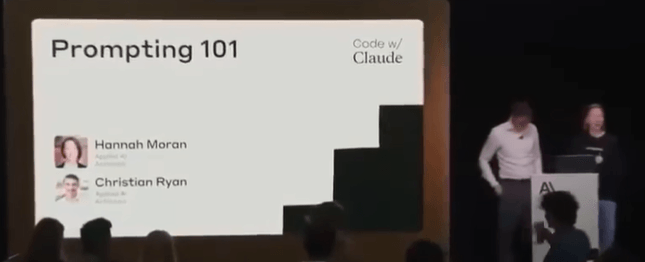
This workshop from Anthropic breaks prompt engineering into practical systems instead of “prompt tricks”.

The core lesson:

Better prompts come from better context, structure, and iteration.

Not from magic phrases.


What Prompt Engineering Actually Is

Prompt engineering is:

→ Giving the model clear instructions

→ Providing enough context

→ Structuring information correctly

→ Guiding the reasoning process

→ Reducing ambiguity

The goal is simple:

Help the model understand:

  1. What the task is
  2. What information matters
  3. How to think through the problem
  4. What output format is expected

The Real Example Anthropic Used

The workshop used a Swedish insurance claims workflow.

Input data:

→ A car accident report form

→ A hand drawn accident sketch

The model needed to:

→ Analyze the documents

→ Understand what happened

→ Determine fault confidently


The First Prompt Failed

Their first prompt was extremely simple.

Something like:

“Review this accident report and determine what happened.”

Result:

Claude incorrectly assumed the report was about a skiing accident.

Why?

Because the model lacked context.

The prompt never explained:

→ This was car insurance

→ The documents were accident forms

→ The sketch represented vehicle movement

→ The goal was insurance claim analysis

The model filled missing gaps with assumptions.

This is one of the biggest lessons in prompting.

If context is missing, the model starts guessing.


Prompt Engineering Is Iterative

Anthropic repeatedly emphasized this.

Good prompts are built through testing.

The workflow looks like this:

  1. Write initial prompt
  2. Test output
  3. Identify failures
  4. Add missing context
  5. Clarify instructions
  6. Test again
  7. Repeat

Prompt engineering is not theory.

It is iterative debugging.


The Structure Anthropic Recommends

Anthropic shared a structured prompt format for production systems.

Their recommended order:

1. Task Description

Tell the model:

→ What role it has

→ What job it needs to perform

→ What success looks like

Example:

“You are an AI assistant helping a Swedish insurance claims adjuster review vehicle accident reports.”

This immediately reduces ambiguity.


2. Dynamic Content

Next comes the actual input data.

Examples:

→ Images

→ PDFs

→ Forms

→ User messages

→ Retrieved documents

→ API data

In their case:

→ Accident forms

→ Hand drawn sketches

This section changes every request.


3. Detailed Instructions

Anthropic strongly recommends explicit reasoning instructions.

Instead of:

“Analyze this”

Use:

→ Review form first

→ Identify vehicle actions

→ Compare sketch against form

→ Evaluate confidence level

→ Determine fault only if evidence is sufficient

The more operational the instructions, the better.


4. Examples

Examples help align behavior.

You show:

→ Sample input

→ Ideal output

This teaches:

→ Output formatting

→ Tone

→ Reasoning depth

→ Confidence handling

Examples are especially useful for:

→ Extraction

→ Classification

→ Structured outputs

→ Decision systems


5. Final Reminders

Anthropic repeats critical constraints at the end.

Example:

→ Do not guess

→ Only make conclusions supported by evidence

→ Clearly state uncertainty

→ Stay factual

This reinforces model behavior before inference begins.


Why Context Matters So Much

The first failure happened because the model lacked environmental context.

After they added:

→ Insurance workflow details

→ Swedish accident reporting explanation

→ Human claims adjuster role

→ Vehicle context

Claude immediately stopped talking about skiing accidents.

The model behavior changed dramatically from context alone.


Anthropic’s Key Prompting Principle

The model should never need to “figure out the environment”.

You should define:

→ The setting

→ The task

→ The domain

→ The rules

→ The expectations

The less guessing required, the better the output.


Tone Context Is Important

Anthropic also discussed tone constraints.

For insurance workflows:

→ Accuracy matters more than creativity

→ Confidence matters more than fluency

So they instructed Claude to:

→ Stay factual

→ Avoid unsupported claims

→ Only conclude when confident

Without these constraints:

models often sound confident even when uncertain.


Confidence Handling Is Critical

One of the best practices from the workshop:

Teach the model how uncertainty should work.

Example:

→ If evidence is weak, say uncertain

→ If data conflicts, explain conflict

→ If information is missing, request clarification

This is extremely important for:

→ AI agents

→ automation systems

→ multimodal analysis

→ enterprise workflows


Their Prompt Improvement Process

Version 1:

→ Minimal context

→ Poor understanding

→ Incorrect assumptions

Version 2:

→ Added task context

→ Added role definition

→ Added tone rules

→ Added confidence requirements

Result:

→ Better reasoning

→ Better extraction

→ Better classification

→ Better reliability

This shows how small prompt changes compound heavily.


Key Lessons From The Workshop

1. Models Need Context

Do not assume the model understands:

→ your workflow

→ your business

→ your domain

→ your data structure

Explain everything clearly.


2. Prompting Is System Design

Good prompts are structured systems.

Not random instructions.

The structure matters:

→ role

→ context

→ instructions

→ examples

→ constraints


3. Explicit Instructions Beat Ambiguity

Weak:

“Analyze this”

Strong:

“Review the accident form first. Compare the sketch. Determine fault only if evidence supports a conclusion.”

Specific instructions improve reasoning quality.


4. The Model Reflects The Prompt

Bad prompt:

→ vague output

→ hallucinations

→ assumptions

Good prompt:

→ grounded reasoning

→ structured thinking

→ confidence awareness


5. Enterprise AI Needs Guardrails

Anthropic repeatedly emphasized:

→ factuality

→ confidence calibration

→ uncertainty handling

Especially for:

→ legal systems

→ insurance

→ healthcare

→ finance

→ automation pipelines


Practical Prompt Template

Here’s the simplified structure based on the workshop:

Role

“You are an AI assistant helping insurance adjusters review vehicle accident reports.”

Task

“Analyze the provided documents and determine what happened.”

Context

“The documents contain Swedish accident forms and hand drawn incident sketches.”

Instructions

→ Review form carefully

→ Compare sketch against form

→ Extract relevant evidence

→ State confidence clearly

→ Do not guess

Output Format

→ Summary

→ Key findings

→ Confidence assessment

→ Fault determination

Final Reminder

“Only make conclusions supported by evidence.”


Best Takeaway From The Entire Workshop

Prompt engineering is not about clever wording.

It is about:

→ clarity

→ structure

→ context

→ iteration

→ constraints

→ reasoning guidance

The better your system design, the better your AI output.

This workshop from Anthropic breaks prompt engineering into practical systems instead of “prompt tricks”.

The core lesson:

Better prompts come from better context, structure, and iteration.

Not from magic phrases.


What Prompt Engineering Actually Is

Prompt engineering is:

→ Giving the model clear instructions

→ Providing enough context

→ Structuring information correctly

→ Guiding the reasoning process

→ Reducing ambiguity

The goal is simple:

Help the model understand:

  1. What the task is
  2. What information matters
  3. How to think through the problem
  4. What output format is expected

The Real Example Anthropic Used

The workshop used a Swedish insurance claims workflow.

Input data:

→ A car accident report form

→ A hand drawn accident sketch

The model needed to:

→ Analyze the documents

→ Understand what happened

→ Determine fault confidently


The First Prompt Failed

Their first prompt was extremely simple.

Something like:

“Review this accident report and determine what happened.”

Result:

Claude incorrectly assumed the report was about a skiing accident.

Why?

Because the model lacked context.

The prompt never explained:

→ This was car insurance

→ The documents were accident forms

→ The sketch represented vehicle movement

→ The goal was insurance claim analysis

The model filled missing gaps with assumptions.

This is one of the biggest lessons in prompting.

If context is missing, the model starts guessing.


Prompt Engineering Is Iterative

Anthropic repeatedly emphasized this.

Good prompts are built through testing.

The workflow looks like this:

  1. Write initial prompt
  2. Test output
  3. Identify failures
  4. Add missing context
  5. Clarify instructions
  6. Test again
  7. Repeat

Prompt engineering is not theory.

It is iterative debugging.


The Structure Anthropic Recommends

Anthropic shared a structured prompt format for production systems.

Their recommended order:

1. Task Description

Tell the model:

→ What role it has

→ What job it needs to perform

→ What success looks like

Example:

“You are an AI assistant helping a Swedish insurance claims adjuster review vehicle accident reports.”

This immediately reduces ambiguity.


2. Dynamic Content

Next comes the actual input data.

Examples:

→ Images

→ PDFs

→ Forms

→ User messages

→ Retrieved documents

→ API data

In their case:

→ Accident forms

→ Hand drawn sketches

This section changes every request.


3. Detailed Instructions

Anthropic strongly recommends explicit reasoning instructions.

Instead of:

“Analyze this”

Use:

→ Review form first

→ Identify vehicle actions

→ Compare sketch against form

→ Evaluate confidence level

→ Determine fault only if evidence is sufficient

The more operational the instructions, the better.


4. Examples

Examples help align behavior.

You show:

→ Sample input

→ Ideal output

This teaches:

→ Output formatting

→ Tone

→ Reasoning depth

→ Confidence handling

Examples are especially useful for:

→ Extraction

→ Classification

→ Structured outputs

→ Decision systems


5. Final Reminders

Anthropic repeats critical constraints at the end.

Example:

→ Do not guess

→ Only make conclusions supported by evidence

→ Clearly state uncertainty

→ Stay factual

This reinforces model behavior before inference begins.


Why Context Matters So Much

The first failure happened because the model lacked environmental context.

After they added:

→ Insurance workflow details

→ Swedish accident reporting explanation

→ Human claims adjuster role

→ Vehicle context

Claude immediately stopped talking about skiing accidents.

The model behavior changed dramatically from context alone.


Anthropic’s Key Prompting Principle

The model should never need to “figure out the environment”.

You should define:

→ The setting

→ The task

→ The domain

→ The rules

→ The expectations

The less guessing required, the better the output.


Tone Context Is Important

Anthropic also discussed tone constraints.

For insurance workflows:

→ Accuracy matters more than creativity

→ Confidence matters more than fluency

So they instructed Claude to:

→ Stay factual

→ Avoid unsupported claims

→ Only conclude when confident

Without these constraints:

models often sound confident even when uncertain.


Confidence Handling Is Critical

One of the best practices from the workshop:

Teach the model how uncertainty should work.

Example:

→ If evidence is weak, say uncertain

→ If data conflicts, explain conflict

→ If information is missing, request clarification

This is extremely important for:

→ AI agents

→ automation systems

→ multimodal analysis

→ enterprise workflows


Their Prompt Improvement Process

Version 1:

→ Minimal context

→ Poor understanding

→ Incorrect assumptions

Version 2:

→ Added task context

→ Added role definition

→ Added tone rules

→ Added confidence requirements

Result:

→ Better reasoning

→ Better extraction

→ Better classification

→ Better reliability

This shows how small prompt changes compound heavily.


Key Lessons From The Workshop

1. Models Need Context

Do not assume the model understands:

→ your workflow

→ your business

→ your domain

→ your data structure

Explain everything clearly.


2. Prompting Is System Design

Good prompts are structured systems.

Not random instructions.

The structure matters:

→ role

→ context

→ instructions

→ examples

→ constraints


3. Explicit Instructions Beat Ambiguity

Weak:

“Analyze this”

Strong:

“Review the accident form first. Compare the sketch. Determine fault only if evidence supports a conclusion.”

Specific instructions improve reasoning quality.


4. The Model Reflects The Prompt

Bad prompt:

→ vague output

→ hallucinations

→ assumptions

Good prompt:

→ grounded reasoning

→ structured thinking

→ confidence awareness


5. Enterprise AI Needs Guardrails

Anthropic repeatedly emphasized:

→ factuality

→ confidence calibration

→ uncertainty handling

Especially for:

→ legal systems

→ insurance

→ healthcare

→ finance

→ automation pipelines


Practical Prompt Template

Here’s the simplified structure based on the workshop:

Role

“You are an AI assistant helping insurance adjusters review vehicle accident reports.”

Task

“Analyze the provided documents and determine what happened.”

Context

“The documents contain Swedish accident forms and hand drawn incident sketches.”

Instructions

→ Review form carefully

→ Compare sketch against form

→ Extract relevant evidence

→ State confidence clearly

→ Do not guess

Output Format

→ Summary

→ Key findings

→ Confidence assessment

→ Fault determination

Final Reminder

“Only make conclusions supported by evidence.”


Best Takeaway From The Entire Workshop

Prompt engineering is not about clever wording.

It is about:

→ clarity

→ structure

→ context

→ iteration

→ constraints

→ reasoning guidance

The better your system design, the better your AI output.

Author
Written By
Vikash Kumar
Building AI agents, n8n workflows and end-to-end automation for 30+ Brands across India, the US, Europe, Dubai & Australia. 7+ years of Experience saving founders real hours every week - no code required.
Ask more Questions about this Blog with AI:

Our AI Articles

Learn from our AI Articles to excel in your profession ;)

n8n Webhook Tutorial: Trigger Any Automation from Anywhere (2026)

Learn how to set up n8n webhooks step by step. This beginner guide covers triggers, test vs production mode, security...

n8n Pricing 2026: Free Self-Hosted vs Cloud Costs Explained

n8n pricing broken down for 2026: every Cloud plan cost, real self-hosted server prices, and how to pick the option...

n8n MCP: How to Connect AI Agents to Any Tool (2026)

n8n MCP lets your AI agent connect to any tool through one shared standard, no custom code needed. Here is...

Lara Acosta LinkedIn Templates and Hooks (2026 Examples)

Copy Lara Acosta LinkedIn templates and hook examples, plus the SLAY framework, to write posts that get read. A simple...

n8n Docker Setup: Install n8n the Easy Way (2026 Guide)

Learn how to install n8n with Docker step by step. A beginner-friendly 2026 guide to run n8n on your own...

How to Self Host n8n for Free: The Beginner VPS Setup Guide (2026)

The n8n cloud version has a free trial that runs out. After that, you pay a monthly fee for every...

10 Best n8n Workflows Every Business Should Automate

Manual work is killing business speed. In 2026, companies that still copy-paste data between apps are already behind. This is...

Automating the First 14 Days After Someone Buys From You

How to automate the first 14 days after a sale closes — welcome messages, account setup, kickoff booking, and day-7/day-14...

10 Questions to Ask Before Hiring an n8n Automation Agency

Before hiring an n8n automation agency, ask about their pricing model (per-workflow vs retainer), who owns the finished workflows, how...

n8n vs Zapier vs Make: Which Automation Tool is Best for Business

n8n is the best fit for businesses that want self-hosting, unlimited executions, and deep AI-agent capability and have some technical...

How to Use OpenRouter with n8n: Free AI Workflows (No Card Needed)

You keep hearing about AI automation but every option seems to cost money. ChatGPT Plus is $20 a month. Claude...

How to Automate Lead Follow-Up Calls with AI: A Step-by-Step Guide

Here is a number that should worry every business owner: leads that are called within five minutes of showing interest...

1:1 Free Strategy Session
Your competitors are already automating. Are you still paying for it manually?

Do you want to adopt AI Automation?

Every hour your team does repetitive work, you're burning real money.
While you wait, faster businesses are cutting costs and moving quicker.
AI and automations aren't the future anymore — they're the present.

Book a live 1-on-1 session where we show you exactly which of your daily tasks can be automated — and what it’s costing you not to.