

What This Workflow Does
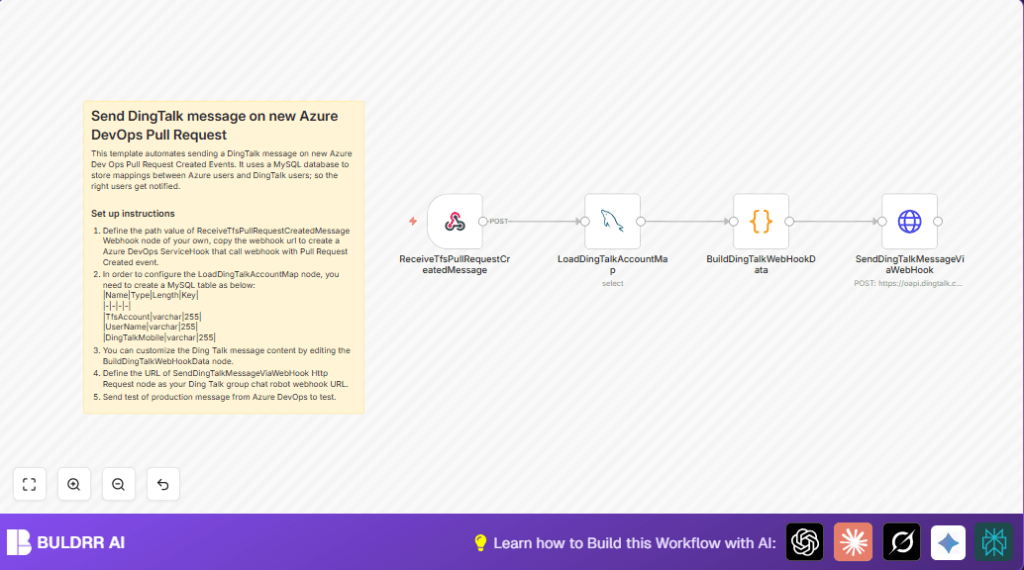
This workflow sends a message to DingTalk group chat every time a new Azure DevOps Pull Request (PR) is created. It uses a MySQL table to match Azure DevOps users with DingTalk contacts, so the correct people get mentioned automatically. This removes manual work and makes sure PR reviews happen faster.
The workflow listens for PR creation events from Azure DevOps via a webhook. It then loads user mappings from MySQL. A Code node builds a DingTalk markdown message, replacing Azure usernames with DingTalk names and adding @ mentions. The message posts to DingTalk using an HTTP request. If a reviewer group means “team,” the workflow mentions all members instead of individuals.
Who Should Use This Workflow
This is for teams managing software development in Azure DevOps who want faster and accurate review notifications in DingTalk. It suits team leads or DevOps engineers who need to cut down manual messaging delays and errors. Users must have access to Azure DevOps with service hooks, a MySQL database for user maps, and DingTalk robot access.
Tools / Services Used
- Azure DevOps: Sends Pull Request Created webhook events.
- MySQL database: Stores mappings of Azure DevOps usernames to DingTalk usernames and mobile numbers.
- n8n: Runs the automation workflow to receive, process, and send messages.
- DingTalk robot webhook: Used to post markdown messages with user mentions to group chats.
Inputs, Processing Steps, and Output
Inputs
- Webhook event JSON from Azure DevOps when a new Pull Request is created.
- User mapping data from
tfs_dingtalk_account_mapMySQL table.
Processing Steps
- Receive webhook: The ReceiveTfsPullRequestCreatedMessage gets the PR data.
- Load user map: The LoadDingTalkAccountMap MySQL node fetches mappings.
- Build message: The BuildDingTalkWebHookData Code node replaces Azure DevOps usernames with DingTalk names, finds reviewers’ mobile numbers, and prepares @ mentions. It checks if the reviewers include a “team” group to mention all instead.
- Send message: The SendDingTalkMessageViaWebHook node posts a markdown message with mentions to DingTalk using the robot webhook URL.
Output
A DingTalk group chat message that alerts the right people about the new Pull Request with correct @ mentions. If “team” is included, all members of the group are notified.
Beginner Step-by-Step: How to Use This Workflow in n8n
Import the Workflow
- Download the provided workflow file using the Download button on this page.
- Open the n8n editor where you want to run the automation.
- Import the workflow by clicking “Import from File” and select the downloaded file.
Configure Credentials and Settings
- Set up the MySQL credentials in the LoadDingTalkAccountMap node to connect to the database containing user mappings.
- Enter the DingTalk robot webhook URL into the SendDingTalkMessageViaWebHook node HTTP request settings.
- Check the webhook address of the ReceiveTfsPullRequestCreatedMessage. Make sure it matches the Azure DevOps service hook URL and path (
pr-notify-template). - If needed, update any user account identifiers or table names in MySQL matching your environment.
Test and Activate
- Run a test from Azure DevOps by creating a new Pull Request. Confirm the workflow triggers and the message posts to DingTalk with correct user mentions.
- Once tested, activate the workflow in n8n by switching it on for continuous listening.
- Optional: Monitor executions in n8n UI and logs for failures or mapping issues.
For teams running self-host n8n, make sure your server is reachable by Azure DevOps, and endpoints are secured.
Code Explanation for Message Building
The Code node matches Azure DevOps usernames to DingTalk mobile numbers and usernames using data fetched from MySQL:
- Functions scan mappings and return matched DingTalk mobile or user name.
- The PR creator display name is replaced with the DingTalk name in the message.
- All reviewers’ usernames are checked: if “team” is detected, a flag to mention all (@all) is set.
- Otherwise, mobiles and names for mentions collect into arrays.
- The final markdown text adds @ mentions of correct DingTalk users or @all if flagged.
This ensures precise mention and highlighting for timely reviews.
Below is the core JavaScript for this mapping and message composition:
// Map Azure DevOps accounts to DingTalk mobile numbers and names
var mapUserMobile = function (tfsAccount) {
  for(var i = 0; i < items.length; i++) {
    var map = items[i].json;
    if(tfsAccount.lastIndexOf(map.TfsAccount) != -1) {
      return map.DingTalkMobile;
    }
  }
  return null;
}

var mapUserName = function (tfsAccount) {
  for(var i = 0; i < items.length; i++) {
    var map = items[i].json;
    if(tfsAccount.lastIndexOf(map.TfsAccount) != -1) {
      return map.UserName;
    }
  }
  return null;
}

// Build message content with @ mentions and replacements
var tfsMessage = $node["ReceiveTfsPullRequestCreatedMessage"].json.body;

// Replace PR creator display name with DingTalk name
var prCreatorTfsDomainName = tfsMessage.resource.createdBy.uniqueName;
var prCreatorTfsDisplayName = tfsMessage.resource.createdBy.displayName;
var prCreatorDingTalkName = mapUserName(prCreatorTfsDomainName);

if (prCreatorDingTalkName !== null) {
  messageText = messageText.replace(prCreatorTfsDisplayName, prCreatorDingTalkName);
}

// Collect DingTalk mobiles to @ for reviewers
for (reviewer of tfsMessage.resource.reviewers) {
  if(reviewer.uniqueName.lastIndexOf("团队") != -1) {
    isAtAll = true;
    continue;
  }
  var mobile = mapUserMobile(reviewer.uniqueName);
  if(mobile !== null) {
    atMobiles.push(mobile);
  }
  var userName = mapUserName(reviewer.uniqueName);
  if(userName !== null) {
    atUsers.push(userName);
  }
}

// Compose final message with @ mentions
if(isAtAll) {
  atUsers.unshift("所有人");
  atMobiles = [];
} else {
  atUsers = atMobiles;
}

if (atUsers.length > 0) {
  messageText = messageText + "
请 @" + atUsers.join(" @") + " 评审";
}

return [{json: {isAtAll, text: messageText, atMobiles: atMobiles.join(", ")}}];
Common Problems and How to Fix
- No data from MySQL node: Check database credentials and table name. Fix any typos or access issues.
- Webhook does not trigger: Recheck the Azure DevOps service hook URL, HTTP method must be POST, and the event should be Pull Request Created.
- DingTalk messages missing mentions: Update MySQL user mapping table to cover all usernames. Use workflow logs to find missing mappings.
Customization Ideas
- Edit the Code node to change message text, formatting, or add project links.
- Add extra fields in MySQL and update the Code node to support email or display names.
- Duplicate DingTalk HTTP nodes to send messages to multiple groups based on project criteria.
- Add triggers for Pull Request updates by configuring additional Azure DevOps service hooks and workflow branches.
- Control when to mention all users via conditions in the Code node for specific reviewer groups.
Summary of Results
✓ Complete automation of PR notifications from Azure DevOps to DingTalk with accurate user mentions.
✓ Saves several hours weekly by removing manual messaging.
✓ Ensures no Pull Request is missed or delayed in review.
✓ Allows easy customization of message content and notification scope.
✓ Works within n8n with simple setup and clear monitoring options.
