

What This Automation Does
This workflow checks for new GitHub releases and makes sure there is a matching open issue in GitLab. It stops duplicate issues and saves time by doing this automatically every week.
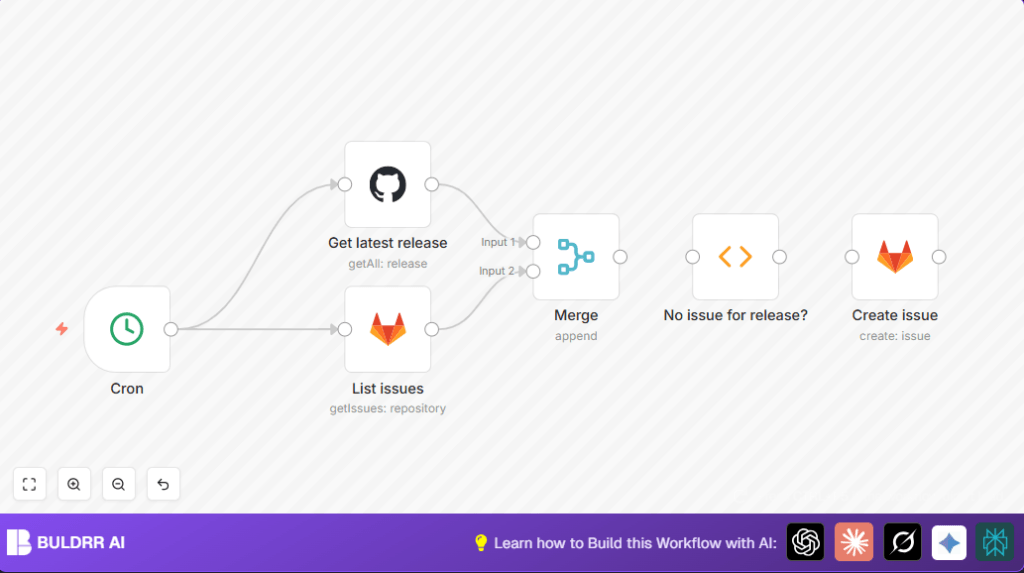
The workflow fetches the latest release info from GitHub, then lists all open issues in GitLab. It looks for a matching issue title using the release tag. If none is found, it makes a new GitLab issue with release details.
This stops missed updates and repeated work. The result is quicker patch tracking and less manual review.
Tools and Services Used
- GitHub API: Used to get the latest release information.
- GitLab API: Used to list current issues and create new issues if needed.
- n8n Automation Platform: Runs the automation workflow on schedule.
Inputs, Processing Steps, and Output
Inputs:
- GitHub repository releases via API.
- GitLab project issues via API.
Processing Steps:
- Fetch the newest release from GitHub limiting results to one.
- Retrieve all open issues from the GitLab project.
- Merge these two data streams to compare releases and issues together.
- Run a function to find if any issue title includes the latest release tag.
- If no matching issue exists, prepare data for issue creation.
Output:
- Creates a new GitLab issue describing the new release if none exists.
- Otherwise, ends without action, avoiding duplicates.
Beginner Step-by-Step: How to Use This Workflow in n8n
Import Workflow
- Download the workflow file by clicking the Download button on this page.
- Open your n8n editor where workflows are created.
- Use the Import from File option to load the downloaded workflow.
Configure Workflow
- Add your GitHub API credentials to the GitHub node.
- Add your GitLab API credentials to the GitLab nodes.
- If needed, update the repository owner and name for GitHub and project details for GitLab.
- Adjust labels, assignee, or issue template content in the create issue node if desired.
Test and Activate
- Run the workflow once manually to check it works as expected.
- Look at outputs to confirm latest release and issues are fetched correctly.
- Activate the Cron node to start weekly automatic checks.
- Save and activate the entire workflow so it triggers regularly.
Use self-host n8n if running the automation on your own server.
Common Problems and Solutions
Problem: Function node gives “Invalid release count: 0” error.
Cause: GitHub node returned no releases or failed to connect.
Fix: Check GitHub API credentials and repository access. Run single GitHub node to verify data retrieval.
Problem: GitLab node shows no issues.
Cause: Wrong project details or insufficient permissions.
Fix: Verify GitLab project owner and repository. Confirm API credentials have issue-listing rights.
Customization Ideas
- Change the Cron node frequency to daily or monthly.
- Edit issue body in the GitLab create node to add release author or changelog details.
- Add a Slack or Email node after issue creation for team notifications.
- Modify the JavaScript in the function node to filter releases by tag pattern.
Summary of Benefits
✓ Automates weekly release monitoring between GitHub and GitLab.
✓ Prevents duplicated GitLab issues for the same release.
✓ Ensures no new releases are missed.
✓ Saves hours of manual checking time.
→ Results in faster patching and better project tracking.
