

What this workflow does
This workflow helps users ask questions about transaction data in Google Sheets using simple chat messages.
It solves the problem of hard and slow manual filtering of data by dates, product, and status.
The result is fast, accurate answers from filtered and summarized transaction data.
Who should use this workflow
This workflow is good for business people who track many sales or refunds in Google Sheets.
People without deep technical skills can get clear answers fast without manually searching sheets.
Tools and services used
- Google Sheets API: Access and query transaction data.
- OpenAI GPT-4 Model: Understand and answer chat questions.
- n8n nodes: Chat Trigger, AI Agent, OpenAI Chat Model, HTTP Request, Code, Buffer Memory, Google Sheets tools, Calculator, Execute Workflow Trigger.
Inputs, processing, and outputs
Inputs
- Chat message from user with natural language question.
- Google Sheets transaction data with product, status, dates, and amounts.
Processing
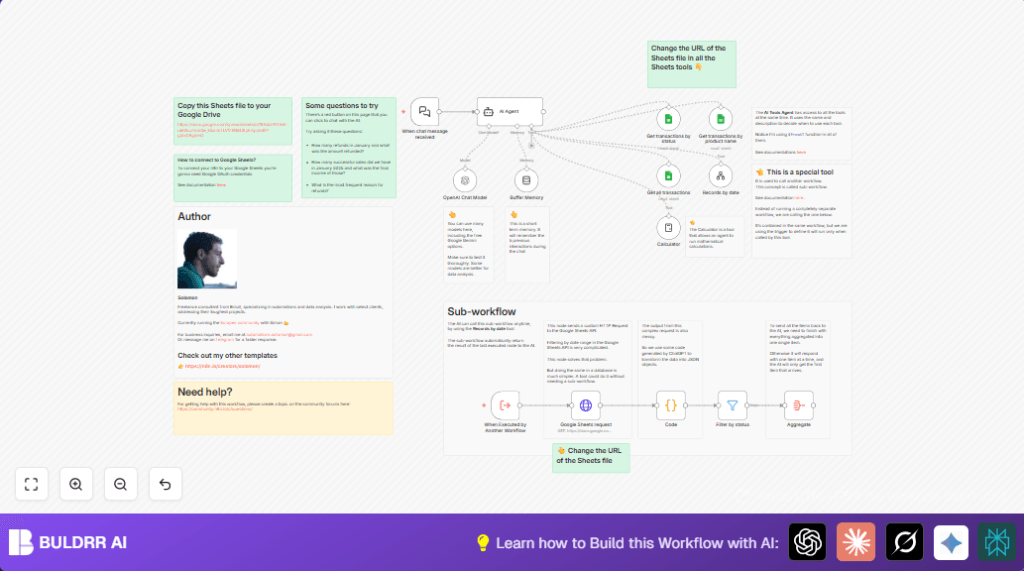
- Chat Trigger node detects incoming question.
- AI Agent uses GPT-4 to understand question and decide queries.
- Custom HTTP Request node sends queries to Google Sheets Visualization API to filter by dates.
- Code node parses complex JSONP response into clean structured data.
- Sub-workflows filter data further by status or product name.
- Calculator node performs any needed math, like totals or counts.
Outputs
- Clear, concise natural language answers returned to the chat user.
Beginner step-by-step: How to build this in n8n
Importing the workflow
- Download the workflow file using the Download button on this page.
- In n8n editor, click on “Import from File” and upload the downloaded workflow file.
Setting up credentials and parameters
- Add Google Sheets OAuth credentials with read access to your transaction sheets.
- Enter the OpenAI API key in the OpenAI Chat Model node.
- Update Google Sheets document IDs or URLs in any Google Sheets or HTTP Request nodes if needed.
- Check prompt messages or code snippets used in Code nodes to ensure any placeholders match your data.
Testing and activation
- Run a test by sending a chat message question like “How many refunds in January?” using the chat interface tied to the Webhook node.
- Check if the workflow executes without errors and returns a correct answer.
- When tests are successful, activate the workflow to run in production.
Note: When using self hosting n8n, consider adding this self-host n8n resource for better setup options.
Edge cases and failure points
- If the Code node shows “No input items found”, the HTTP Request may have failed. Check authentication and query parameters carefully.
- If AI Agent gives wrong or no answers, verify OpenAI API key and usage limits.
- Google Sheets date filtering may fail due to incorrect query syntax. Use the custom HTTP Request as configured here.
Customizations ideas
- Change Google Sheets document or sheet names to your own data.
- Adjust GPT model temperature to get more creative or precise answers.
- Add filters for customer name, region, or payment method by updating sub-workflows.
- Increase or decrease Buffer Memory node’s size to remember more or less conversation history.
- Add new tools or APIs to extend AI Agent capabilities.
Summary and main results
→ The workflow understands questions about Google Sheets transactions by date, product, and status filters.
→ It runs complex queries using custom HTTP Requests, then cleans and processes data automatically.
✓ Saves hours by removing manual filtering and spreadsheet errors.
✓ Provides clear, fast answers in natural language chat replies.
✓ Works without needing deep technical or coding skills.
✓ Easily customizable to fit different business data or filters.
