
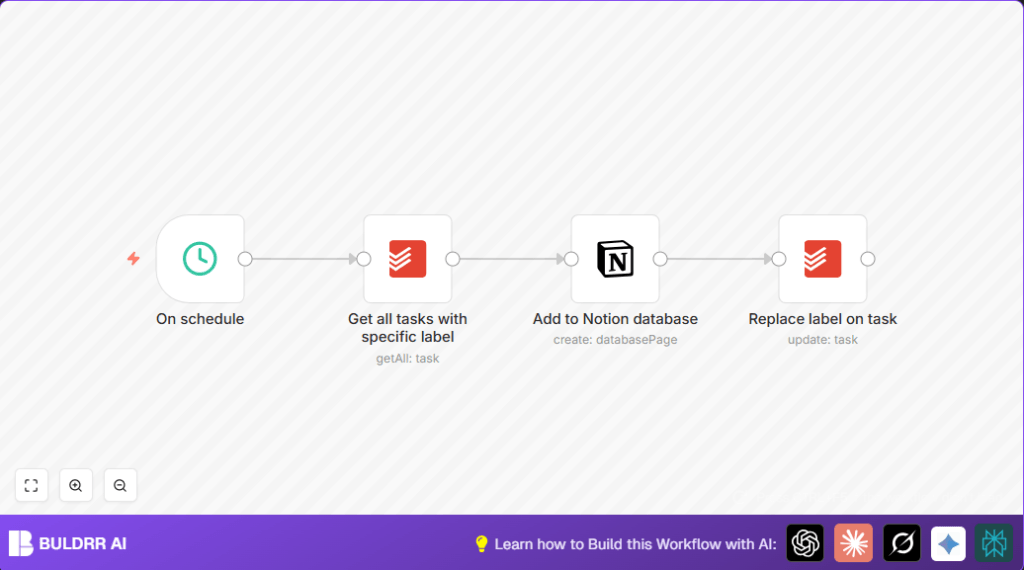

What This Automation Does
This workflow moves tasks labeled “send-to-notion” from Todoist to Notion automatically.
It saves time by copying tasks without manual work.
After adding tasks to Notion, it changes the Todoist label to “sent” and adds a Notion link.
This helps keep both apps up to date and reduces mistakes.
Tools and Services Used
- n8n: Runs the automation workflow.
- Todoist: Holds the tasks with labels for syncing.
- Notion: Stores the synced tasks as pages in a database.
Inputs, Processing Steps, and Outputs
Inputs
- Tasks from Todoist with the label “send-to-notion”.
- Credentials for Todoist and Notion API access.
Processing Steps
- Schedule trigger runs the workflow every set time.
- Todoist node fetches all tasks with the “send-to-notion” label using label ID.
- Notion node creates a new page in specified database for each fetched task.
- Todoist update node changes task label from “send-to-notion” to “sent” and adds Notion page link in the task description.
Outputs
- New pages in Notion database representing synced tasks.
- Updated Todoist tasks with adjusted labels and Notion links.
Beginner Step-by-Step: How To Use the Workflow in n8n
Importing the Workflow
- Download the workflow file from this page.
- Inside n8n editor, select “Import from File” option.
- Upload the downloaded workflow file.
Configuring Credentials
- Add Todoist OAuth2 credentials in the relevant node.
- Add Notion API integration credentials in the Notion node.
Updating IDs and Labels
- Set the correct Todoist label ID for “send-to-notion” in the fetch node.
- Set the target Notion database ID in the Notion node.
- If you use different label names or IDs, update them accordingly.
Testing and Activating
- Run the workflow manually once to check if the tasks sync correctly.
- Check if the Notion pages created and Todoist labels updated.
- Activate the workflow by toggling the active switch to enable scheduled runs.
If using self hosting n8n, refer to self-host n8n for setup.
Customizations and Extensions
- Change the sync trigger label in the Todoist fetch node using its label ID value.
- Add more properties to the Notion page like due dates, priority, or tags by mapping fields in the Notion node.
- Adjust the schedule trigger interval to control syncing frequency and avoid API rate limits.
Troubleshooting Common Issues
- Problem: Todoist node returns no tasks.
Cause: Using wrong label ID or no tasks have the label.
Solution: Verify label IDs from Todoist and task labeling. - Problem: Permission denied error writing to Notion.
Cause: Wrong API credentials or missing permissions.
Solution: Check and update Notion integration permissions. - Problem: Tasks not updating label after sync.
Cause: Incorrect dynamic expressions or node connections.
Solution: Confirm use of correct expressions for task ID and description in Todoist update node.
Pre-Production Checklist
- Verify Todoist OAuth2 credentials have needed scopes.
- Confirm Notion API key has database access and correct database ID.
- Run schedule trigger manually first for testing.
- Create test Todoist tasks labeled “send-to-notion” to validate syncing.
- Backup Notion database or prepare rollback plan before live use.
Deployment Guide
After configuring, turn on the workflow using the toggle in n8n editor.
The workflow will then run at scheduled times to sync tasks.
Check logs for errors and monitor executions on the n8n dashboard.
Summary of Results
✓ Saves 4-6 hours weekly by automating task transfers.
✓ Reduces data entry mistakes by removing manual steps.
✓ Keeps Todoist and Notion data linked and updated.
✓ Improves project tracking and task visibility.