
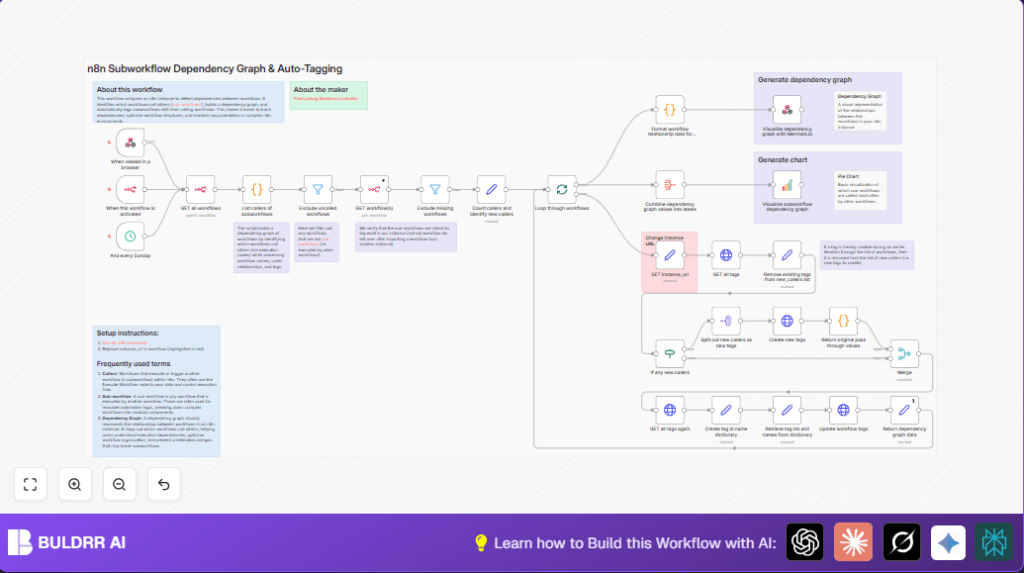

What This Automation Does
This workflow finds subworkflow dependencies inside your n8n instance automatically.
It detects which workflows call other subworkflows, then builds a clear graph showing these connections.
You get tagged subworkflows labeled with their calling workflows and two types of visuals: a pie chart and an interactive MermaidJS graph.
This saves you time checking who uses what and stops accidental breaking of shared subworkflows.
How This Workflow Works
Inputs: The workflow calls the n8n API to get all workflows and tags data.
Processing: It scans each workflow’s nodes for execution nodes that call subworkflows.
Then it builds a map between subworkflows and their callers.
It removes workflows that have no callers and excludes any that are missing or deleted.
For each subworkflow, it fetches full data to check tags.
It finds which caller tags are missing and creates those tags first if needed.
Finally, it updates each workflow’s tags, matching them to actual callers.
Outputs: Updated workflow tags that accurately reflect real dependencies.
Two visual charts: a pie chart summarizing most called subworkflows, and a MermaidJS graph displaying dependency lines interactively in a browser via webhook.
Who Should Use This Workflow
If managing many complex workflows and subworkflows causes confusion about who calls what, this helps.
If manual tagging is too slow or error-prone, this automation keeps tags synced automatically.
If you want a clear, easy-to-understand visual of subworkflow usage, this fits well.
Beginner or advanced users in n8n benefit, including teams wanting to avoid costly mistakes due to hidden dependencies.
Tools and Services Used
- n8n API: To list workflows, get workflow details, and manage tags.
- HTTP Request nodes: For API calls within n8n.
- Code nodes: To parse workflows and build dependency mappings.
- Schedule Trigger: To run this workflow regularly.
- Webhook node: To expose the MermaidJS dependency graph for browser viewing.
Beginner Step-by-Step: How to Use This Workflow in n8n
Step 1: Download and Import
- Click the Download button on this page to get the workflow JSON file.
- Inside your n8n editor, select “Import from File” and pick the downloaded JSON.
Step 2: Configure Credentials and URLs
- Provide your n8n API credentials in the credentials section.
- Open the SET instance_url node and update the URL to your actual n8n instance API base URL.
- If the workflow uses other IDs, emails, or paths, replace those with your own values.
Step 3: Test the Workflow
- Run the workflow manually once to check that the API calls work and dependency graph data appear.
Step 4: Activate for Production
- Turn on the workflow or enable the Schedule Trigger node to run it automatically on a timer.
- Check outputs regularly and share the webhook URL for the MermaidJS graph with your team.
Using these steps, a beginner can quickly set up this solution without building from zero.
Follow simple edits and imports to keep subworkflow tagging and visualizations current.
How Inputs Flow to Outputs
- Inputs: The full list of workflows and existing tags retrieved by API.
- Processing: Detection of execution nodes referencing subworkflows, building mapping of dependencies.
Filtering out unused or missing workflows.
Comparing current tags vs required tags and creating missing tags.
Updating workflows with new tags.
Generating visual graph data. - Outputs: Corrected and updated workflow tags.
Visual charts (pie chart and MermaidJS dependency graph).
Edge Cases and Failures
If the instance URL is wrong, API calls fail with 404 errors.
Tags not updating can happen if API keys lack write permission.
Some workflows might have stale or deleted subworkflow references, which are filtered out in processing.
The MermaidJS graph can fail if webhook code or scripts are broken or incomplete.
Customization Ideas
- Change the Schedule Trigger timing to daily or monthly.
- Filter workflows by name or tag inside the workflow retrieval node to narrow analysis.
- Modify pie chart colors or type in the QuickChart node.
- Add notification nodes after tag creation to alert team members.
- Expand the code node to find nested or parameter-based subworkflow calls.
- Use the provided link for self-host n8n if advanced hosting or control is needed.
Summary of Benefits
✓ Automatically finds and maps subworkflow dependencies.
✓ Keeps workflow tags up to date with real caller information.
✓ Produces easy-to-understand visual graphs with pie and interactive MermaidJS charts.
✓ Saves hours of manual checking and fixes workflow breakage risks.
✓ Suitable for beginners to advanced users managing many workflows.
// Example snippet from "List callers of subworkflows" Code node:
const workflows = items[0].json.workflows;
const graph = {};

workflows.forEach(workflow => {
  if (workflow.nodes) {
    workflow.nodes.forEach(node => {
      if (node.type === "n8n-nodes-base.executeWorkflow" || node.type === "@n8n/n8n-nodes-langchain.toolWorkflow") {
        const calledId = node.parameters.workflowId;
        if (calledId) {
          if (!graph[calledId]) {
            graph[calledId] = { callers: [] };
          }
          graph[calledId].callers.push(workflow.id);
        }
      }
    });
  }
});

return [{json: graph}];
This code looks through all workflows, checks each workflow’s nodes for those running other workflows, then builds a list of which workflows call which subworkflows by their IDs.
This allows the rest of the automation to tag and visualize this relationship.