
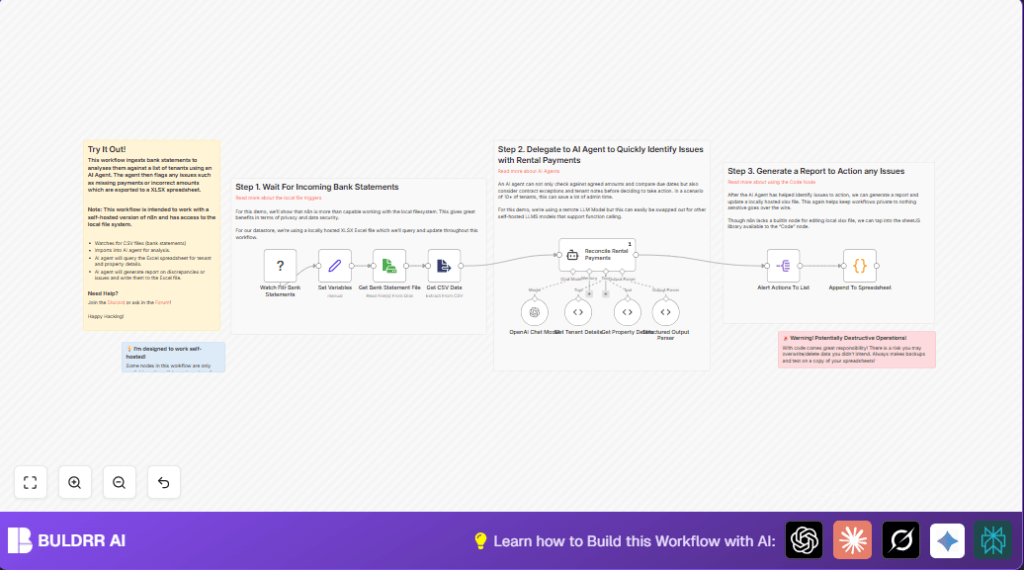

What This Workflow Does
This workflow automatically checks rental payments from bank statement CSV files. It compares payments to tenant contracts in a local Excel file. An AI agent reviews for missed, partial, or extra charges. It then writes a report of payment issues in the Excel file. All data stays local and private. This saves manual work and helps avoid missed or wrong payments.
Who Should Use This Workflow
This is useful for property managers handling many rental units. Those spending hours checking tenant payments manually will benefit most.
Also good for users wanting a local, secure solution without sending financial data online.
Tools and Services Used
- Local File Trigger node: Watches folder for new bank CSV files.
- Read/Write File node: Reads CSV file content.
- Extract From File node: Converts CSV content to JSON.
- OpenAI Chat Model node: Runs GPT-4 for payment analysis.
- LangChain Agent node: Performs payment reconciliation logic.
- LangChain ToolCode nodes: Query tenant and property data from Excel.
- Structured Output Parser node: Parses AI JSON output.
- Split Out node: Splits alerts into individual items.
- Code node: Adds flagged alerts to Excel and creates backups.
Beginner Step-by-Step: How to Use the Workflow in n8n
Download and Import
- Download the workflow file using the Download button on this page.
- Open n8n Editor where you want to use the workflow.
- Click “Import from File” and select the downloaded workflow.
Configure Credentials and Settings
- In n8n, add your OpenAI API Key in the OpenAI Chat Model node’s credentials.
- Update any spreadsheet paths or folder locations in the Set Variables node and Local File Trigger node. Use full local paths.
- If needed, edit any tenant or property IDs in the LangChain ToolCode nodes.
Test and Activate
- Run the workflow once manually or drop a sample CSV file in the watched folder to test.
- Look at the workflow execution output to check for flagged payment issues.
- When satisfied, activate the workflow to run automatically on new files.
This workflow works on self-host n8n setups that allow local file access.
Inputs, Processing, and Outputs
Inputs
- New bank statement CSV files saved in a monitored local folder.
- Local Excel workbook with tenant and property details.
Processing Steps
- Local File Trigger detects new CSV files.
- Read/Write File reads CSV contents.
- Extract From File converts CSV to structured JSON.
- OpenAI Chat Model and LangChain Agent analyze payments, flagging missing or wrong amounts.
- LangChain ToolCode nodes retrieve tenant/property info from Excel.
- Structured Output Parser formats AI output.
- Split Out separates alerts.
- Code node appends alerts to Excel with backups.
Outputs
- Updated local Excel sheet with detailed payment issue alerts.
- Backup copy of the Excel file for safety.
Common Issues and Fixes
Problem: “File not found” or permission errors in Local File Trigger.
Fix: Check folder paths are correct and that self-host n8n has permission to read folders.
Problem: AI gives bad JSON or no alerts.
Fix: Adjust system message in LangChain Agent to ensure correct JSON format. Test with sample data.
Problem: Code node can’t write Excel file.
Fix: Close Excel if open elsewhere. Confirm spreadsheet path is correct.
Customization Ideas
- Expand tenant queries in LangChain ToolCode to include contact info or lease status.
- Change AI system message in LangChain Agent to flag only specific issues like missed payments.
- Add email notification with an Email Send node triggered on alerts.
- Replace OpenAI with self-hosted language models for full data control.
- Add audit log sheet to record each reconciliation run in the Code node.
Summary
✓ Saves 6+ hours monthly checking rental payments.
✓ Flags missed, partial, or extra payments accurately.
✓ Keeps tenant financial data private on local system.
✓ Updates payment alert reports in Excel automatically.
✓ Eases property manager workload and improves accuracy.
