
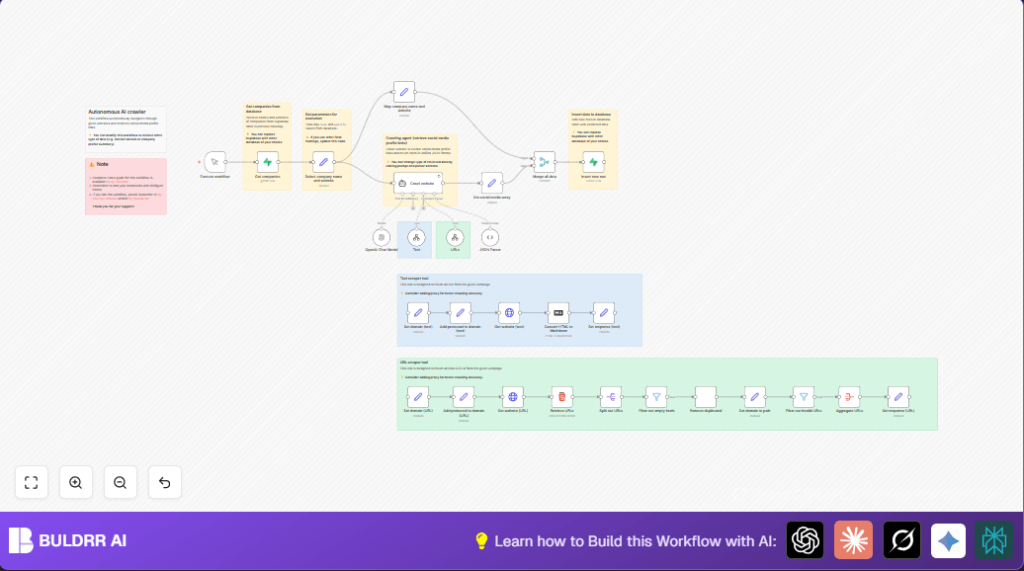

What This Workflow Does
This workflow takes a list of company websites.
It finds all social media links from those websites automatically.
The output is a clean list of social profile URLs per company.
This saves a lot of time compared to searching websites manually.
It helps marketing teams get accurate social data fast.
The workflow starts by fetching companies from a Supabase database.
Then an AI agent crawls every site to extract text and links.
The AI picks out social media URLs from all collected links.
Results are organized in JSON format.
The workflow stores the data back into a Supabase table.
This process runs with little human input.
Tools and Services Used
- n8n Automation Platform: Runs the workflow and nodes.
- Supabase: Stores company input data and output social links.
- OpenAI GPT-4 API: Provides AI for crawling and link extraction.
- LangChain AI Agent: Runs the autonomous crawler using retrieval tools.
Inputs, Processing Steps, and Outputs
Inputs
- Company names and website URLs from the Supabase
companies_inputtable.
Processing Steps
- Retrieve all company records with their websites.
- Use Set node to keep only company name and website.
- Run LangChain AI agent to crawl each website.
- The AI uses a text retrieval tool to get readable content.
- The AI uses a URL retrieval tool to find and clean all internal links.
- AI identifies which URLs are social media profiles.
- Parse the AI JSON output into structured data via JSON Parser node.
- Combine company info and extracted social URLs into one object.
- Insert the structured data back into Supabase
companies_outputtable.
Outputs
- Stored structured JSON with company names, websites, and their social media profile URLs.
Beginner Step-by-Step: How to Use This Workflow in n8n Production
Step 1: Download and Import the Workflow
- Click the Download button on this page to save the workflow file.
- Open the n8n editor.
- Use Import from File to upload the downloaded workflow.
Step 2: Configure Credentials and Settings
- Add your OpenAI API Key in n8n credentials.
- Set Supabase credentials with your project keys.
- Update table names or fields if needed to match your database schema.
- Check prompt text or URLs inside the LangChain AI Agent node and adjust if necessary.
Step 3: Test the Workflow
- Run the workflow using the Manual Trigger node.
- Check execution logs for any errors.
- Verify results appear in your Supabase output table.
Step 4: Activate Workflow for Production
- Change the Manual Trigger to a scheduled trigger for automatic runs.
- Monitor execution logs regularly.
- Consider running self-host n8n for better security and scalability.
Customization Ideas
- Change AI prompt in the crawler node to extract emails or phone numbers instead of social media links.
- Add proxy settings in HTTP request nodes for sites blocking direct access.
- Increase crawl depth by modifying embedded tool logic for deeper navigation.
- Switch Supabase nodes to other databases like MySQL if preferred.
- Extend JSON parser to extract metadata like social profile descriptions.
Common Problems and How to Fix Them
- Supabase returns empty data or auth errors.
Check credentials and regenerate API keys as needed. - AI fails to find social URLs or returns partial output.
Loosen prompt constraints or add proxy to bypass site blocks. - HTTP Request nodes time out or fail.
Increase timeouts, add retries or use proxies. - Workflow stops unexpectedly.
Monitor logs to find node errors and fix specifics.
Pre-Production Checklist
- Ensure Supabase tables
companies_inputandcompanies_outputexist. - API keys for OpenAI are active and usable.
- Test HTTP requests independently to confirm website access.
- Try manual prompts in OpenAI playground to verify AI prompt quality.
- Run tests with a small sample of companies.
Summary of Benefits and Outcome
✓ Saves up to 20 hours weekly in manual website social media link collection.
✓ Consistent, accurate extraction of social media profile URLs.
✓ Easy storage and querying of unified data in Supabase.
✓ Automates tedious tasks with minimal human intervention.
✓ Flexible prompts allow extraction of other contact info as needed.
