

What This Automation Does
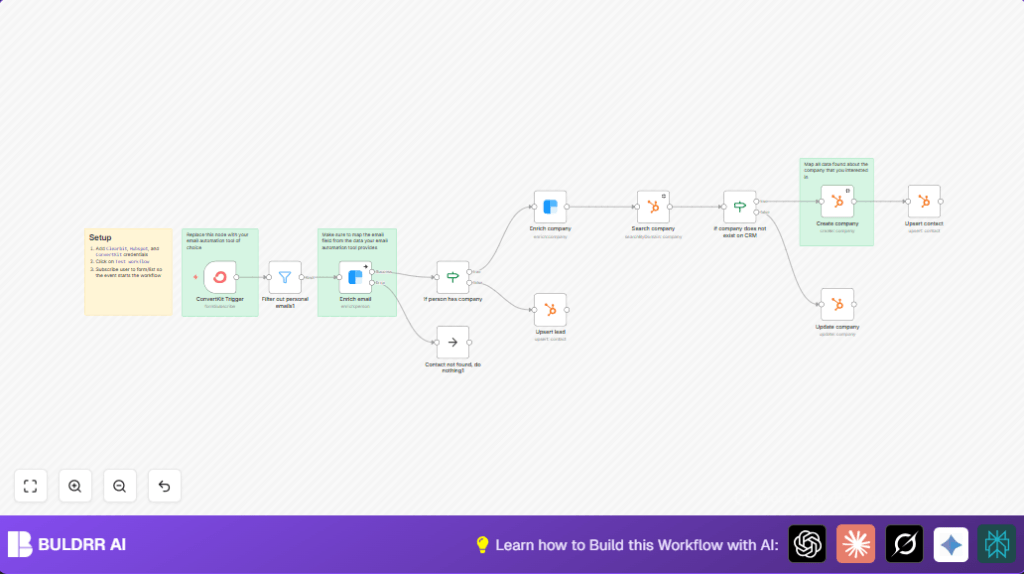
This workflow watches for new subscribers on a certain ConvertKit form. It ignores personal email addresses like Gmail or Yahoo. Then it fetches detailed info about the person using Clearbit’s person API. If the person works at a company, it fetches company info too. The workflow looks in HubSpot CRM to find the company. If the company is not there, it creates it. If the company exists, it updates the record. Then, the contacts and leads are added or updated in HubSpot and linked with the company record.
The goal is to save time and avoid manual errors. The CRM stays up to date with accurate, enriched info about leads and companies.
Tools and Services Used
- ConvertKit: Sends new subscriber data from a specific form.
- Clearbit Person API: Provides enriched data about the lead based on email.
- Clearbit Company API: Retrieves detailed company information by domain.
- HubSpot CRM: Manages contacts, leads, and company records.
- n8n Automation Platform: Runs the workflow linking all these services.
How This Workflow Works: Input → Process → Output
Input
- New subscriber from a specific ConvertKit form sends email and signup data.
Process
- Filter removes personal emails filtering out common free email domains.
- Clearbit Person API enriches subscriber email with personal and employment data.
- If employment domain exists, Clearbit Company API fetches company details.
- HubSpot CRM is searched for existing company by domain.
- If company does not exist, workflow creates new company in HubSpot.
- If company exists, workflow updates company information.
- Lead and contact data are upserted into HubSpot and linked to company where applicable.
Output
- HubSpot contains enriched and linked company and contact records.
- CRM stays accurate, reducing manual entry and data errors.
Who Should Use This Workflow
This workflow fits any marketing or sales team that needs to collect leads from email platforms and keep CRM data accurate. If lead enrichment and avoiding duplicate contacts are problems for your team, this helps.
It works well for users with ConvertKit, Clearbit, and HubSpot accounts. The user should have access to API keys and basic n8n experience or willingness to use pre-built workflows.
Beginner Step-by-Step: How to Use This Workflow in n8n
Step 1: Download and Import
- Download the workflow file using the Download button on this page.
- Inside the n8n editor, choose Import from File and select the downloaded file.
Step 2: Add Credentials and Settings
- Add your ConvertKit API credentials.
- Add Clearbit API credentials for person and company enrichment.
- Add HubSpot OAuth2 credentials for CRM access.
- Update form IDs, email filters, or domain values if your setup requires.
Step 3: Test the Workflow
- Trigger the workflow with a test subscriber from your ConvertKit form.
- Check the execution results to confirm data goes through filtering and enrichment steps.
- Verify company and contact records get created or updated correctly in HubSpot.
Step 4: Activate for Production
- Set the workflow to Active mode in n8n so it listens continuously.
- Make sure the webhook URL is live in ConvertKit to receive real data.
- Monitor occasional runs to check for any API limit issues or errors.
For better control, users can consider self-host n8n on a server.
Inputs and Outputs
Inputs
- Email addresses from new subscribers on selected ConvertKit forms.
- API credentials for Clearbit and HubSpot.
Outputs
- HubSpot CRM with up-to-date company and contact records.
- Filtered lead data skipping personal emails.
- Enriched personal and company lead details.
Edge Cases and Failure Points
- Clearbit may return no enrichment if email or domain is incorrect or service limits hit.
- HubSpot search could fail to match companies due to domain discrepancies.
- The webhook trigger from ConvertKit won’t fire if webhook URLs or form IDs are wrong.
- Personal emails could slip through filter if domain list is incomplete.
Customization Ideas
- Adjust email domain filter list in Filter out personal emails1 to include or exclude more domains.
- Add extra company fields like revenue or industry to HubSpot create/update node.
- Replace ConvertKit Trigger node with other email platform triggers if needed.
- Enhance error handling on Clearbit nodes by sending alerts instead of just continuing.
- Add lead scoring logic using a Function node after enrichment to prioritize leads.
Summary and Result
✓ The workflow automates capturing new leads from ConvertKit and enriching with Clearbit.
✓ It ensures only business emails proceed, improving data quality.
✓ HubSpot CRM gets accurate, updated company and contact profiles.
→ Saves user at least 6 hours a week on manual data work.
→ Reduces errors like missing data and duplicates.
→ Keeps sales and marketing teams focused on real work, not data fixing.
