
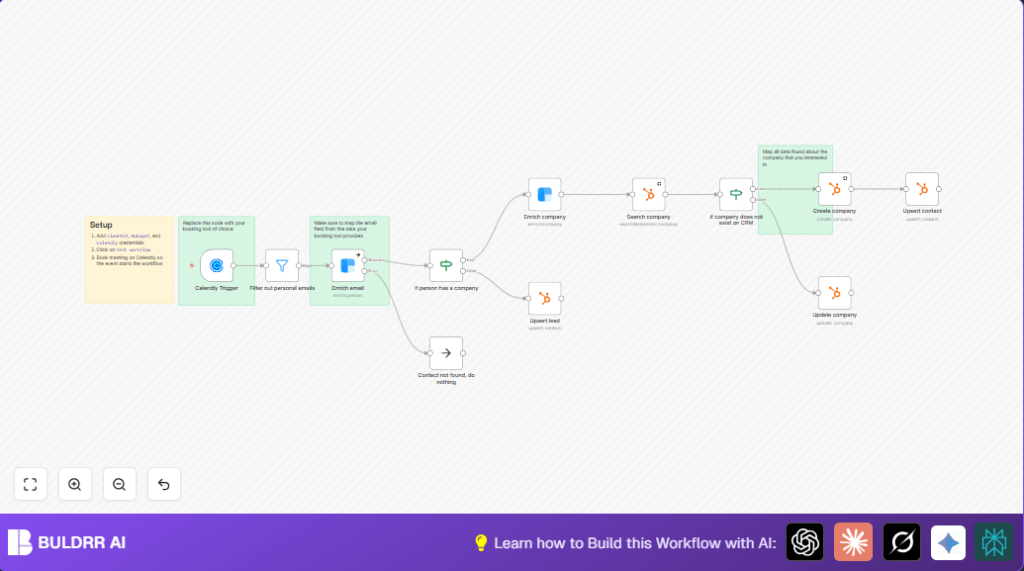

What This Automation Does ⚙️
This workflow starts when someone books a meeting on Calendly. It stops errors in your CRM by filtering personal emails, then fills in more info about the lead and their company using Clearbit. It checks if the company is in HubSpot and adds or updates it. Contacts are inserted or updated with their company info. This saves time by automating info entry.
Input comes from Calendly meeting bookings. The workflow filters emails to keep only business ones. Then it enriches email data with Clearbit. It checks the company domain. If the company is new, it creates a company record in HubSpot using Clearbit data. If the company exists, it updates info. Finally, it adds or updates the contact linked to the company. If no company domain is found, it adds the contact without company data.
Tools and Services Used
- Calendly: Sends meeting invitee data via webhook.
- Clearbit API: Enriches person and company details from email and domain.
- HubSpot CRM: Stores contacts and companies, supports OAuth2.
- n8n: Runs the automation workflow, connects all services.
Beginner Step-by-Step: How to Use This Workflow in n8n
Import Workflow
- Download the workflow using the Download button on this page.
- In n8n editor, click “Import from File” and choose the downloaded workflow.
Configure Credentials
- Go to n8n Settings → Credentials.
- Add or update the Calendly API Key, Clearbit API Key, and HubSpot OAuth2 credentials.
- Make sure OAuth2 tokens in HubSpot are authorized and valid.
Update Node Parameters (if needed)
- Check nodes that need IDs, emails, or domain names; update them to match your data.
- Make sure the Calendly Trigger webhook URL is configured in Calendly integrations webhooks.
Test the Workflow
- Book a test meeting in Calendly with a business email.
- Observe the workflow running in n8n Executions panel.
Activate for Production
- Toggle the workflow switch ‘ON’ in n8n to activate.
- Monitor executions to catch errors early.
For self hosting n8n, check self-host n8n resources.
Inputs, Processing Steps, and Outputs
Inputs
- Calendly sends meeting invitee data, including email and name.
Processing Steps
- Filter out personal emails to keep only business leads.
- Enrich the lead’s email with Clearbit to get job title and company domain.
- Check if the lead’s company domain exists in HubSpot.
- If no company, enrich company info via Clearbit and create new company record.
- If company exists, update existing company info with fresh Clearbit data.
- Upsert contact in HubSpot linked to the company.
- If no company domain found, upsert contact without company.
Outputs
- Contact records in HubSpot enriched with business data.
- Company records created or updated in HubSpot.
- CRM data stays accurate and timely, sales pipeline improves.
Edge Cases and Failure Handling
- If a personal email is submitted, the workflow filters it out to avoid bad enrichment.
- If Clearbit returns no data, the workflow can skip or upsert minimal contact info.
- If HubSpot OAuth2 tokens expire, reauthorization is needed to restore workflow function.
- If the Calendly webhook is not set, the workflow won’t trigger—webhook setup must be verified.
- The workflow includes exit points when required data is missing to avoid errors.
Customization Ideas
- Replace the Calendly Trigger with other event or lead capture nodes.
- Add LinkedIn enrichment calls to get more lead info.
- Filter companies by industry before continuing.
- Edit email filters to include or exclude domains based on audience.
- Map more custom HubSpot fields from Clearbit data for richer CRM profiles.
Summary
✓ Saves hours every week by automating lead data entry.
✓ Improves CRM accuracy by enriching contacts and companies automatically.
→ Starts with Calendly meeting bookings and ends with updated HubSpot data.
→ No manual copying needed, reducing errors and delays in sales process.
